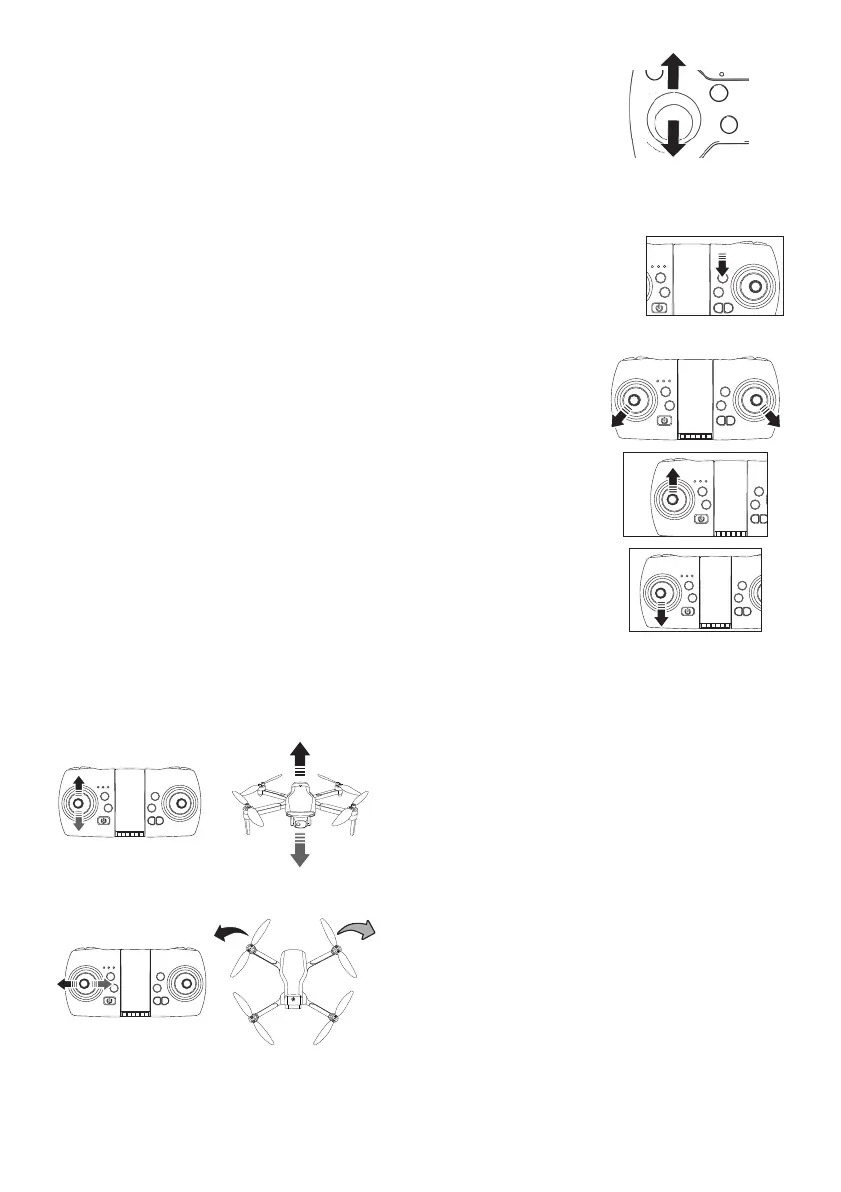
FLYING CONTROLS
Push the left joystick up: the drone rises.
Pull the left joystick down: the drone descends.
Push the left joystick to the left: the drone turns on
itself to the left.
Push the left joystick to the right: the drone turns on
itself to the right.
Before each flight, you must establish the link between the drone
and the remote control by performing this operation: Push the left
joystick all the way up, then pull the joystick down, you will hear a confir-
mation “beep”. The LED lights are now solid, this means the drone is
ready to take off.
Just press the “Auto Takeoff” button, the drone
takes off and hovers at a height of approximately 1 to 2 meters. You can now
start flying the drone with the remote control joysticks. Press the “Auto Lan-
ding” button, the drone will land automatically and the propellers will stop
rotating.
TAKEOFF / LANDING
METOD 1
1. Move the left joystick of the remote control 45° to the left and the
right joystick 45° to the right (see right illustration), the propellers
rotate slowly, the drone unlocking is completed.
2. Once the drone is unlocked, push the left control stick up and the
propellers accelerate to get the drone off the ground.
3. Push the left control lever of the remote controller to the lowest
position for 2-3 seconds to land the drone. You can control the
drone to land at a designated location via the right controller. The
propellers will stop spinning when the drone is on the ground.
METOD 2
ALTITUDE CONTROL (left joystick)
LEFT / RIGHT TURN (left joystick)



 To Next Page