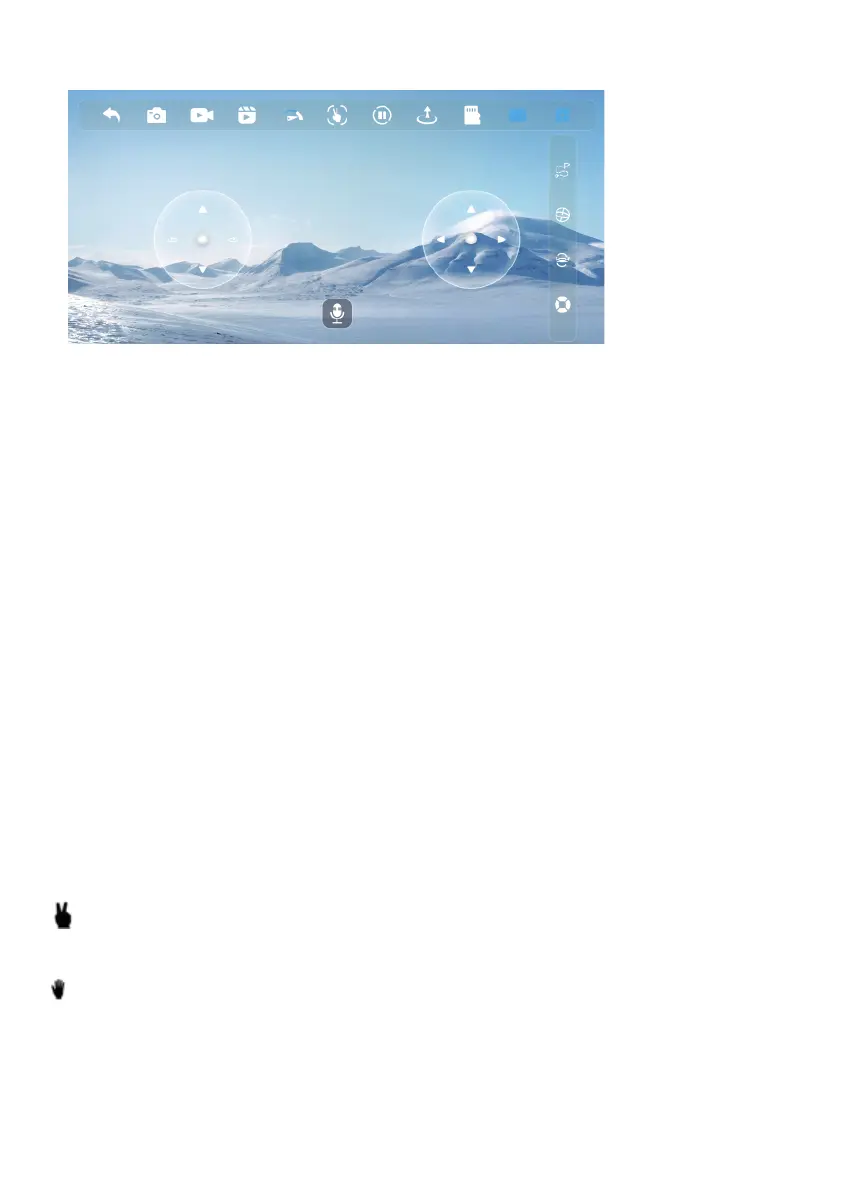
CONTROL INTERFACE
Gesture control (icon 4 in the control interface above)
Click on the gesture button, the system will automatically recognize different hand movements
to take photos or videos.
Photo : Perform this figure with your hand between 1 and 4 meters from the drone’s camera
lens. When the gesture is recognized, you will see a 3, 2, 1 countdown on the
application screen before the photo is taken.
Vidéo : Perform this figure with your hand between 1 and 4 meters from the drone's camera
lens. The video recording begins when the gesture is fully recognized. The video
recording ends when this gesture is recognized again.
1. Return to the home screen
2. Take photo: tap once to take a photo
3. Taking video: press once to start recording and press again to stop it
4. Access to photo/video album
5. Speed control. 2 levels, level 1 (low speed) by default.
6. Gesture control for taking photos and videos (more explanation below)
7. Emergency stop: the drone propellers stop immediately
8. Automatic self-takeoff / Automatic self-landing
9. TF card: This icon will be on if a TF card is inserted into the drone, otherwise it will be off
10. Show/Hide Virtual Controllers
11. Show/Hide more functions
12. Follow a drawing: Draw a flight plan on the screen and the drone will follow it. Be sure that
the drone is in a clear space without obstacles around.
13. Gyroscope Calibration (see earlier in this manual)
14. Press this key to perform 3D acrobatics (the drone must fly 3 meters above the ground).
15. Headless mode (more information on this mode further up in the manual)
16. Throttle Control (Altitude): Slide the ball up or down gently
17/18. Turn left/right: slide the ball left or right gently
19. Activation of voice functions
20/21. Forward/backward flight
22/23. Flight left/right
1 2 3 4 5 6 7 8 9 10
11
12
13
14
15
16
17 18
19
20
21
22
23



 To Next Page