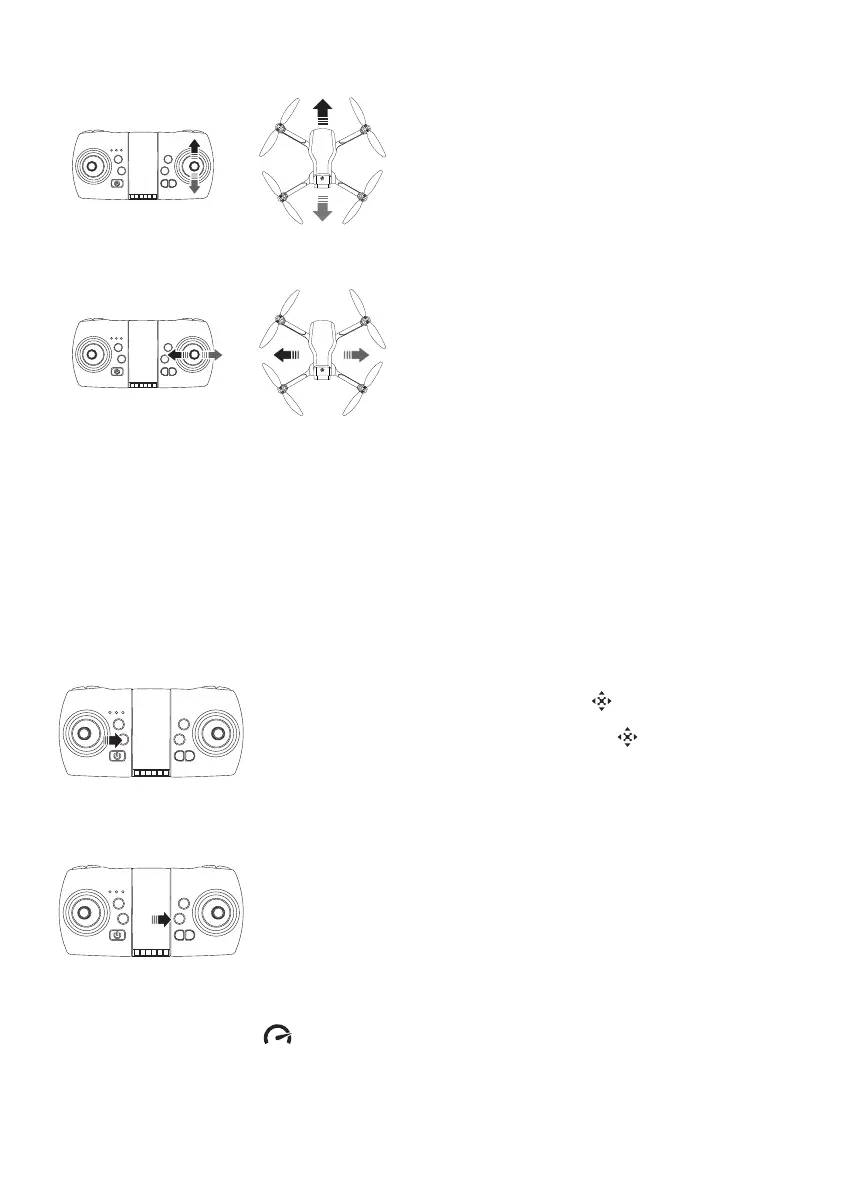
FORWARD / BACKWARD FLY (right joystick)
SIDEWARD FLY (right joystick)
FLYING IN CF MODE (DIRECTION LOCK, HEADLESS)
When this mode is enabled, the drone uses the direction it has stored at the time of
synchronization and takes the pilot's position as a reference when using the right joystick on the
remote. The movement front or back of this joystick will move away the drone or let it come
closer from the pilot, and regardless of the orientation of the front of the drone.The operation of
this mode requires that the pilot remains in the same place as at the time of synchronization and
keeps the drone in front of him during the flight.
Before the flight, place the drone in front of you with the back of the drone pointing to the remote
control. Then proceed to take-off (see this section above in this manual for more details)
Push the right joystick up: the drone flies
forwards.
Push the right joystick down: the drone flies
backwards.
Push the right joystick to the left: the drone
fly leftwards
Push the right joystick to the right: the drone
fly rightwards.
In flight, press the “Headless Mode” button on the remote
control to engage this mode. The drone's lights flash and the
remote control buzzer sounds. Press the button again to exit
this mode.
ONE KEY RETURN
When you press to this button, the drone will fly back to the
controller's position, and this function will stop when you use the
right joystick to control the direction of the drone.
Note that the drone will not proceed to auto landing when you
activate this function. When the drone is close to teh remote
control’s position, you need to take the control of it manually.
SPEED SELECTION
The speed selector button controls the flight speed forward, backward, left and right.
The default setting is low speed. Press this button, the remote control will beep twice, high speed
mode is selected. Press this button again and the drone will return to low speed mode (1 beep).



 To Next Page