SWITCH TEST
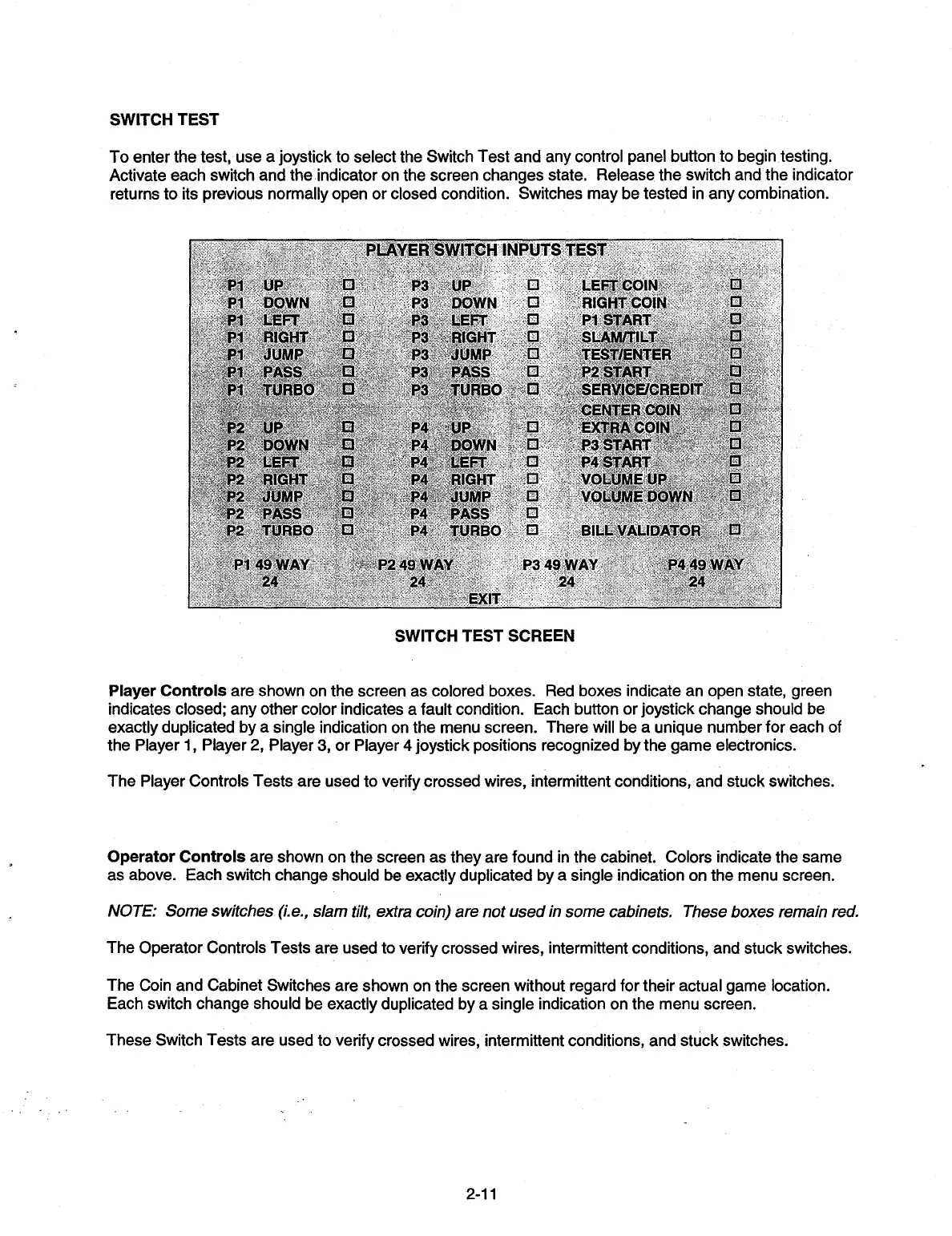
To enter the test, use a joystick to select the Switch Test and any control panel button to begin testing.
Activate each switch and the indicator on the screen changes state. Release the switch and the indicator
returns to its previous normally open or closed condition. Switches may be tested in any combination.
PLAYER SWITCH INPUTS TEST
P1
UP
0
P3
UP
0
LEFT COIN
0
P1
DOWN
0
P3
DOW N
0
RIGHT COIN
0
P1
LEFT
0
P3
LEFT
0
P1 START
0
P1
RIGHT
0
P3
RIGHT.0
SLAM/TILT
0
P1
JUMP
U
P3
JUMP
0
TEST/ENTER
U
P1
PASS
0
P3
PASS
0
P2 START
U
P1
TURBO
0
P3
TURBO
0
SERVICE/CREDIT
U
CENTER COIN
0
P2
UP
0
P4
UP
0
EXTRA
COIN
0
P2
DOWN
0
P4
DOWN
0
P3 START
U
P2
LEFT
0
P4
LEFT
0
P4
START
0
P2
RIGHT
0
P4
RIGHT
0
VOLUME UP
:i
P2
JUMP
0
P4
JUMP
0
VOLUME DOWN
U
P2
PASS
0
P4
PASS
0
P2
TURBO.
:
...:
D
P4
TURBO:.....
0
BILL
VALIDATOR
0
P1
49
WAY
P249
WAY
P349 WAY
P4 49 WAY
24
24,-
24
24
EXIT
SWITCH TEST SCREEN
Player Controls
are shown on the screen as colored boxes. Red boxes indicate an open state, green
indicates closed; any other color indicates a fault condition. Each button or joystick change should be
exactly duplicated by a single indication on the menu screen. There will be a unique number for each of
the Player 1, Player 2, Player 3, or Player 4 joystick positions recognized by the game electronics.
The Player Controls Tests are used to verify crossed wires, intermittent conditions, and stuck switches.
Operator Controls
are shown on the screen as they are found in the cabinet. Colors indicate the same
as above. Each switch change should be exactly duplicated by a single indication on the menu screen.
NOTE: Some switches (i.e., slam tilt, extra coin) are not used in some cabinets. These boxes remain red.
The Operator Controls Tests are used to verify crossed wires, intermittent conditions, and stuck switches.
The Coin and Cabinet Switches are shown on the screen without regard for their actual game location.
Each switch change should be exactly duplicated by a single indication on the menu screen.
These Switch Tests are used to verify crossed wires, intermittent conditions, and stuck switches.
2-11


 To Next Page