OPERATOR CONTROLS
Access to the menu system for statistics, adjustments, and testing is secured by lock and key to prevent
tampering. When the menu system is entered, on screen messages guide the operator through tasks.
CABINET SWITCHES
• Power Switch (on top of the cabinet near the
left rear corner or on the power supply, in manygarnes)
The Power Switch turns off the game during service. It does not reset the game
variables.
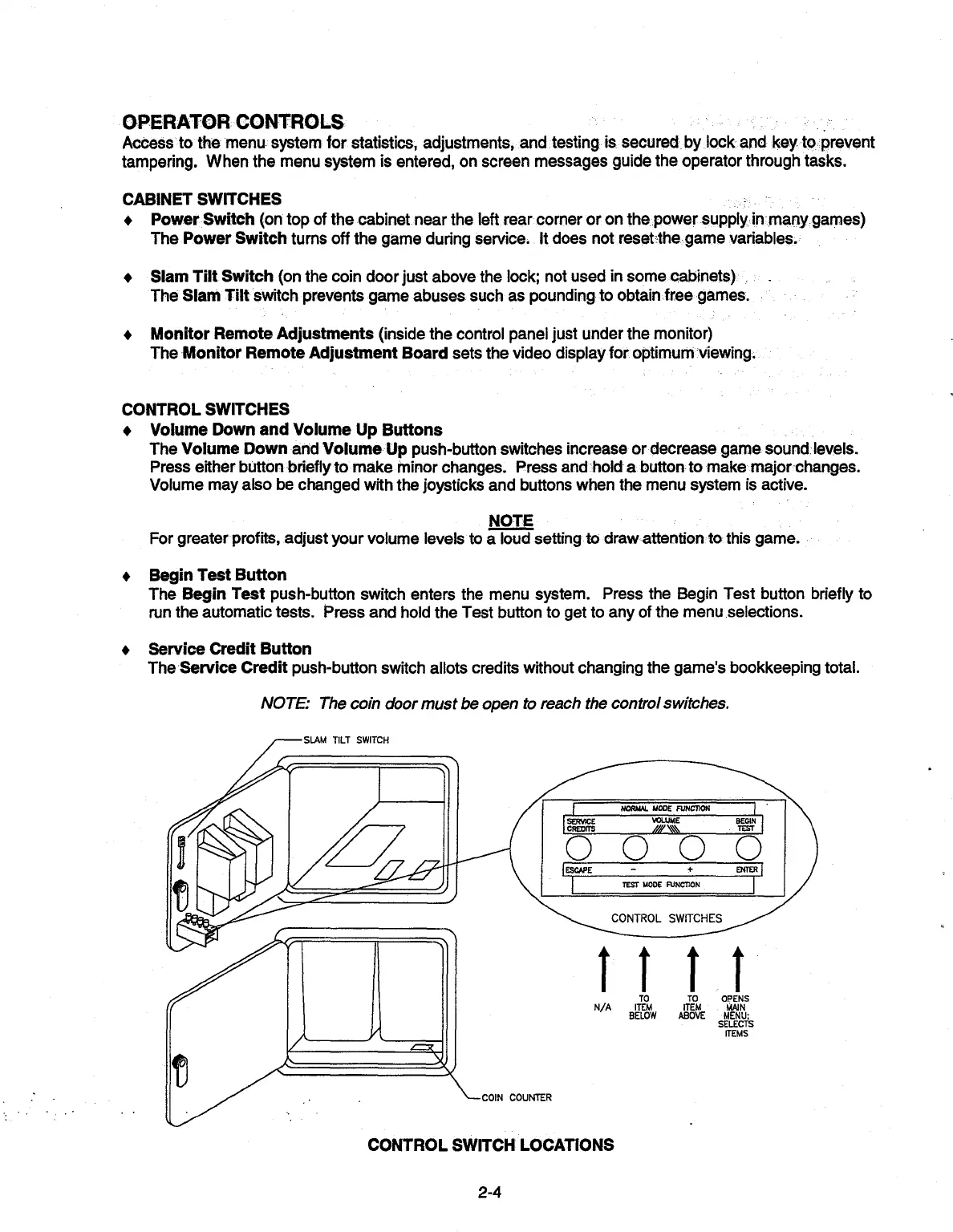
• Slam Tilt Switch
(on the coin door just above the lock; not used in some cabinets)
The Slam Tilt switch prevents game abuses such as pounding to obtain free games
• Monitor Remote Adjustments (inside the control panel just under the monitor)
The Monitor Remote Adjustment Board sets the video display for optimum viewing
CONTROL SWITCHES
• Volume Down and Volume Up Buttons
The Volume Down and Volume Up push-button switches increase or decrease game sound: levels.
Press either button briefly to make minor changes. Press and 'holda button to make major changes.
Volume may also be changed with the joysticks and buttons when the menu system is active.
NOTE
For greater profits, adjust your volume levels to a loud setting to draw attention to this game.
• Begin
Test Button
The
Begin
Test push-button switch enters the menu system. Press the Begin Test button briefly to
run
the automatic tests. Press and hold the Test button to get to any of the menu selections.
• Service
Credit Button
The Service Credit push-button switch allots credits without changing the game's bookkeeping total.
NOTE: The coin door must be open to reach the control switches.
TILT SWITCH
Y
I
N
"
~J~
+
ENTER
TEST
MODE
FUNCTION
CONTROL SWITCHES
COIN COUNTER
I II t
TO
TO
OPENS
N/A
ITEM
ITEM
MAIN
BELOW ABOVE MENU;
SELECTS
ITEMS
CONTROL SWITCH LOCATIONS
2-4



 To Next Page