Exchanging the water filter
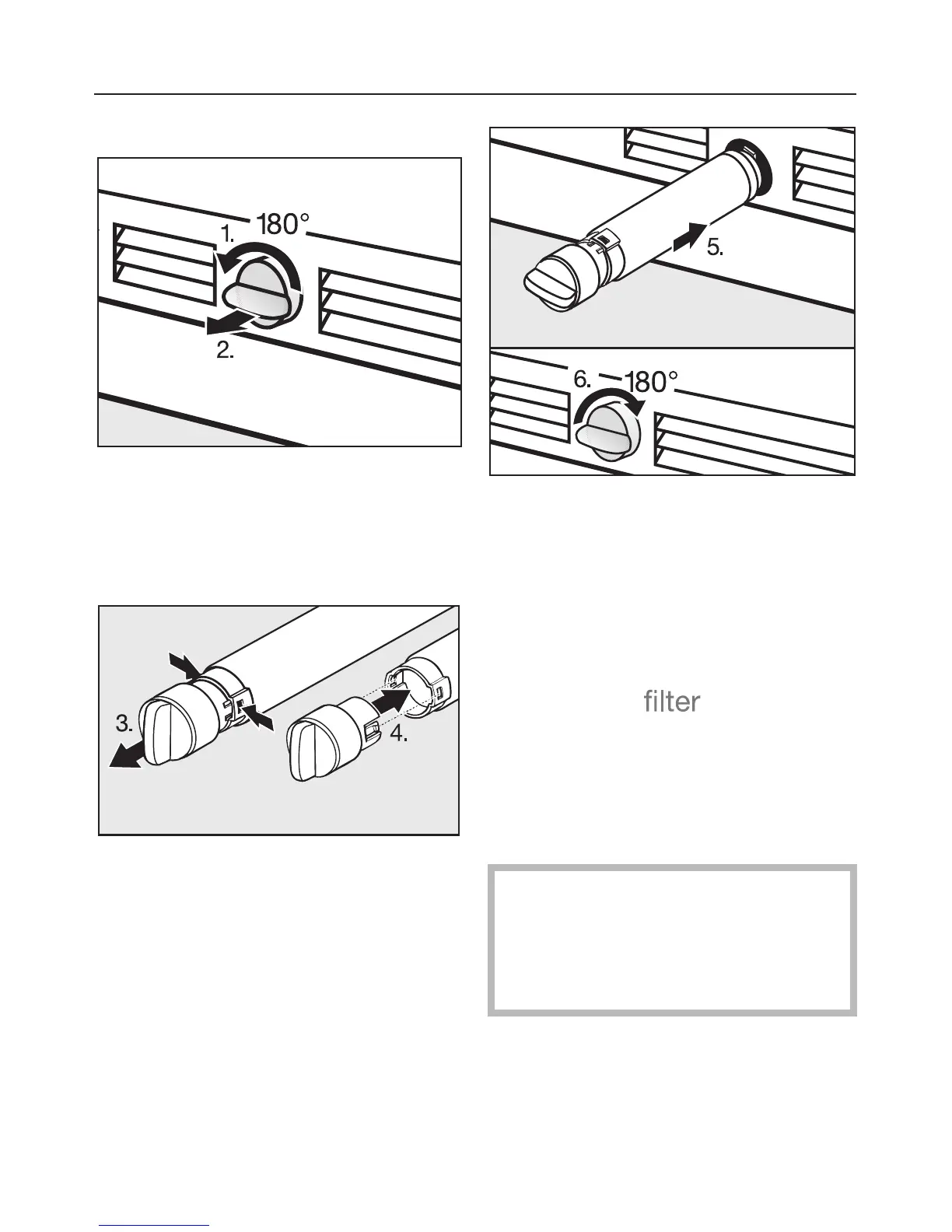
^ Push in and rotate the filter cap on
the base panel of your appliance
counterclockwise 180°, 1.
^ Pull the used filter cartridge out of the
appliance, 2.
^
Remove the cap from the used filter,
3.
^
Take a new filter cartridge out of the
packaging and remove the protective
cap.
^
Push the cap onto the new filter
cartridge, 4.
^ Push the filter cartridge with cap, in a
horizontal position, all the way into
the opening in the base panel, 5.
^ Rotate the filter cartridge clockwise
180° until the cap is in a horizontal
position, 6.
The filter change needs to be
confirmed before the "filter" indicator
will go out. See "Re-setting the filter
indicator".
Whenever you replace the filter, the
system must be re-set. This will
ensure the indicator light for the next
filter change will come on at the right
time.
Water filter
37


 To Next Page