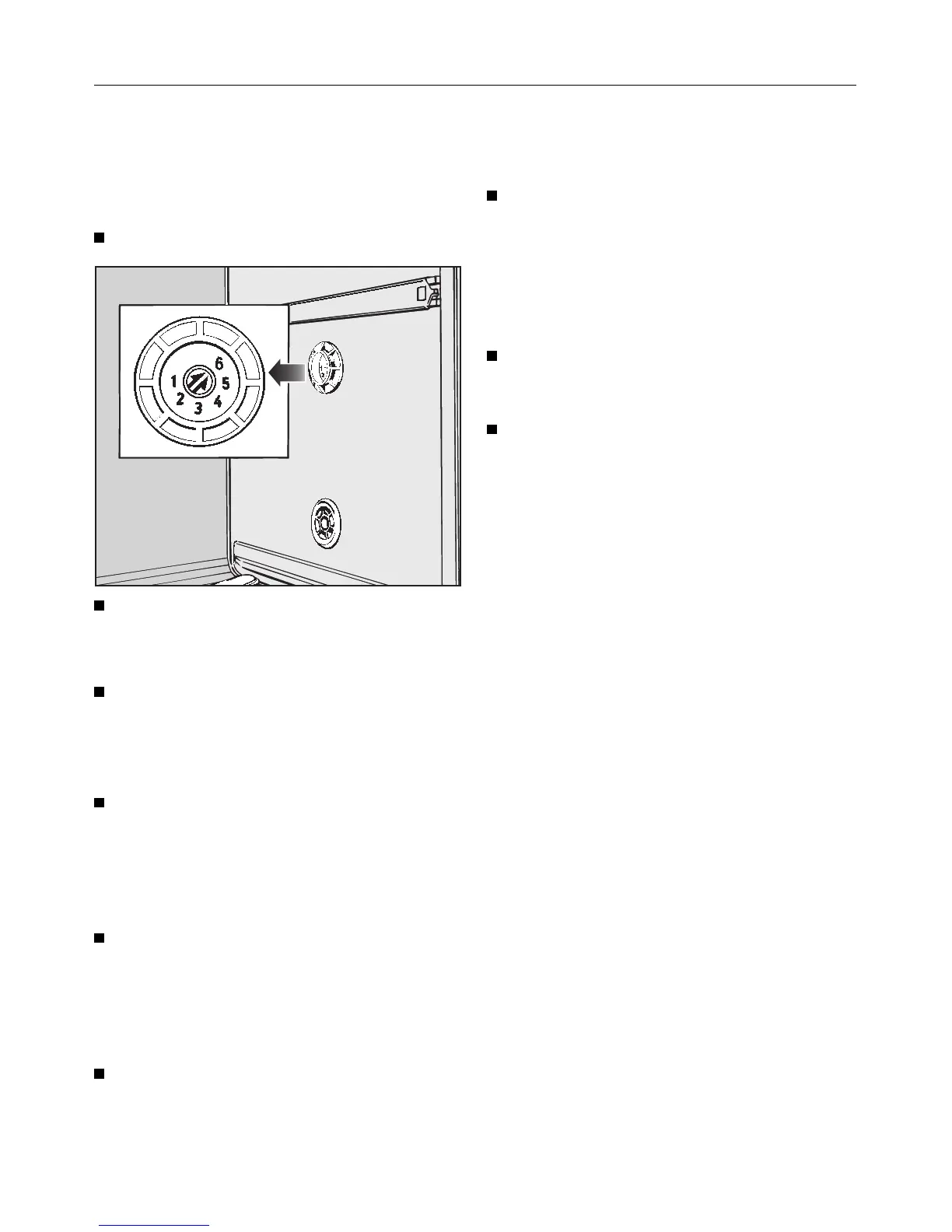
To set the water softener
Setting the water softener for a hard-
ness level of 1 - 35 gr/gal:
Turn the dishwasher off.
Use a screwdriver to remove the lid of
the water hardness level selector in
the wash cabinet.
Check that the selector is set to 6
(factory setting). If not, use a flat
blade screwdriver to turn the selec-
tor until it clicks on setting 6.
Press the "+" and "START/Stop" but-
tons while simultaneously turning the
dishwasher ON.
"P" and a number will appear in the
time display.
Press the "NORMAL 55 °C/130 °F"
program button.
A value corresponding to the curren-
tly set water hardness level will ap-
pear in the display.
Press the "Top Solo" button as often
as necessary until the hardness of
your water in gr/gal appears in the
display.
Example:
For a water hardness of 30 gr/gal.
Keep pressing the "Top Solo" button
until "30" appears in the display.
Once "36" is reached, the display will re-
turn to "1".
Press the “START/Stop” button.
“SP” appears in the display.
Press the “START/Stop” button again.
The water hardness value is now stored
in the machines memory.
Water softener
16



 To Next Page