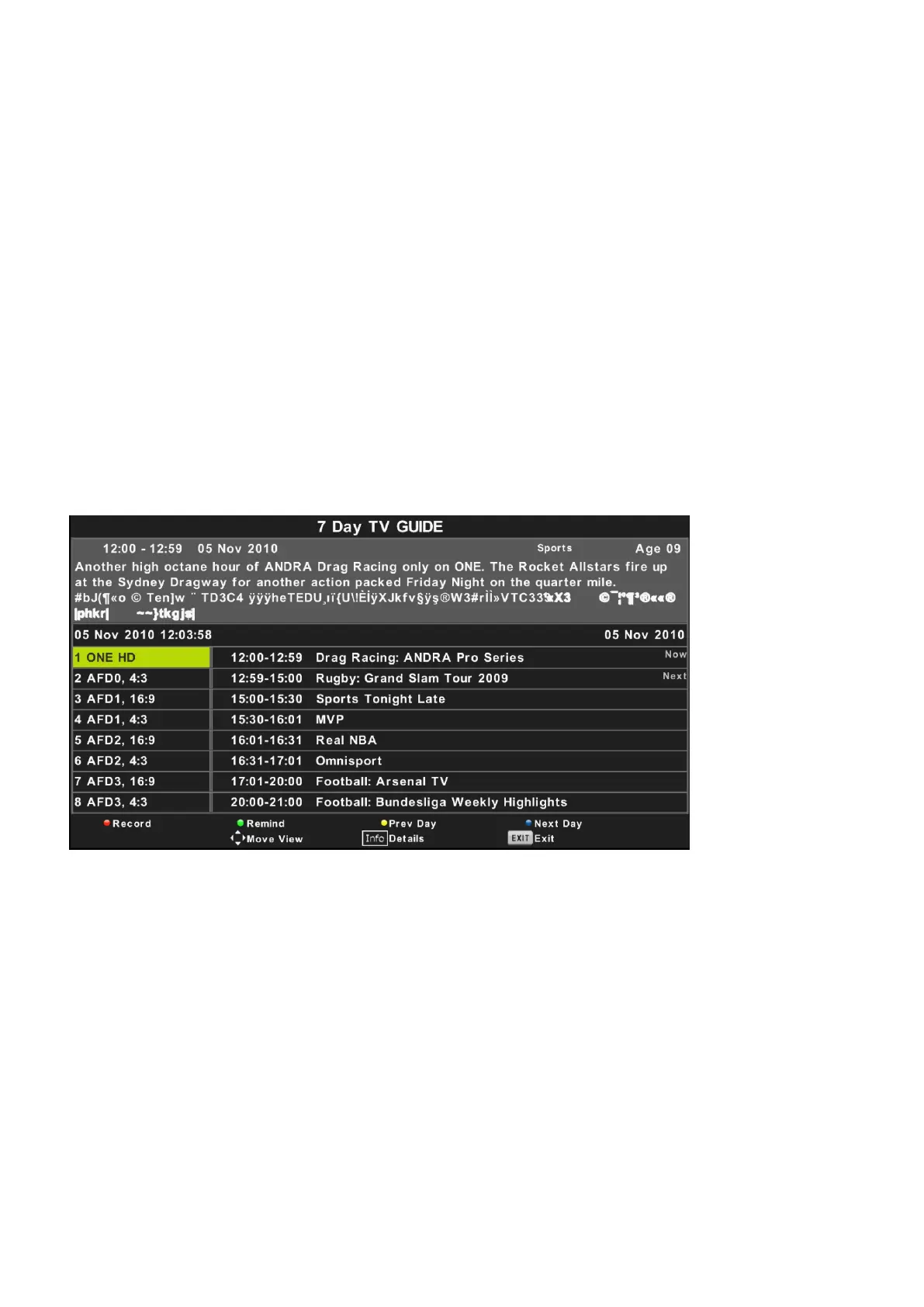
EPG
Press EPG in the remote control to record the programmes.
18
Press UP/DOWN navigation button to select preferred program.
Press LEFT/RIGHT navigation button to switch between left column and right column.
When a program is highlighted (cursor moved to Right column):
Press button to record program.RED
Press button repeatedly to set a reminder. GREEN
Press button to display program guide of previous day.YELLOW
Press button to display program guide of next day.BLUE
C.When the “Ku_ASTRA…” (Right) column is highlighted:
LNB (Low Noise Block) Type
Press LEFT/RIGHT navigation button to enter submenu. Then use UP/DOWN navigation button to select
desired option.
LNB Power
Press LEFT/RIGHT navigation button to select desired option.
22 kHz
Press LEFT/RIGHT navigation button to select desired option.
Toneburst
Press LEFTRIGHT navigation button to select desired option.
DisEqc1.0 (Digital Satellite Equipment Control)
Press LEFT/RIGHT navigation button to select desired option.
DisEqc1.1
Press LEFT/RIGHT navigation button to select desired option.
Motor
Press LEFT/RIGHT navigation button to select desired option.


 To Next Page