Function Testing
After checking all connections in accordance to installation instructions prior, connect power cables to vehicle’s battery. Attach Black Cable to
Negative (-) Battery Terminal and secure, followed by attaching the Red Cable to Positive (+) Battery Terminal.
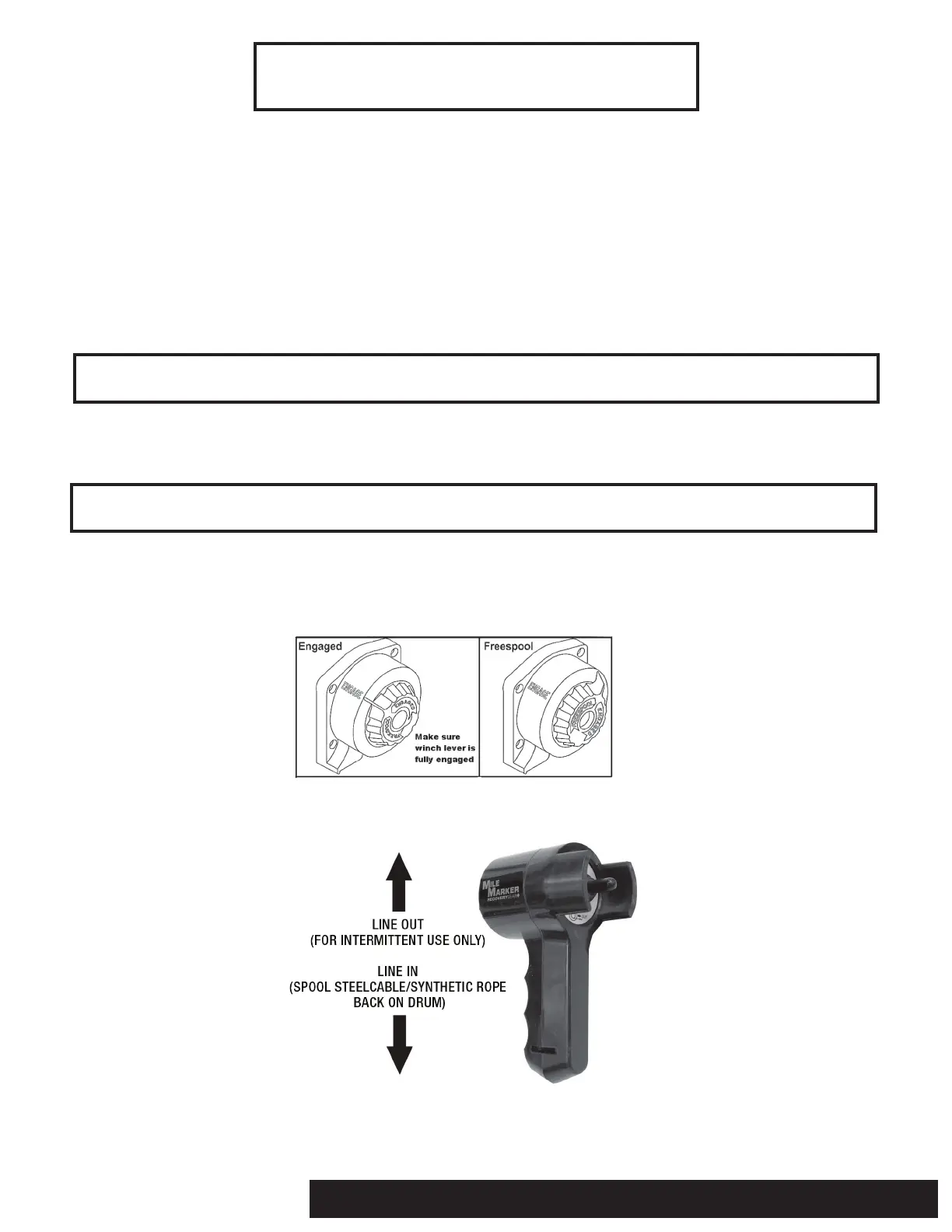
1. Before testing the winch, turn the clutch handle to the “Freespool” position. Always wear heavy gloves when handling winch steel cable/
synthetic rope. Using a Mile Marker hook strap, pull about two feet of steel cable/synthetic rope off the winch drum, and place the clutch
handle in the “Engaged” position (Fig. 3-1).
2. Toggle the Joystick “down” to retrieve line. When using the handlebar remote, you can also toggle the “IN” button for the same retrieval
function (Fig. 3-2). Steel cable/synthetic rope will spool in on drum.
3. Toggle the Joystick “up” to Power Out winch steel cable/synthetic rope. When using the handlebar remote, you can also toggle the “OUT”
button for the same Power Out function (Fig. 3-2). Winch steel cable/synthetic rope will spool out off of drum.
4. If any of the above functions are not working properly, recheck all connections in accordance with Wiring Instructions in this manual, or
refer to Troubleshooting Section in the back of manual.
NOTE: If steel cable/synthetic rope is spooled “Out” while pressing the “IN” function, please refer to Fig. 2-1 (on page 5), and switch power
cables to opposite studs on motor.
NOTE: The “OUT” function is for INTERMITTENT USE ONLY, as you are powering drum against the brake, and can damage internal mechanism.
3-1: Clutch Function Diagram
3-2: Remote Control Function Diagram
WINCH OPERATION
2121 Blount Road Pompano Beach, FL 33069 MileMarker.com 1.800.886.8647PAGE 6



 To Next Page