EasyManua.ls Logo

Milesight UR32 - UR32 Reset Button Operation; UR32 Ethernet Port Link Indicator

Milesight UR32
15 pages
Print Icon
To Next Page IconTo Next Page
To Previous Page IconTo Previous Page
Loading...
UR32 Quick Start Guide
www.milesight-iot.com
6
Static/Static/Off: normal signals with 11-20 ASU
(average signal strength)
Static/Static/Static: strong signals with 21-31 ASU
(signal is good)
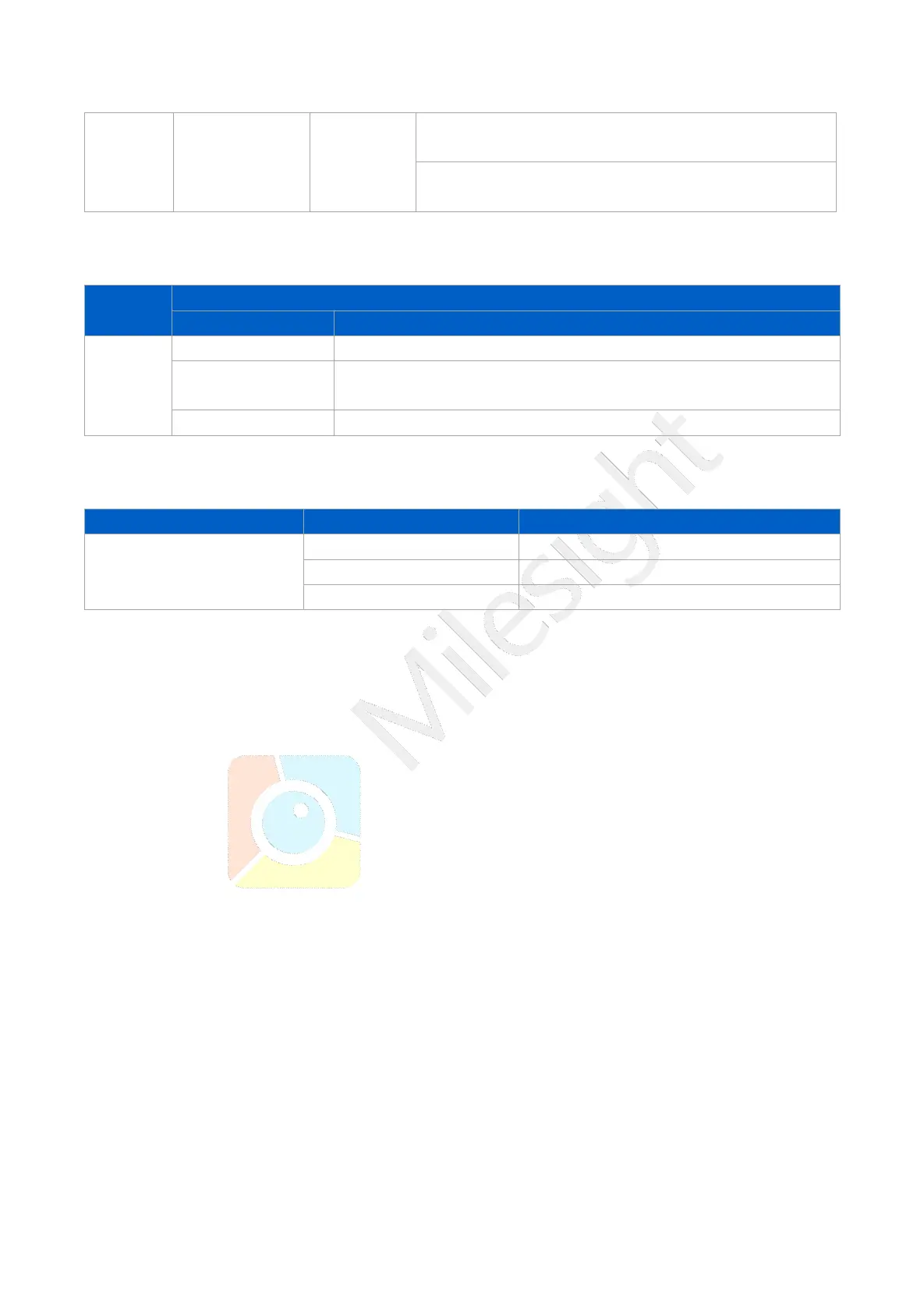
2.5 Reset Button
Reset button is under the SIM slots.
Function
Description
SYSTEM LED
Action
Reset
Blinking
Press and hold the reset button for more than 5 seconds.
Static Green
Rapidly Blinking
Release the button and wait.
Off Blinking
The router is now reset to factory defaults.
2.6 Ethernet Port Indicator
Indicator
Status
Description
Link Indicator (Orange)
On
Connected
Blinking
Transmitting data
Off
Disconnected

Related product manuals