UR35 Quick Start Guide
www.milesight-iot.com
3. Hardware Installation
Environmental Requirements
- Power Input: 9-48 VDC (48 VDC is needed for PoE output)
- Power Consumption: Typical 3.9W (Max 4.6 W)
- Operating Temperature: -40°C to 70°C (-40°F -158°F)
- Relative Humidity: 0% to 95% (non-condensing) at 25°C/77°F
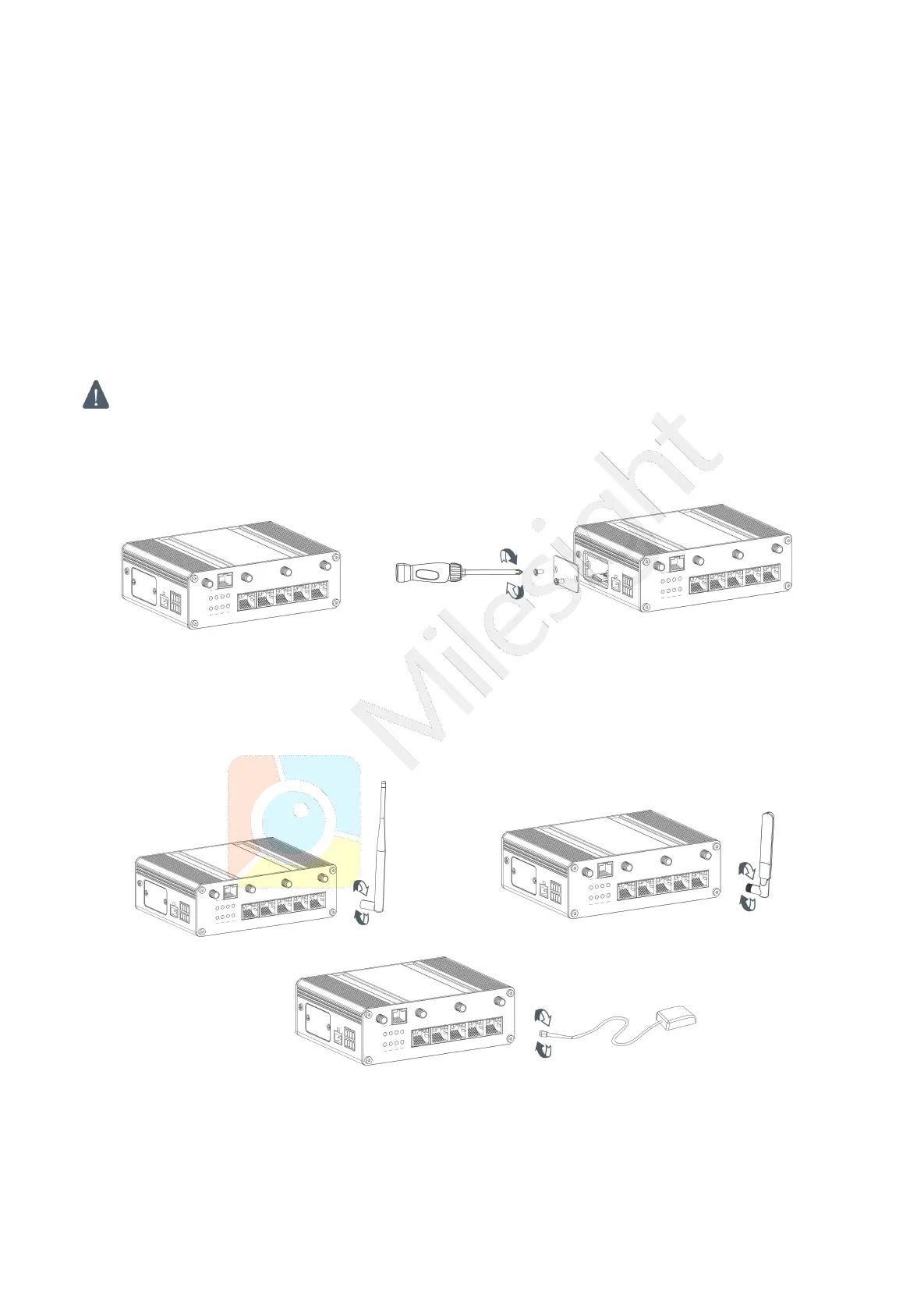
3.1 SIM Card/Micro SD Card Installation
UR35 do not support hot-plug. Please cut off the power before insert or take off cards.
A. Unscrew the cover of the SIM card/Micro SD B. Put SIM card/Micro SD card into the slot
then insert the card then take it off. and screw it up.
3.2 Antenna Installation
Rotate the antenna into the antenna connector accordingly.
The external antenna should be installed vertically always on a site with a good signal.
3.4 Router Installation
The router can be placed on a desktop or mounted to a wall or a DIN rail.


 To Next Page