UR35 Quick Start Guide
www.milesight-iot.com
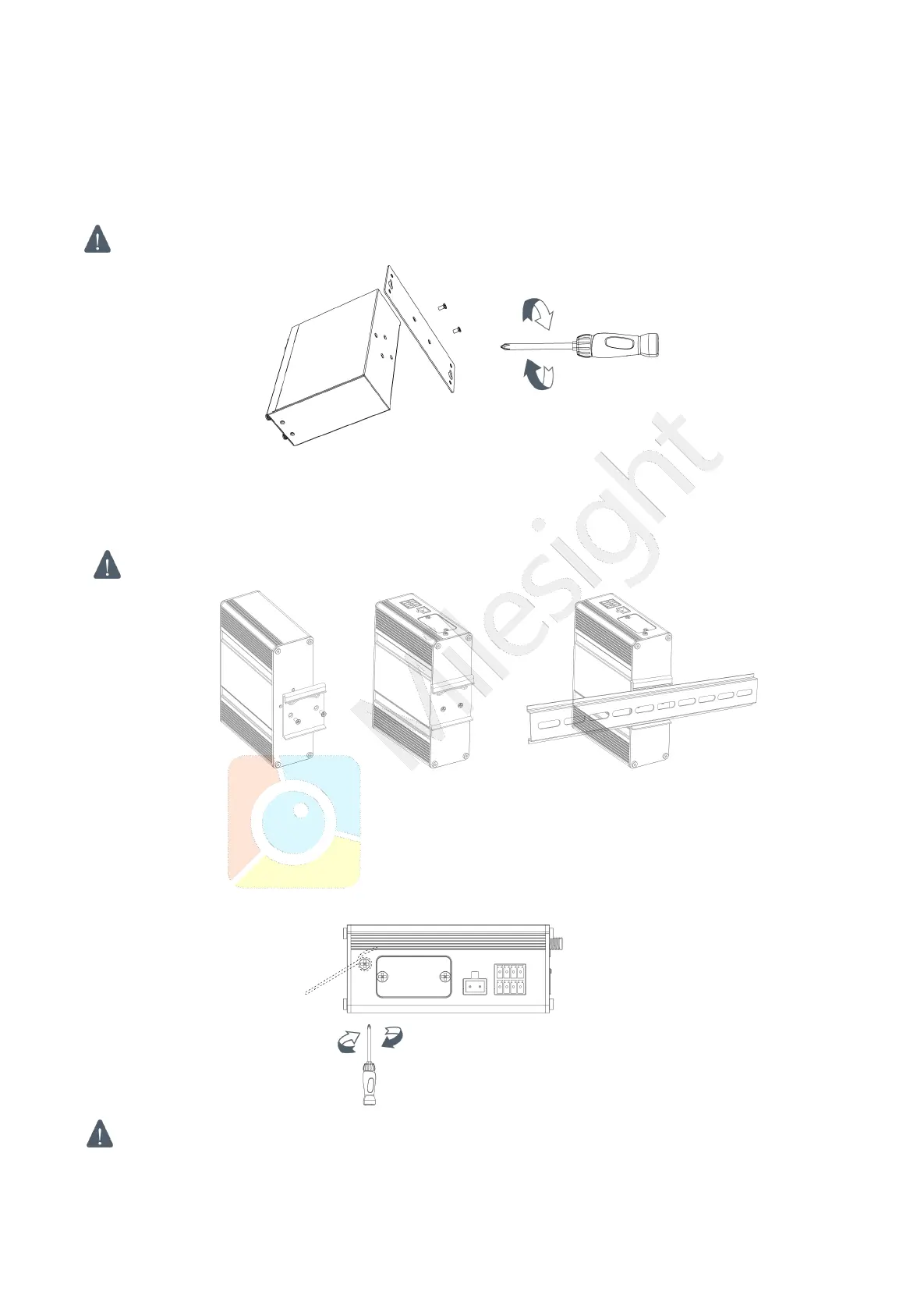
3.4.1 Wall Mounting (Measured in mm)
Use 2 pcs of M3 × 6 flat head Phillips screws to fix the wall mounting kit to the router, and then use 2
pcs of M3 drywall screws to mount the router associated with the wall mounting kit on the wall.
Recommended torque for mounting is 1.0 N·m, and the maximum allowed is 1.2 N·m.
3.4.2 DIN Rail Mounting (Measured in mm)
Use 2 pcs of M3 × 6 flat head Phillips screws to fix the DIN rail to the router, and then hang the DIN rail
on the mounting bracket. It is necessary to choose a standard bracket.
Recommended torque for mounting is 1.0 N·m, and the maximum allowed is 1.2 N·m.
3.5 Protective Grounding Installation
A. Remove the grounding nut.
B. Connect the grounding ring of the cabinet’s grounding wire onto the grounding stud and screw up the
The router must be grounded when deployed. According to operating environment, the ground wire
should be connected with grounding stud of router.


 To Next Page