MILESTONE
USER MANUAL
ETHOS EZ User manual MA073-006 Terminal chapter Page - 47 -
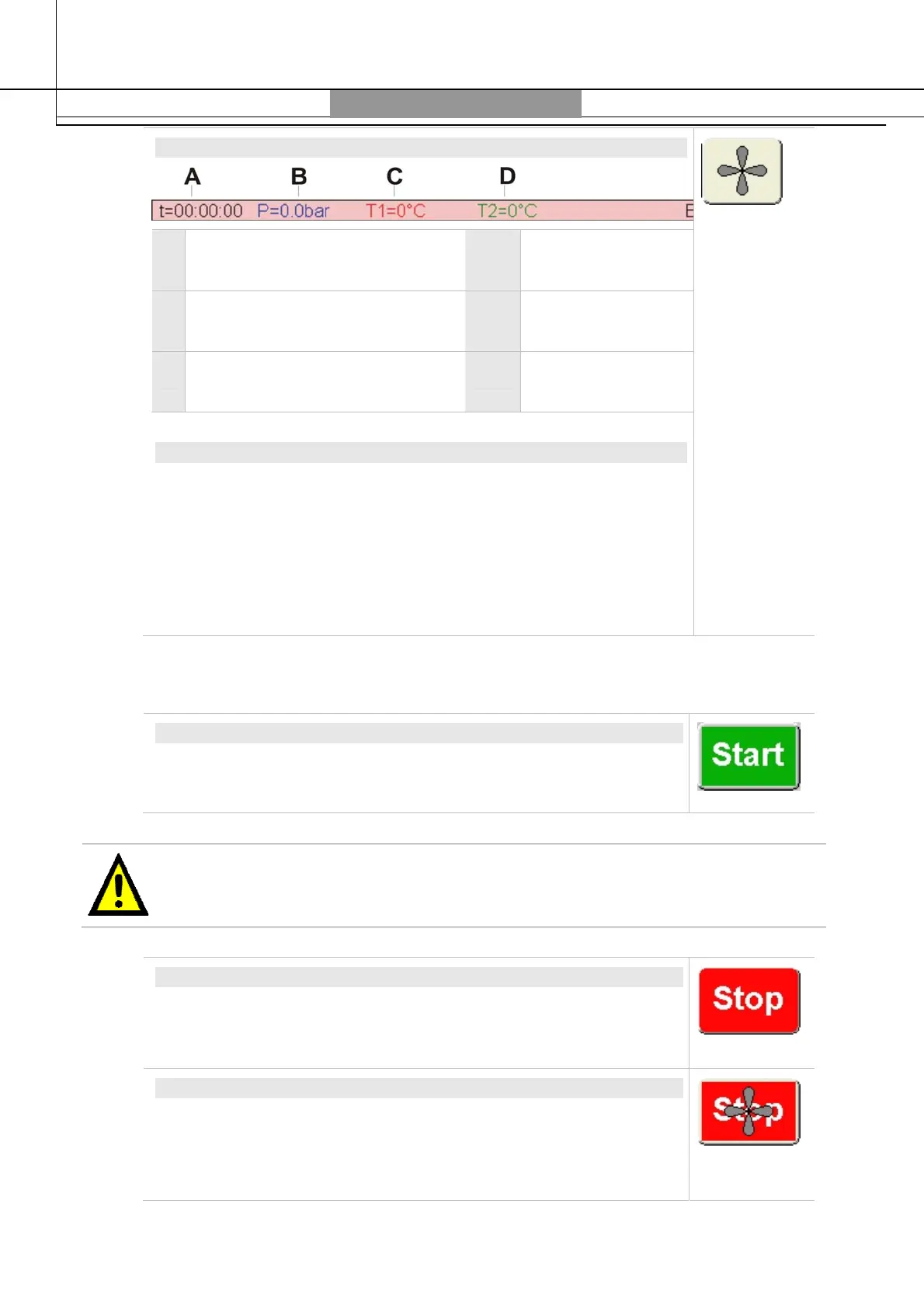
STATUS BAR
A t = Time elapsed from microwave
program start
D T2 = External temp
reactor wall
B P = Internal pressure of pressure
reactor
E E = Microwave power
C T1 = Internal temperature of
pressure reactor
VENTILATION / COOLING
Touching this icon “
Ventilation”
will start ventilation also outside the
microwave program. With ventilation ON, the icon has a red
background.
Ventilation time (cooling time) is automatically started at the end of
the heating steps, i.e. steps with microwave irradiation. During
ventilation there is no microwave emission. Only ventilation and
recording of all parameters are active.
Program Run
START
Touch the
Start
icon to start the microwave program.
The microwave unit must be ready to start.
If for any parameter a 0 (zero) value is set, an error message appears at start and the
program cannot be started.
STOP
After start of a run, the
Stop
icon will show up. After 5 seconds pre-
heating time – which is separately indicated in the time display – the
first heating step will start.
STOP VENTILATION
Touching the
Stop
icon will stop the microwave program and the
ventilation time will start.
The ventilation time can be stopped by touching the
Stop
Ventilation
icon.



 To Next Page