26
27
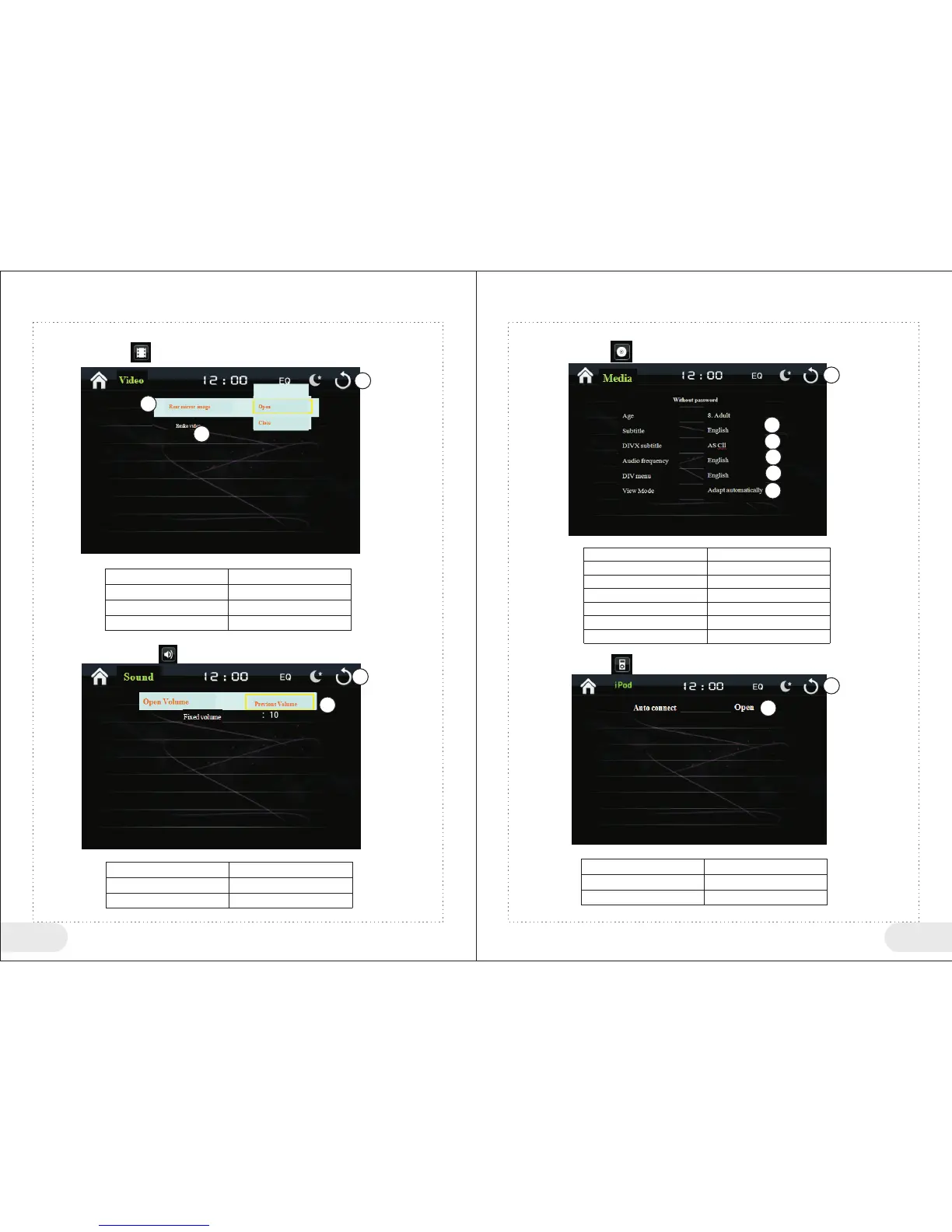
7、Video Settings
In setting menu click“ ” to enter video settings interface.
<Video Function Button> Table
1
2
3
Button No
Function Instructions
Return to main menu
Rear mirror image setting
Brake video setting
1
8、Volume
In setting menu click “ ” to enter sound effect settings interface.
Settings
<Sound Effect Function Button> Table
1
2
Return to main menu
Volume Setting
9、Media Settings
In setting menu click “ ” to enter media settings interface.
1
2
<Media Setting Button> Table
1
2
3
4
5
6
Return to main menu
Set DVD Subtitle
Set DIVX Subtitle
Set DVD Language
Set DIV Subtitle
View Mode Selection
1
2
3
4
5
6
10、iPod Settings
In setting menu click “ ” to enter media settings interface.
<iPod Setting Button> Table
1
2
Return to main menu
Auto connect selection
1
2
2
3
Button No
Function Instructions
Button No
Function Instructions
Button No
Function Instructions


 To Next Page