8
9
2. DVD Play
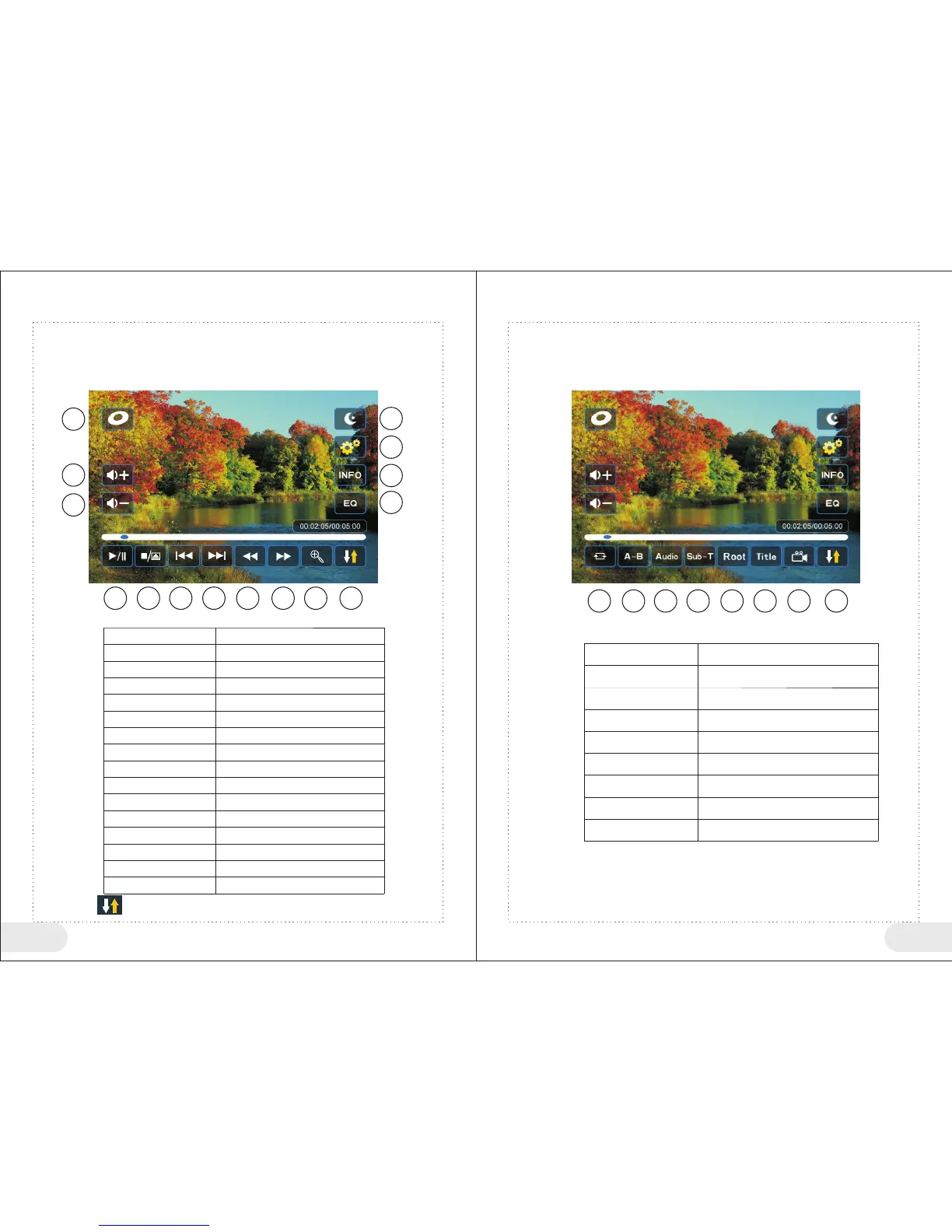
1:During DVD play, click (5) icon in the center of the touch screen, to pop up <DVD> play button.
2: Click (5) icon in the center of the touch screen again, to close <DVD> play button.
3: If you do not operate <DVD> play button for 10 seconds, system will exit automatically
1
2
3
4
5
6
7
8 9
10 11
12 13 14 15
Button No
1
2
3
4
5
6
7
8
9
10
11
12
13
14
15
<DVD> play button table P1
Discs
Volume+
Volume-
Screen off
Settings
Display Current Play Information
Sound Effect Setting
Play/Pause
Stop
Previous Song
Next Song
Fast Reverse
Fast Forward
Enlarge
Enter P2
Click “ ” icon to enter P2 play button , as shown in the following figure.
1 2 3 4
5
6 7 8
1
2
3
4
5
6
7
8
Repeat
A-B Repeat
Sound Track/Language Switch
Subtitle Switch
Return to Disc Main Menu
Return to Disc Subtitle Menu
Angle Shift (requires disc support)
Enter P1 Menu
Function Instructions
<DVD> play button table P2
Button No
Function Instructions


 To Next Page