24
25
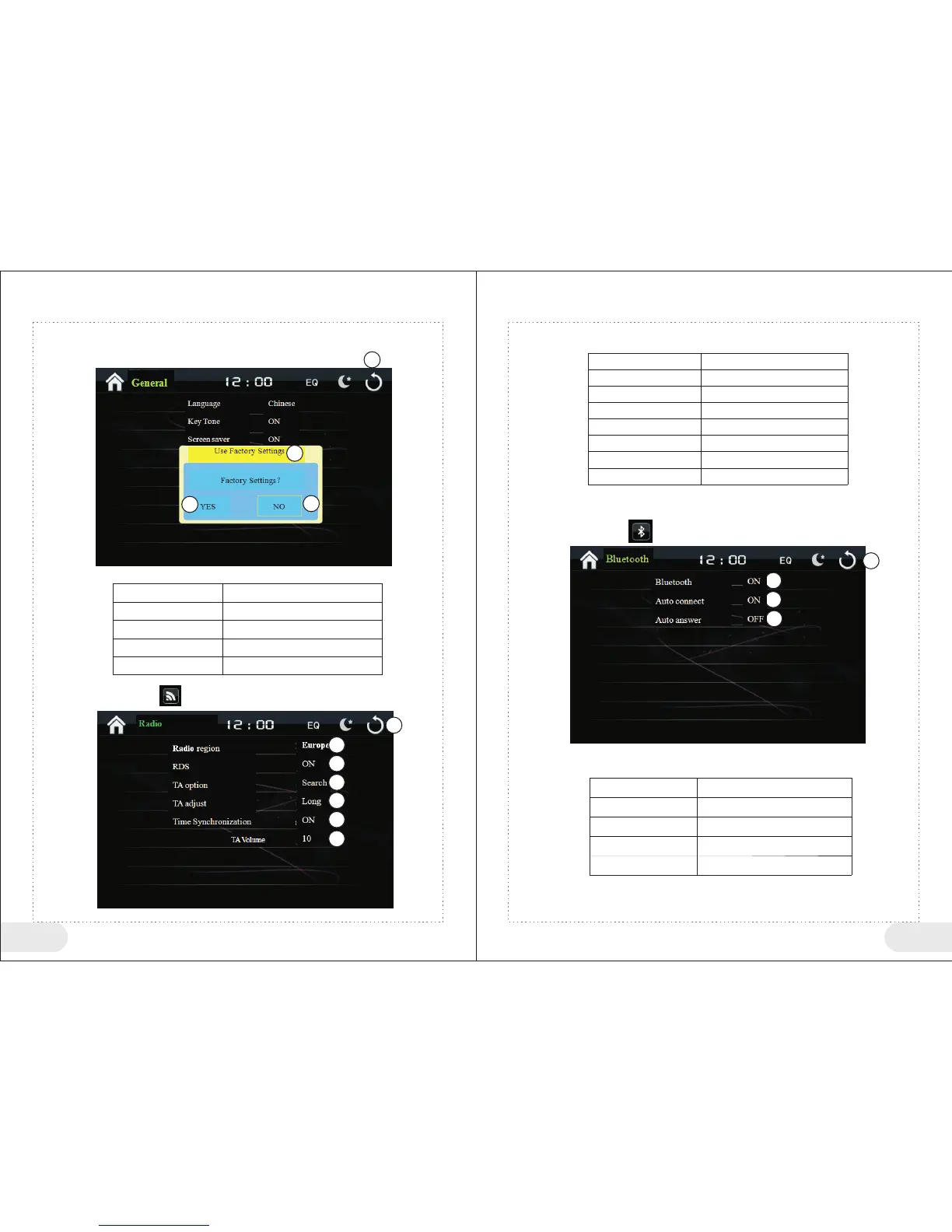
4、Use Factory Settings
In general menu, click “Use Factor Settings” to enter use factory settings interface.
1
<Use Factory Settings Button > Table
1
2
3
4
Button No
Function Instructions
Return to main menu
Current Operation Instructions
Restore Factory Settings
Exit Factory Settings
5、Radio Settings
In setting menu, click“ ” to enter Radio settings interface.
1
<Radio Settings Button> Table
Button No
Function Instructions
1
2
3
4
5
6
7
Return to main menu
Radio region selection
RDS switch
TA option
TA adjust
Time Synchronization Switch
TA Volume Adjust
6、Bluetooth Settings
In setting menu click“ ” to enter Bluetooth settings interface
<Bluetooth Settings Button> Table
Button No
Function Instructions
1
2
3
4
Return to main menu
Bluetooth switch settings
Auto connect switch settings
Auto answer switch settings
1
2
3
4
3
2
4
2
3
4
5
6
7


 To Next Page