OM-1585 Page 18
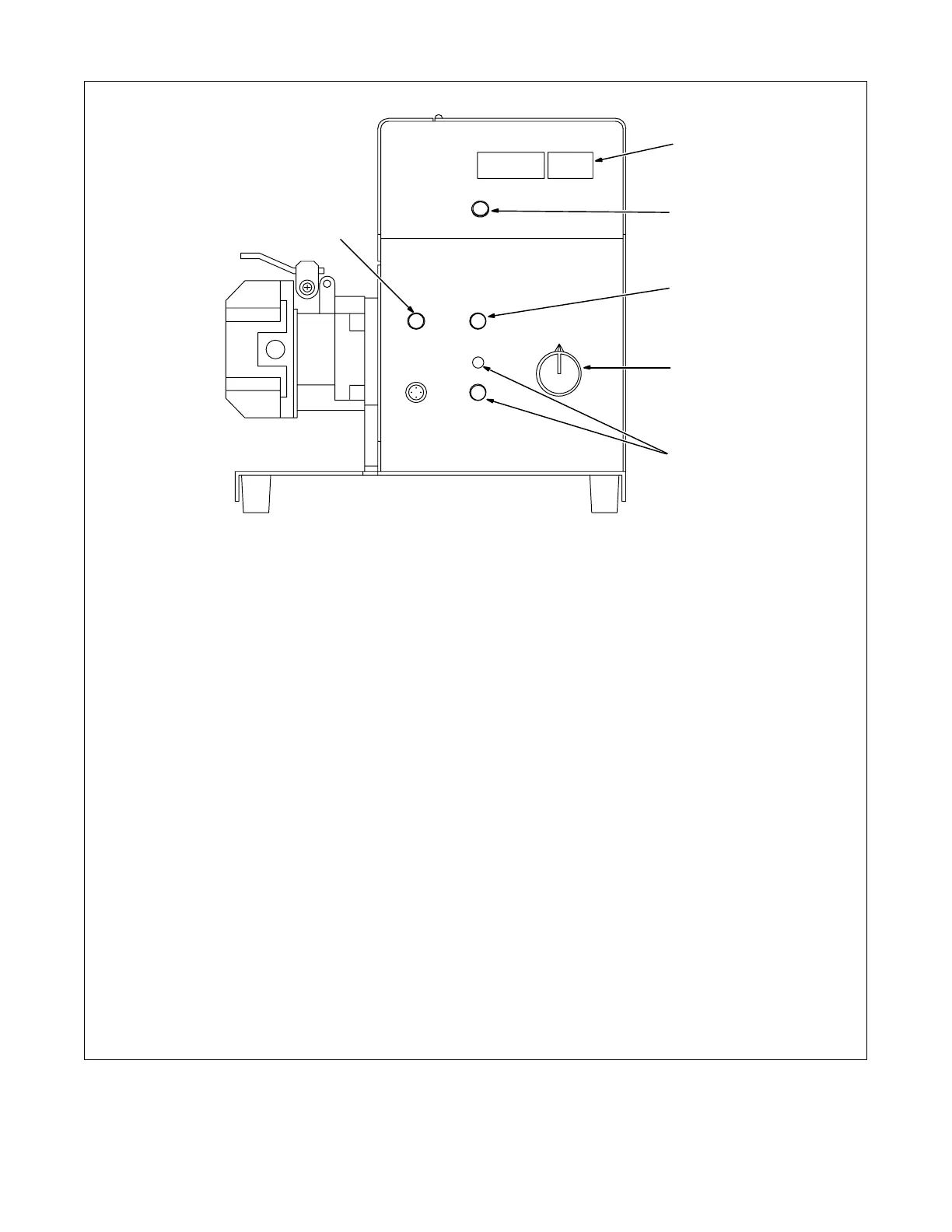
5-3. Front Panel Controls
ST-155 222-A
1 Display
2 Parameter Select Button
Press button to move > on display.
3 Jog Button
Push to momentarily feed welding wire
without energizing welding circuit or shield-
ing gas valve.
Jog speed is varied using the Display Con-
trol while Jog button is pressed. Default set-
ting is 200 IPM.
4 Display Control
Turn control to change value pointed to by >.
Turning control one click causes Trim (arc
length) to increase/decrease by one or Volt
to increase/decrease by 0.1.
When IPM is selected, turning control one
click causes wire feed speed (IPM) to
increase/decrease by one.
When MPM is selected, turning control three
clicks causes wire feed speed (MPM) to
increase by 0.1.
When Prg # is selected, turning control one
click causes program number (Prg #) to
increase/decrease by one.
The program number cannot be changed
while welding, with exception of Dual
Schedule Mode (see Section 7).
Pulse is a default setting. To change type of
process (Pulse, Adaptive Pulse, or MIG) use
side panel controls.
5 Trigger Hold Button And Indicator Light
Trigger Hold can be set on a per program
basis. Indicator light comes on for programs
where this feature is active.
To weld without holding gun trigger through-
out weld cycle, press and release button to
turn feature on (indicator light turns on).
To start weld cycle, press and release gun
trigger within three seconds after an arc has
been struck. To end weld cycle, press and
release gun trigger.
6 Purge Button
Push to momentarily energize gas valve
without energizing the welding circuit.
Holding the Jog and Purge buttons at the
same time displays pulse parameters on
the side panel display and voltage on
front panel display.
1
2
3
4
5
6



 To Next Page