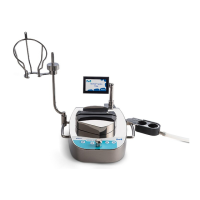
The Steritest™ Symbio 3-Media Pump is a device designed for sterility testing, offering features for efficient and reliable operation. This quick guide outlines the initial setup and basic operation of the pump, including hardware installation and software navigation.
Function Description
The Steritest™ Symbio 3-Media Pump is primarily used for sterility testing, likely in pharmaceutical or laboratory environments. It is designed to work with three different media, suggesting versatility in testing various sample types or protocols. The pump facilitates the transfer of samples through filtration units, which is a common method for sterility testing. The communication hub acts as a central point for connecting various accessories and data sources, enhancing the pump's functionality and integration into laboratory workflows. The "Autotest" feature, which appears after the pump certificate is activated, indicates a self-diagnostic capability, ensuring the pump is operating correctly before use. The ability to switch between "Standard Mode" and "Test Method Mode" suggests that the pump can be used for general operations or pre-defined, validated testing procedures, which is crucial for regulatory compliance in sterility testing.
Important Technical Specifications
While specific numerical technical specifications like flow rates or dimensions are not provided in this document, several functional specifications can be inferred:
- Connectivity: The device features a fuse slot, USB port, Ethernet port, Footswitch port, and Syringe support port. This extensive connectivity allows for integration with various peripherals and network systems. The USB port likely supports data transfer and firmware updates, while the Ethernet port enables network connectivity for data logging or remote control. The footswitch port suggests hands-free operation, which can improve efficiency and ergonomics during testing. The syringe support port indicates compatibility with syringe-based operations, possibly for adding reagents or samples.
- Power: An "On/off switch" is present on the communication hub, indicating a standard electrical power input.
- Control Interface: The pump features a control panel with an on/off button, open/close button (likely for the pump head), back and next buttons for navigation, and a control knob that can be turned and pressed for various operations. This combination of buttons and a knob provides a flexible and intuitive user interface.
- Display: The pump is equipped with a screen that displays various information, including the pump certificate status, serial number, next calibration date, and accessory connection status. The graphical user interface (GUI) is crucial for monitoring and controlling the testing process.
Usage Features
The Steritest™ Symbio 3-Media Pump offers several features designed to enhance user experience and operational efficiency:
- Easy Installation: The guide details straightforward installation procedures for the bottle holder, drain tray, and communication hub, suggesting a user-friendly setup process. The numbered steps and clear diagrams aid in quick assembly.
- Intuitive Control Panel: The control panel is designed for ease of use, with dedicated buttons for common actions like powering on/off, opening/closing the pump head, and navigating menus. The control knob allows for precise selection and adjustment of parameters.
- Accessory Integration: The communication hub serves as a central point for connecting various accessories such as a footswitch, overfilling sensor, and syringe support. The screen displays the connection status of these accessories, ensuring proper setup before testing.
- Multiple Operating Modes: The pump supports "Standard Mode" for general use and "Test Method Mode" for executing predefined testing procedures. This flexibility allows users to adapt the pump to different testing requirements and ensures consistency for validated methods.
- Configuration Menu: A dedicated configuration menu allows users to customize pump parameters, manage accessories, and upload test methods, providing comprehensive control over the device's operation.
- Pump Certificate Activation: The initial setup includes a pump certificate activation process, which resets the calibration countdown to 12 months. This ensures the pump is properly registered and maintained for accurate results.
- Autotest Functionality: After certificate activation, the pump performs an "Autotest" procedure, which likely checks the system's readiness and functionality, contributing to reliable operation.
- Hands-Free Operation: The footswitch port suggests the possibility of hands-free control, which can be beneficial in sterile environments or when operators need to maintain focus on other tasks.
Maintenance Features
While detailed maintenance instructions are not provided in this quick guide, several features suggest ease of maintenance and compliance:
- Calibration Tracking: The pump's display shows the "Next calibration in: 364 days," indicating an integrated system for tracking calibration schedules. This is critical for maintaining the accuracy and validity of test results, especially in regulated environments. The pump certificate activation process also resets this countdown, ensuring a fresh calibration cycle upon initial setup.
- Self-Diagnostic (Autotest): The "Autotest" function serves as a preliminary maintenance check, ensuring the pump is in good working order before use. This can help identify potential issues early, reducing downtime and ensuring reliable performance.
- Modular Design (Inferred): The separate installation steps for the bottle holder and drain tray suggest a modular design, which can simplify cleaning and replacement of components, contributing to easier maintenance and hygiene.
- Fuse Slot: The presence of a fuse slot indicates that the device is protected against electrical overloads, and fuses can be replaced if necessary, which is a common maintenance task for electronic equipment.
- Firmware Updates (Inferred): The USB port, while not explicitly stated for firmware updates, is a common interface for such purposes, allowing the pump's software to be kept current with new features or bug fixes.

 Need help?
 General


 To Next Page
