SETUP 25
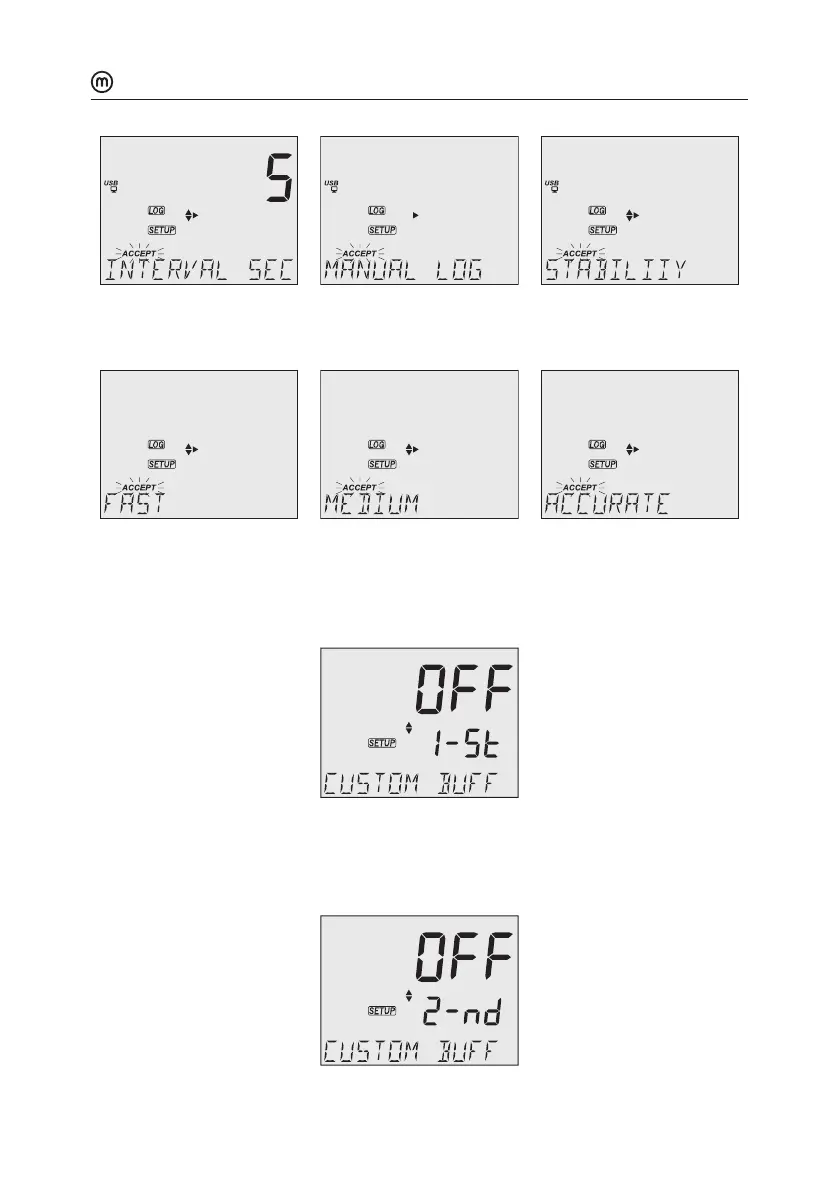
Use keys to set time interval: 5 (default), 10, 30 sec. or 1, 2, 5, 15, 30, 60, 120, 180 min.
Use keys to select stability type: fast (default), medium or accurate.
First Custom Buer
Press RANGE/ to set a default buer value as starting value.
Use keys to set the value of the first custom buer.
pHmV
NO MTC ATC
AUTO
HOLD
SLOPE
CLEAR
CAL
1.68
4.01
6.86
7.01
9.18
10.01
12.45
CUST1
CUST2
DATE
ACCEPT
ºC
ºF
pH
mV
TIME
Second Custom Buer
Press RANGE/ to set a default buer value as starting value.
Use keys to set the value of the second custom buer.
pHmV
NO MTC ATC
AUTO
HOLD
SLOPE
CLEAR
CAL
1.68
4.01
6.86
7.01
9.18
10.01
12.45
CUST1
CUST2
DATE
ACCEPT
ºC
ºF
pH
mV
TIME



 To Next Page