Need help?
Do you have a question about the Minolta MNCD37 and is the answer not in the manual?
Identifies camcorder buttons, components, and displays using numbered diagrams.
Detailed description of each button's function and purpose on the MNCD37.
Instructions for inserting memory cards and attaching the windshield mount.
Guides for starting the camcorder via in-car power or USB.
Covers operations for Video, Photo, and Playback modes.
Explanation of icons and indicators shown on the camcorder's screen.
Settings for video resolution, loop recording, audio, motion detection, collision sensitivity, date/time stamp.
Settings for photo resolution, stabilization, quality, sharpness, white balance, ISO, date/time stamp.
Options to delete and protect recorded files.
Settings for park mode, date/time, power off delay, language, frequency, formatting, and reset.
Steps for connecting the camcorder to a computer for media transfer.
Instructions on how to reset the camcorder if it becomes unresponsive.
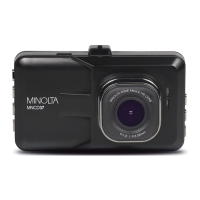
The Minolta MNCD37 Dash Cam is a versatile in-vehicle camcorder designed for capturing high-definition video and high-resolution photos. Its primary function is to record driving events, providing valuable evidence in case of accidents, as well as documenting daily commutes, travel, and outdoor activities. The device integrates multiple functions, including 1080p HD video capture, high-resolution photo capture, and a compact form factor, making it an ideal companion for any vehicle.
The MNCD37 operates primarily in three modes: Video Mode, Photo Mode, and Playback Mode. Upon powering on, the camcorder defaults to Video Mode and automatically begins recording, ensuring that critical moments are captured without manual intervention. Users can manually start or stop recording at any time by pressing the OK/RECORD button. The camcorder utilizes high-performance video decoding technology and compression ratios to deliver excellent video quality, even in a wide, large-angle view when mounted to a car's windshield.
In Video Mode, the device offers several user-adjustable settings to fine-tune video capture. These include selecting video resolution (1080p for highest quality, 720p for medium, and 480p for low), enabling Loop Recording to set a maximum duration for video clips (1, 3, or 5 minutes), and controlling Audio Recording (ON or OFF) via the built-in microphone. A key feature is Motion Detection, which automatically initiates recording when movement is detected in front of the lens and stops after 10 seconds of no further movement. Collision Sensitivity is another crucial function, allowing the camcorder to automatically begin recording and lock the video file upon detecting a collision, protecting it from deletion. The Date & Time Stamp feature imprints the date, or date and time, onto recorded video files for evidential purposes.
Photo Mode allows users to capture still images. Similar to video settings, photo capture can be customized with various resolutions (from 1.3 Mega Pixels to 12 Mega Pixels for highest quality), Photo Stabilization to reduce motion blur in shaky or low-light conditions, and Photo Quality settings (Super Fine, Fine, Normal) to manage compression levels and image detail. Photo Sharpness can also be adjusted (Hard, Normal, Light) to control the visible detail. White Balance settings (Auto, Daylight, Cloudy, Tungsten, Fluorescent) help adjust the color of light, while ISO settings (Auto, 100, 200) determine light sensitivity. Like video files, photos can also have a Date & Time Stamp imprinted.
Playback Mode enables users to review recorded video and photo files directly on the camcorder's display. The most recent file is displayed first, and users can navigate through files using the UP and DOWN buttons. Video clips can be played, paused, fast-forwarded, and rewound. This mode also provides options to delete individual files or all files, and to protect files from accidental deletion, ensuring important evidence is preserved.
The MNCD37 is designed for ease of use. It automatically powers on and begins recording when connected to a car's power port, making it a "set it and forget it" device. The included windshield suction cup mount allows for easy and secure attachment to the car's windshield, ensuring a wide field of view. The mount is designed for simple insertion and removal.
The camcorder features a 3.0-inch LCD screen for clear display of current views, menus, options, and status indicators. Buttons are clearly labeled for intuitive operation: OK/Record for starting/stopping recording and confirming selections, Mode for cycling between Video, Photo, and Playback modes, Lock File for protecting video files during recording, Power for turning the device on/off and disabling the LCD monitor, Reset for factory default settings, Menu for accessing and exiting settings, and Up/Down for navigation.
For power, the camcorder can be connected to a car's power port via the auxiliary DC power adapter or to a computer via a USB cable. The internal battery has a limited capacity, primarily intended for emergency use. The Auto Power Off Delay setting allows users to configure how long the camcorder stays on after power is disconnected or the car's ignition is turned off (1 or 3 minutes, or OFF).
Media transfer to a computer is straightforward: connect the camcorder via USB, select "Mass Storage," and access files from the "Removable Disk" in "This PC." The camcorder functions as a card reader, storing media in a folder on the removable disk.
The MNCD37 includes several features for maintenance and troubleshooting. The Format Memory Card option allows users to erase all video and photo files from the MicroSD card. This is useful for clearing storage, but users are cautioned that formatted media cannot be recovered. The Reset To Default function allows users to restore all menu settings to factory defaults without deleting any stored media.
In case the camcorder freezes or becomes unresponsive, a dedicated RESET button is provided. Inserting a pointy object into the reset hole on the underbody of the camcorder will power cycle and fully reset the device.
Proper handling and care are emphasized in the manual. Users are advised not to disassemble or attempt to service the camcorder themselves, and to avoid exposing it to moisture or extreme temperatures. It's recommended to allow the camera to warm up when moving from cold to warm environments. The camera lens should not be touched or subjected to pressure, nor exposed to direct sunlight for extended periods. Cleaning should be done with a slightly damp soft cloth, avoiding abrasive chemicals or strong detergents. It is normal for the camera body to feel warm during extended use. The LCD monitor should also be protected from impact.
For the windshield suction cup mount, if its grip weakens over time, thoroughly cleaning the clear suction area with soap and water, allowing it to dry for 2 hours, and then reapplying it is recommended to restore adhesion.
The camcorder supports MicroSDHC cards up to 32GB for external storage. The firmware version can be checked through the settings menu, providing information about the device's current software. Language settings are also available, offering a variety of options including English, French, Spanish, Portuguese, German, Italian, Cantonese, Mandarin, Russian, Japanese, Korean, and Arabic. Frequency settings (50Hz or 60Hz) can be adjusted based on the region of use, with 60Hz being the standard for North America.
 General
| Video Resolution | 1080p |
|---|---|
| Loop Recording | Yes |
| G-Sensor | Yes |
| Parking Monitoring | Yes |
| Night Vision | Yes |
| Display | LCD |
| Viewing Angle | 120 degrees |
| Storage | MicroSD up to 32GB |
| Battery | Rechargeable lithium battery |

 To Next Page