SNMP-NV6
Page 32
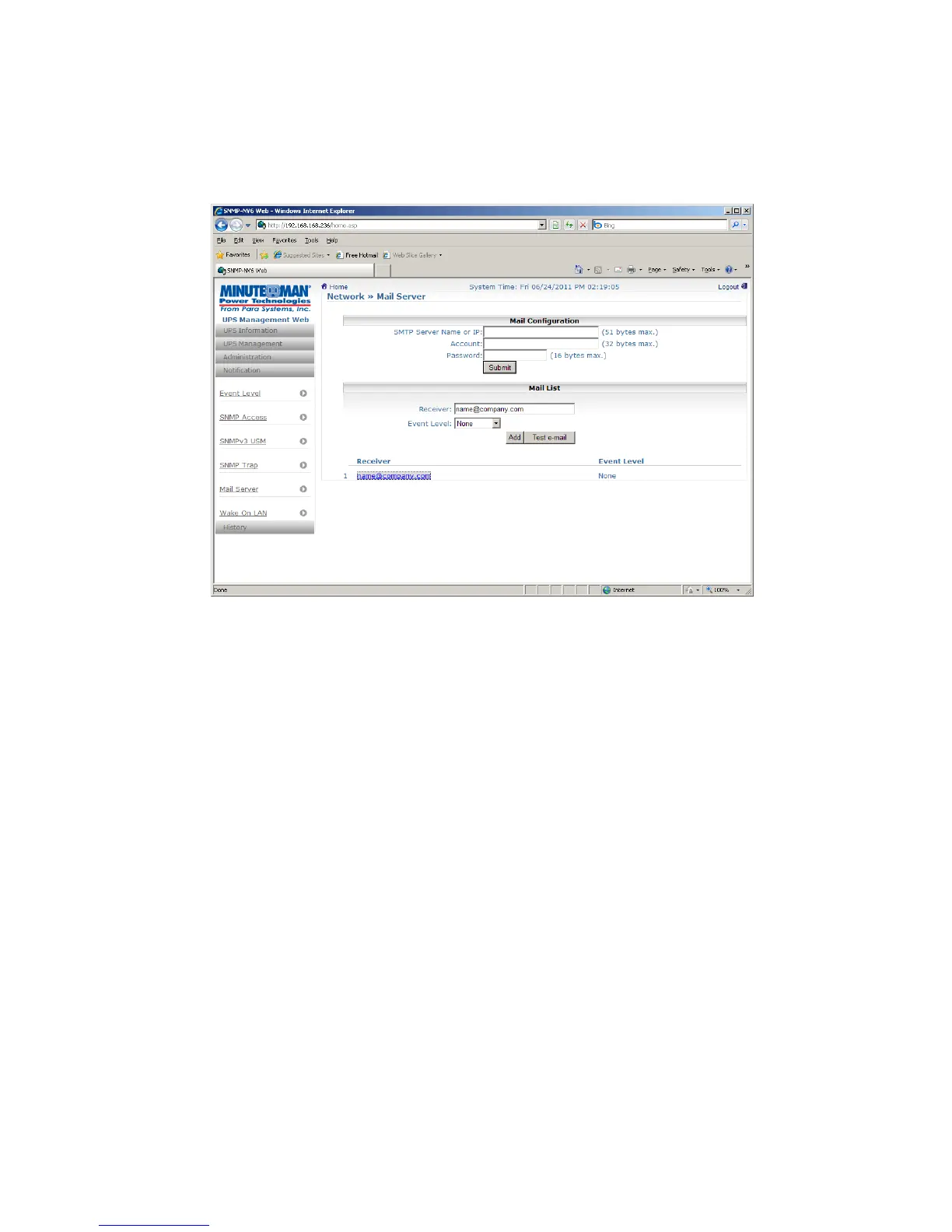
5.5.4 Mail Server
The administrator can set up the SMTP Mail Server and the e-mail receiver so the designated
recipient can receive the e-mail notification from the SNMP-NV6 card whenever a power
event occurs. The maximum number of e-mail users is 256.
SMTP Server Name or IP: This is the hostname of a SMTP Mail Server used to send the
email message from the SNMP-NV6 card. When entering a hostname, you are also
required to enter the DNS IP in the TCP/IP page.
Account: The Mail Server’s login account (if required).
Password: The Mail Server’s login password (if required).
Receiver: Enter the email address that you want the SNMP-NV6 card to send an e-mail
to.
Event Level: Select the event level that you want to go to the corresponding e-mail
recipient. If you select Information, the notification of all power events will be sent to the
target address; if you select Warning, the notification of the Warning event as well as the
Alarm event will be sent to the target address; if you choose Alarm, only the notification
of the Alarm event will be sent to the target address. You can change the event level
from UPS Management – Event Level menu.


 To Next Page