Mio SLICE User Guide 10
PAI Points
Earned In Activity
PAI Points
Earned Today
To end and save the activity session, press down the button for 2 seconds. SLICE will exit Workout Mode and
return to All-Day Mode.
PAI points earned in recorded activities are automatically rolled into your PAI Score and PAI Points Earned Today.
You can review details of your recorded activities in the Accurofit App.
PAI POINTS E ARNED SCREENS
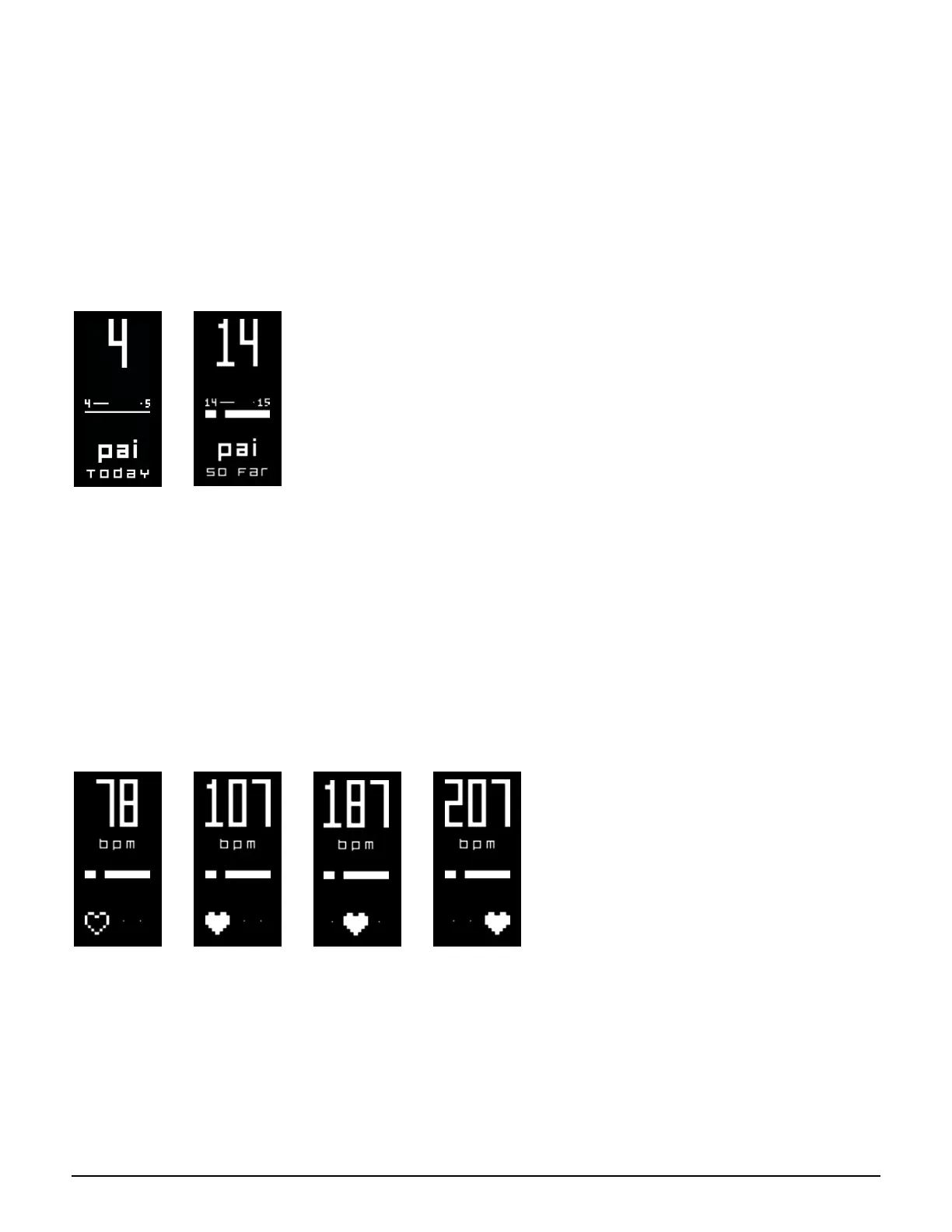
There are two screens on SLICE that show you how many PAI points you have earned today and your progress
towards the next PAI point.
The PAI points you have accumulated are indicated by the big number on the top. The progress bar between the
small numbers in the middle show you how close you are to earning your next PAI point.
HE AR T R ATE & INTENSIT Y ZONE SCREEN
Scroll to the Heart Rate & Intensity Zone screen at any time to see your current heart rate. It can take a few
seconds to detect and display your heart rate when SLICE is in All-Day Mode.
The position of the heart icon is an indicator of your current intensity zone.
Resting Zone
or Detecting
Heart Rate
Low Intensity
Zone
Moderate
Intensity Zone
High Intensity
Zone
PAI intensity zones are personalized based on your resting heart rate and maximum heart rate. The higher
your intensity, the quicker you earn PAI. PAI intensity zones may shift a bit from day to day as your resting
heart rate changes.


 To Next Page