Mio SLICE User Guide 5
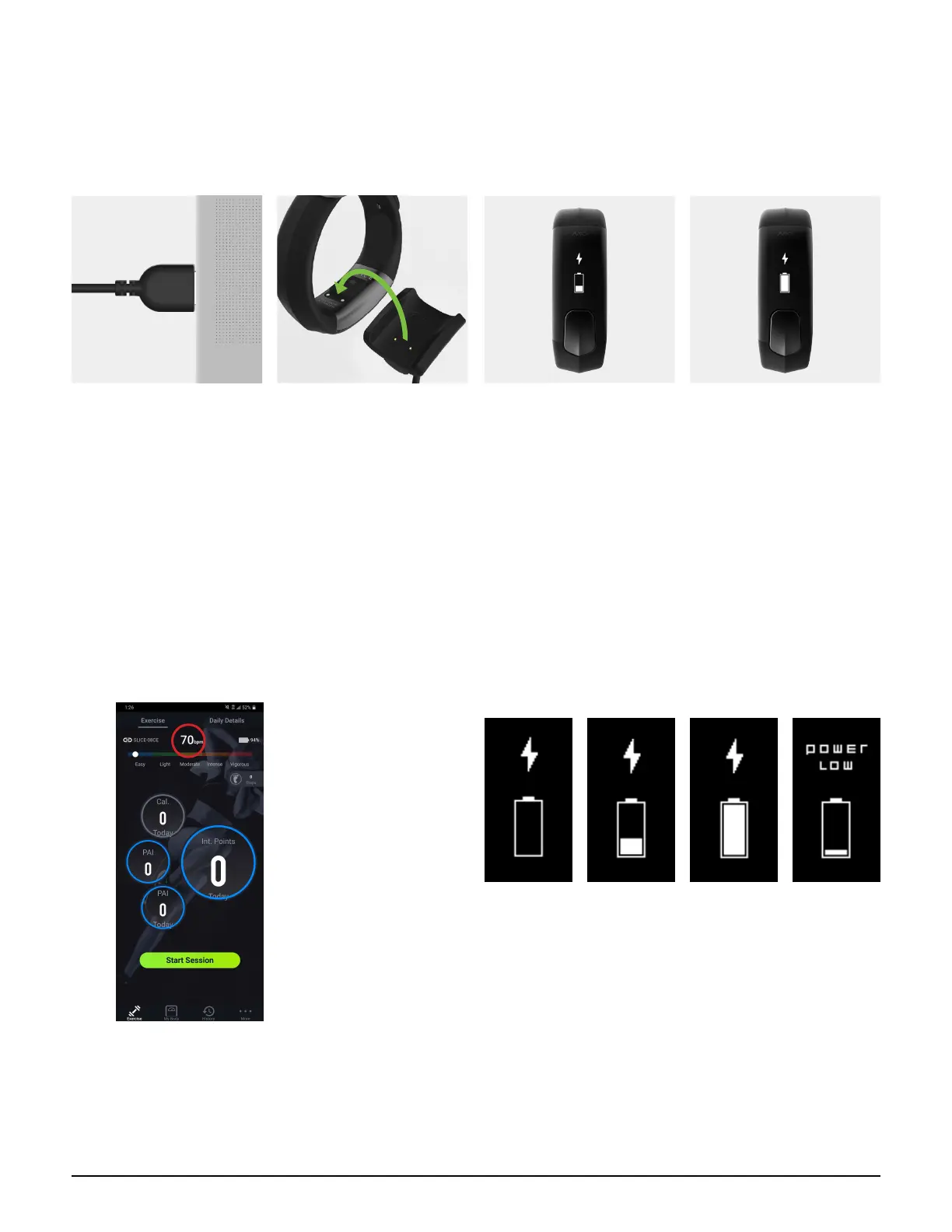
CHARGING
Important: Make sure the two charging contacts on the back of the SLICE are dry. If they are wet, pat them gently
with a dry towel.
1. Plug the USB charger
into the USB port of your
computer.
2. Align the two charging
contacts on the back
of the SLICE to the two
charging pins on the USB
charger. The magnets in
the charger will help the
two pieces lock into place.
3. The screen will display
a charging icon to indicate
that the battery is charging.
Depending on the SLICE
battery level, it can take
a few minutes for the
charging icon to appear.
4. It will take approximately
2 hours to fully charge;
the display will show a
full battery icon. Each full
charge will provide up to 4
days of normal use.
B AT T E R Y S TAT U S
The battery level is displayed in the
Accurofit App.
SLICE will display the following screens
to indicate its battery status:
Battery is charging Battery is
fully charged
Low Battery
(10% charge)
For important battery care and battery safety information, please see Battery Care.


 To Next Page