5. Usage
MiRCharge48V Operating guide (en) 11/2019 - v.1.3 ©Copyright 2019: Mobile Industrial Robots A/S. 29
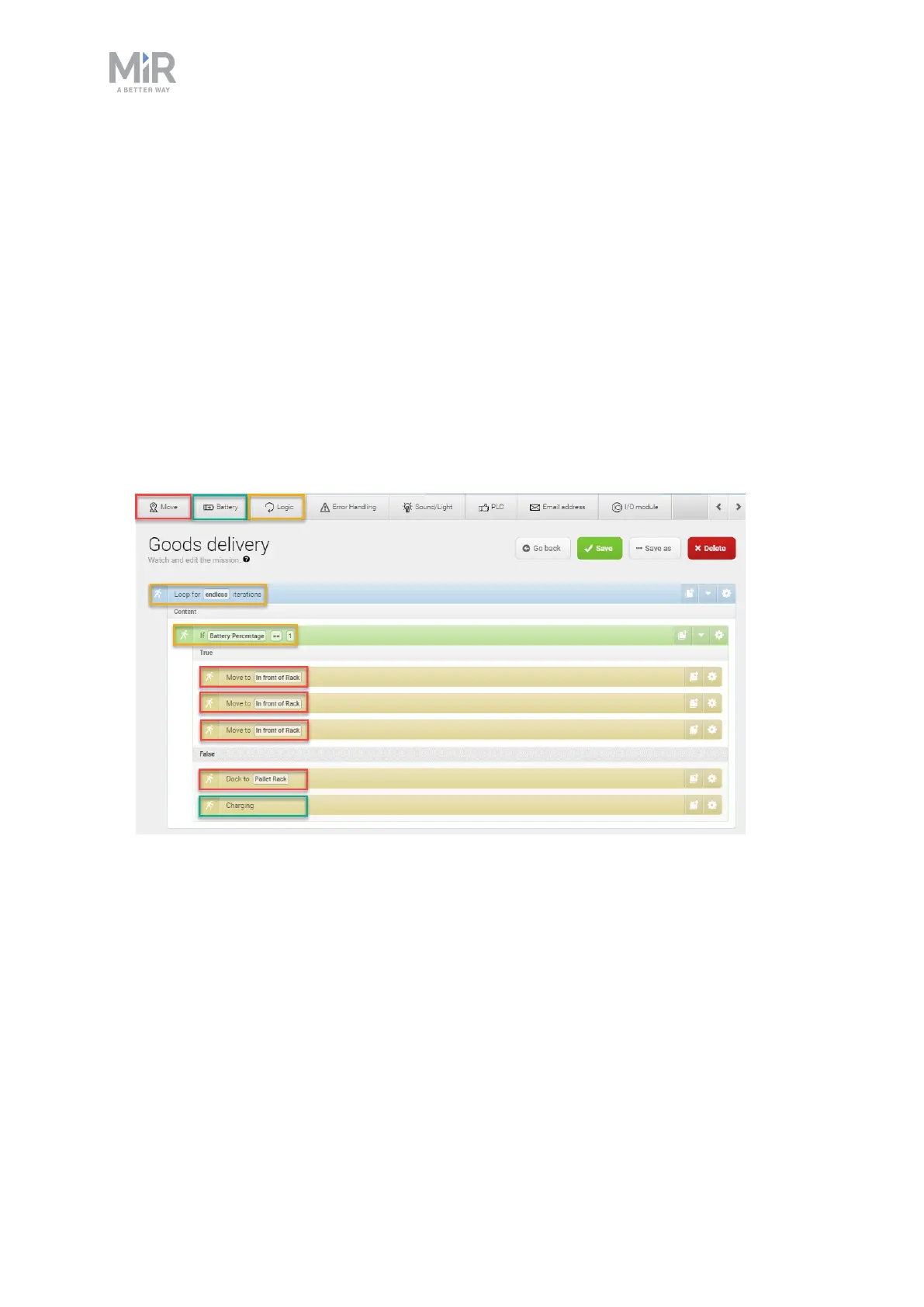
2. Within the Create mission window complete the following steps to add the necessary
actions:
1. In the Logic menu, select Loop.
2. Select the gray bar that reads Content to embed the next action into the Logic
action.
3. In the Logic menu, select If.
4. Select the gray bar that reads True to embed the next actions into the If action.
5. In the Move menu, select Move three times.
6. Select the gray bar that reads False to embed the next actions into the If action.
7. In the Move menu, select Move.
8. In the Battery menu, select Charging.
The mission should look like this:
The next steps describe how to define the parameters of the If action, and where the
robot should move when the If action is True or False. To set the parameters of each
action, open the action dialog by selecting the gearwheel icon of the action in question.


 To Next Page