MIRAGE SYSTEMS
3
Installing
the
Cypres
processing
unit
(Also see the Cypres installation manual)
For installation! the processing unit is placed into a
specially bolstered and labeled nylon pocket which is
pre"installed in every Mirage reserve container#
Excess cable is stowed in the flat part of the pocket
underneath the velcro"adjustable flap# If you have to
stow both the thinner EOS cable and the thicker cable
to the control unit! be sure to place the thicker cable so
that it lies on top of the thinner one# [Fig# $]
Installing
the
EOS
and
Cypres
Control
Unit
Feed the EOS and control unit through the opening
and up the built in channel in the reserve pack tray#
The EOS cable is routed through the small slit on the
%& closing flap and into the Cypres channel# Secure the
EOS using the elastic keeper# Insert the control unit
into the control unit transparent pouch in the backpad#
[Fig# ']
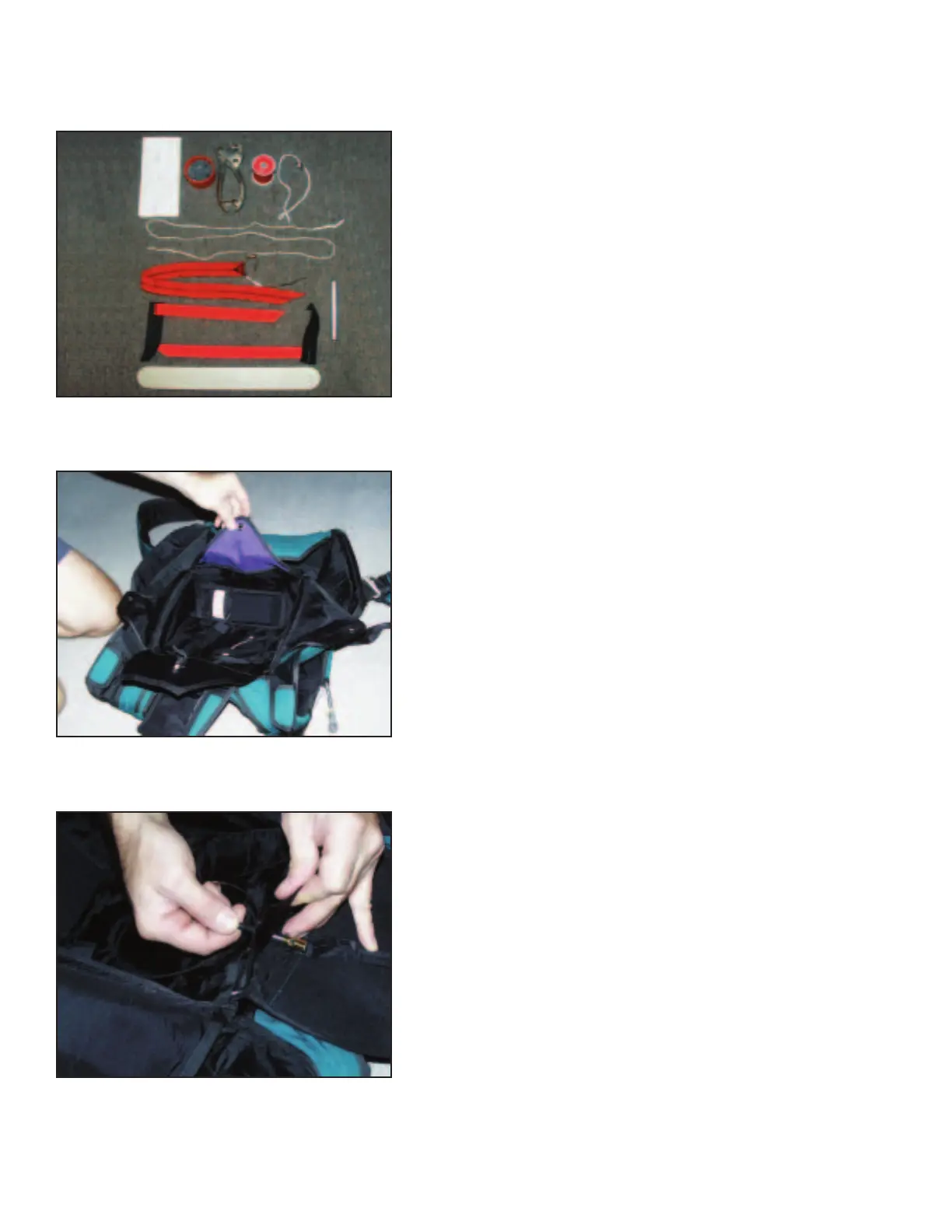
TOOL
LIST
&# Complete Mirage packing data card
$# Lead seal! press! and thread
'# Cypres loop! washer! and silicone
(# Long pull up cord
)# Temporary pin
*# Temporary pile velcro tabs
+# Leverage Bar or Packing Paddle [Fig# &]
Helpful Hint: Count and keep track of your tools!
Packing the Reserve Container
Fig# &
Fig# $
Fig# '


 To Next Page