Page 2 of 4 Flip Connect Hosted VoIP – Mitel 5320(e) IP Phone Quick User Guide www.flipconnect.co.uk/support/userguides
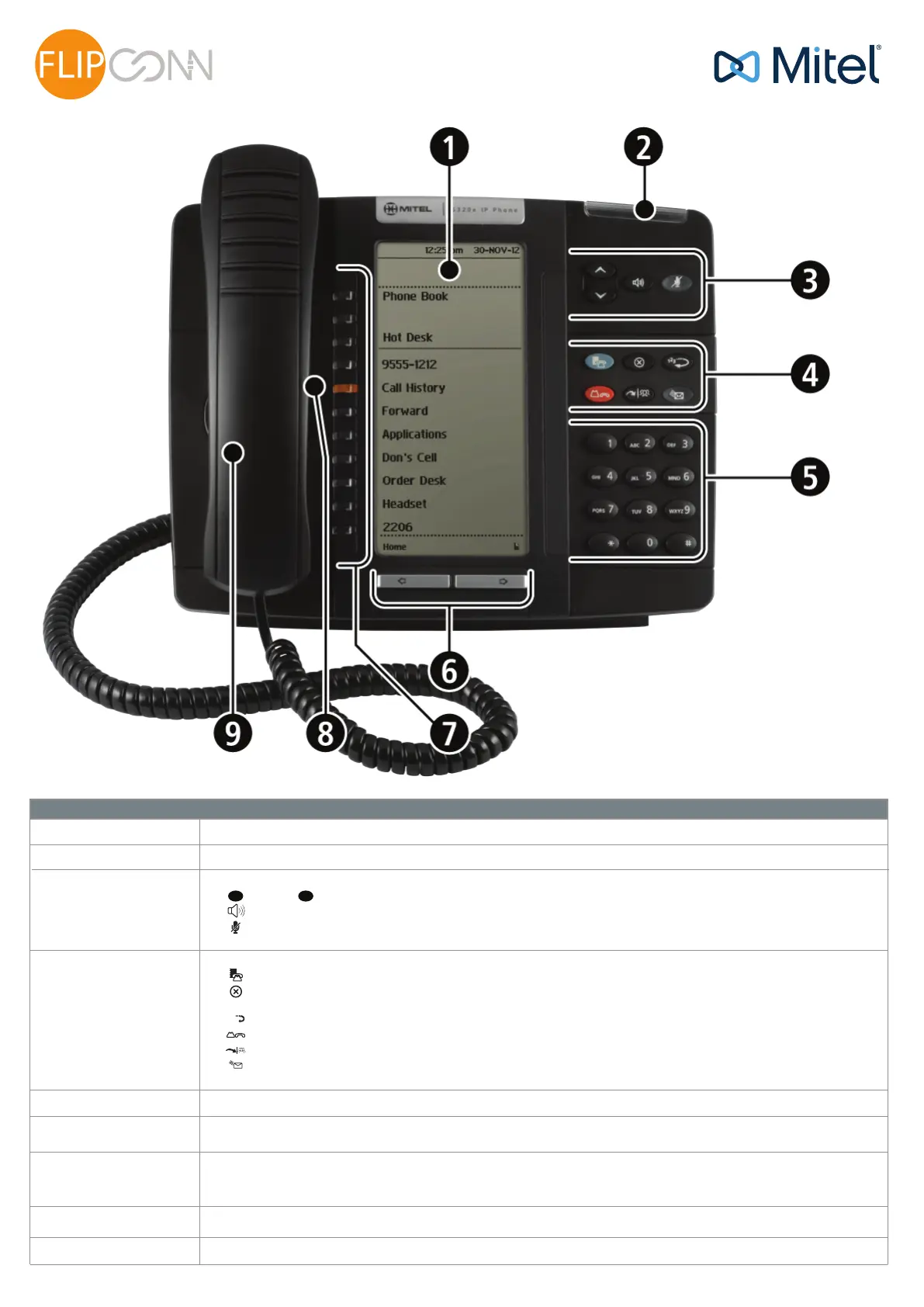
Elements of your phone
1) Display
Provides a large, high-resolution viewing area that assists you in selecting and using phone features.
-
+
2) Ring/Message Indicator
Flashes to signal an incoming call and to indicate a message waiting in your voice mailbox.
3) Volume, Speaker
and Mute Controls
Provides the following audio control capability:
- (UP) and (DOWN) provide volume control for the ringer, handset, and handsfree speakers.
- (SPEAKER) enables and disables Handsfree mode.
- (MUTE) enables Mute, which allows you to temporarily turn your phone's handset, headset or handsfree
microphone off during a call.
4) Fixed Function Keys
5) Keypad
Use to dial.
6) Navigation Page Keys
Use to display additional pages of information for certain applications. The 5320e has two page navigation keys: Back and
Next.
7) Programmable
Feature Keys and Softkeys
Provides 7 self-labeling keys that can be programmed as speed call keys, fixed function keys, hard keys, applications, or
line appearance keys, according to your communication needs. On your home page, the bottom left feature key is always
your Prime Line key. The top three keys are softkeys.
8) Handsfree Speaker
Provides sound for Handsfree calls and background music.
9) Handset
Use for handset calls. If you are in headset or handsfree mode, you do not need to use the handset.
<
<
1 3
2
Gives you access to the following phone functions:
- (MENU): provides access to menus for your phone's applications and settings.
- (CANCEL): ends a call when pressed during the call, and, when you are programming the phone, eliminates any
input and returns to the previous menu level.
- (REDIAL): calls the last number dialed.
- (HOLD): places the current call on hold.
- (TRANS/CONF): initiates a call transfer or establishes a three-party conference call.
- (MESSAGE): provides access to your voice mailbox and flashes to notify you of messages waiting in your voice
mailbox. Note: The Ring/Message indicator also flashes when messages are waiting.
Mitel 5320(e) IP Phone
Quick User Guide
ECT
Better . Connected
TM



 To Next Page