5624 Wireless Handset User Guide
Hot Keys
Any key "0", "2" - "9" can be set to a hot key. A long press on any of these numbers in stand
by mode provides a short cut to the Call contact list. The list is in alphabetic order. Which key
you press depends on where the contact appears in the list.
A hot key can be programmed to give access to frequently used functions such as dialing a
specific handset number, a short cut on the menu, or sending an SMS.
Multifunction Button
This button can be used as a short cut to functions and has long and double press modes as
defined by the user of the handset. If the button is defined, it can be used in standby mode only.
Volume Button
The two buttons on the upper left side of the handset are used for increasing/decreasing the
earpiece, headset, and loudspeaker volume.
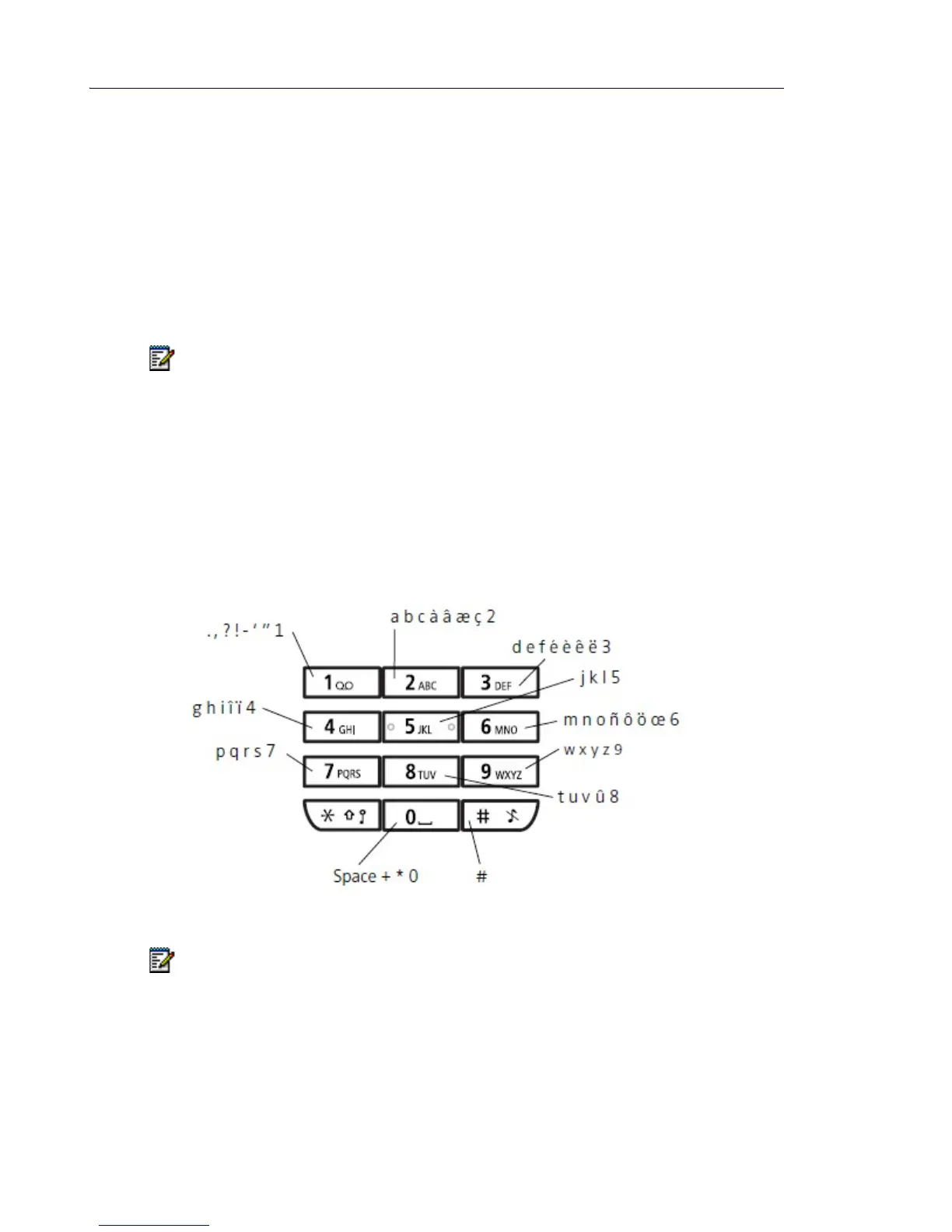
Alphanumeric Keys
Figure 5: Available Characters
Note: This feature does not apply to the 5624 Personal Alarm license.
Note: Depending on the selected menu language, other characters can be available.
This means that the character order can differ from the table above.



 To Next Page