5MiVoice MX-ONE – Mitel 6730/6731
English
Mitel 6730/6731
Quick Reference Guide
Display screen
The screen comprises three information lines.
9
10
11
13
14
15
17
16
12
18
19
18
1
3
5
6
7
8
20
2
4
21
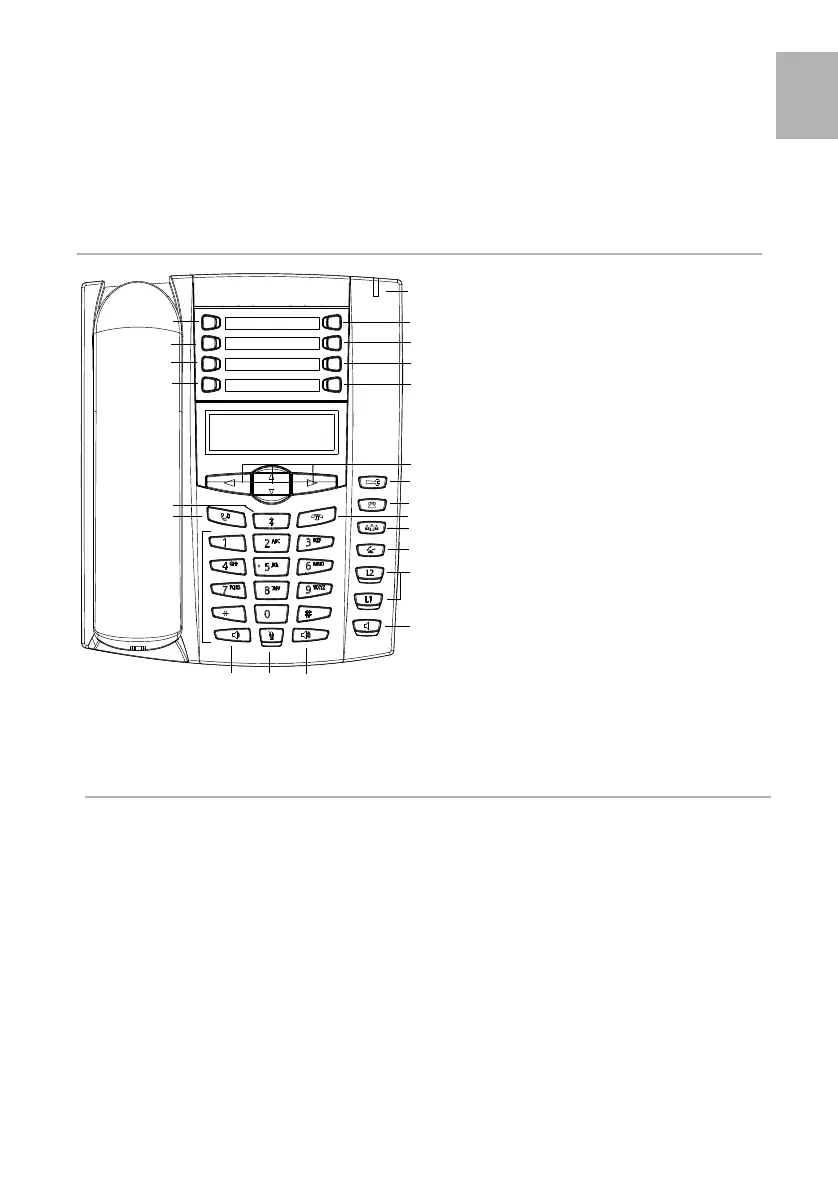
This Quick Reference Guide includes short descriptions
on how to use the basic features of the IP phone Mitel
6730/6731 when used with a MX-ONE system. More
features and technical requirements are available in the
User Guide.
The complete User Guide is available in electronic format
on www.mitel.com
Read the safety instructions before use!
1 LogOn/LogOff key
2 Message Waiting
3Diversion
4Shortcut key
5 Save contact
6 Delete contact
7 Local- or Corporate directory
8Services
9Nvigation keys
10 Options
11 Callers list
12 Clear call key
13 Transfer
14 Line keys
15 Loudspeaker key
16 Outgoing calls list
17 Hold/Unhold
18 Decrease / increase volume
19 Mute
20 Message waiting lamp
21 Conference
In idle The screen displays:
- The extension number
- E.g. the user name, number of missed
incoming calls, personal number
profile, absence or diversion.
- The date and time
During a
call
The screen displays:
- The correspondent’s name and/or
number
- An icon showing the call status
- The time since the start of the call
In the
menus
In the options menus, in the local
directory, lists and during
programming, the screen guides the
user in his or her choices and settings.
6731_QRG_MX-ONE.book Page 5 Wednesday, November 15, 2017 7:51 PM



 To Next Page