NuPoint Voicemail
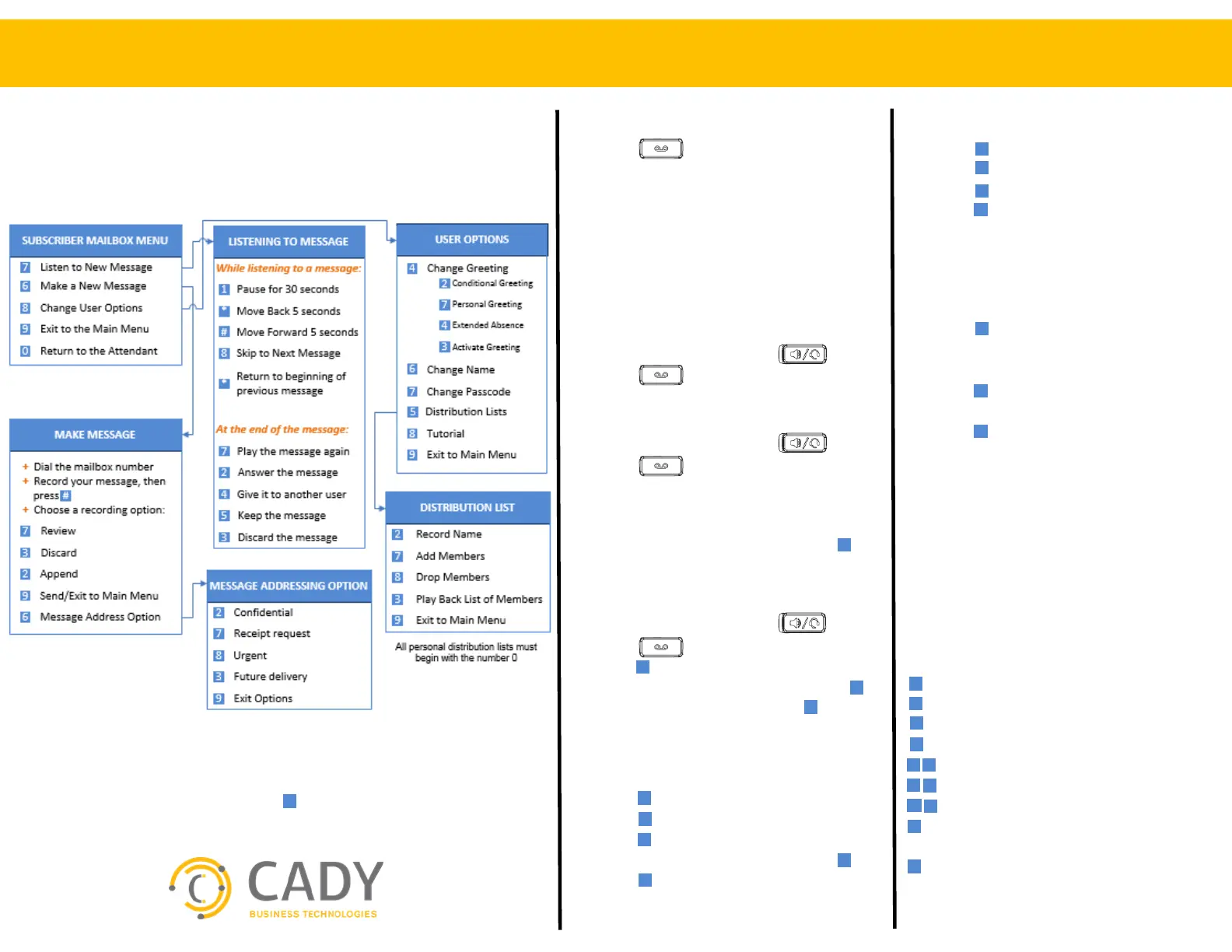
Voicemail Flowchart
SETTING UP YOUR MAILBOX
+ Press the voicemail key
+ Enter temporary passcode 1111
The voicemail system tutorial will walk
you through setting up your mailbox, i.e.:
+ Change passcode
+ Record personal greeting
+ Record name
ACCESSING YOUR MAILBOX
When the message waiting light is on
+ Lift the handset or press
+ Press the voicemail key
+ Enter passcode
When the message waiting light is off
+ Lift the handset or press
+ Press the voicemail key
+ Enter passcode
Outside of office
+ Dial your direct line or main number
+ When voicemail answers, press
+ Enter passcode
RECORD PERSONAL GREETING
+ Access your mailbox
+ Press for User Options
+ Press to change your greeting
+ Press to record your greeting
+ Record your greeting then press
+ Press to save your greeting
When you hear “Greeting Saved” your active
greeting is confirmed.
WHILE LISTENING TO A MESSAGE
+ Press to pause for 30 seconds
+ Press to move back 5 seconds
+ Press to move forward 5 seconds
+ Press to skip to the next message
FORWARD A COPY OF A
MESSAGE TO ANOTHER MAILBOX
After listening to a message
+ Press to give the message
+ Enter mailbox number to give the
message to
+ Press to record a greeting that will
be sent with the message
+ Press to send the recording and exit
to the main menu.
SAMPLE GREETING
Hello, you have reached the voice
mailbox for _____. I’m not available to
take your call, please leave your name,
number and a brief message. I’ll return
your call as soon as possible.
SHORTCUTS
While listening to a message
- Rewinds in 5 sec increments
- Fast forward in 5 sec increments
- Pause
- Resume
- Skip to the next message
- Skip back to the previous message
- Replay the time stamp
- Skips personal greeting to begin
recording immediately
- Send the recording
You can undelete a message by pressing immediately after deleting the message.
You will be unable to recover the deleted message after you disconnect the call
Quick Reference Guide
From another desk
+ Lift the handset or press
+ Press the voicemail key
+ Press when prompted for a passcode
+ Enter mailbox number then press
+ When greeting starts, press
+ Enter passcode


 To Previous Page
 Loading...











