22
System Set Up
5
en
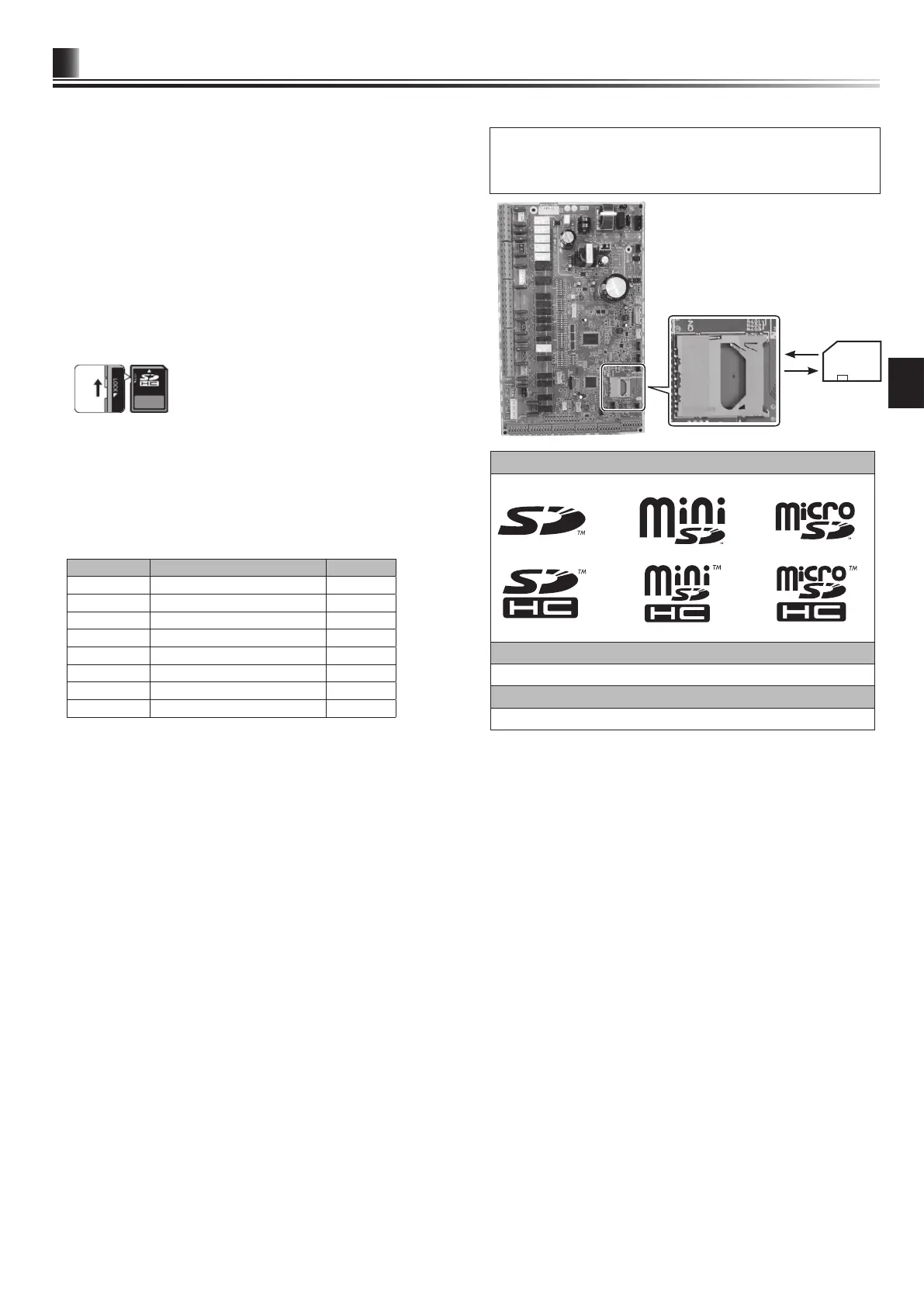
(a) For insertion, push on the SD memory card until it clicks into place.
(b) For ejection, push on the SD memory card until it clicks.
Note: To avoid cutting ngers, do not touch sharp edges of the SD
memory card connector (CN108) on the FTC control board.
Logos
Capacities
2 GB to 32 GB *2
SD speed classes
All
• The SD Logo is a trademark of SD-3C, LLC.
The miniSD logo is a trademark of SD-3C, LLC.
The microSD logo is a trademark of SD-3C, LLC.
*2 A 2-GB SD memory card stores up to 30 days of operation logs.
5.5 Using SD memory card
The hydrobox is equipped with an SD memory card interface in FTC.
Using an SD memory card can simplify main remote controller settings and can
store operating logs. *1
*1 To edit main remote controller settings or to check operating data, an Ecodan
service tool (for use with PC) is required.
<Handling precautions>
(1) Use an SD memory card that complies with the SD standards. Check that the
SD memory card has a logo on it of those shown to the right.
(2) SD memory cards to the SD standards include SD, SDHC, miniSD, micro SD,
and microSDHC memory cards. The capacities are available up to 32 GB.
Choose that with a maximum allowable temperature of 55ºC.
(3) When the SD memory card is a miniSD, miniSDHC, microSD, or micro SDHC
memory card, use an SD memory card converter adapter.
(4) Before writing to the SD memory card, release the write-protect switch.
(5) Before inserting or ejecting an SD memory card, make sure to power off the
system. If an SD memory card is inserted or ejected with the system powered
on, the stored data could be corrupted or the SD memory card be damaged.
*An SD memory card is live for a short duration after the system is powered off.
Before insertion or ejection wait until the LED lamps on the FTC control board
are all off.
(6) The read and write operations have been veried using the following SD mem-
ory cards, however, these operations are not always guaranteed as the speci-
cations of these SD memory cards could change.
Manufacturer Model Tested in
Verbatim #44015 Mar. 2012
SanDisk SDSDB-002G-B35 Oct. 2011
Panasonic RP-SDP04GE1K Oct. 2011
Arvato 2GB PS8032 TSB 24nm MLC Jun. 2012
Arvato 2GB PS8035 TSB A19nm MLC Jul. 2014
SanDisk SDSDUN-008G-G46 Oct. 2016
Verbatim #43961 Oct. 2016
Verbatim #44018 Oct. 2016
Before using a new SD memory card (including the card that comes with the
unit), always check that the SD memory card can be safely read and written to
by the FTC controller.
<How to check read and write operations>
a) Check for correct wiring of power supply to the system. For more
details, refer to section 4.4.
(Do not power on the system at this point.)
b) Insert an SD memory card.
c) Power on the system.
d) The LED4 lamp lights if the read and write operations are successfully
completed. If the LED4 lamp continues blinking or does not light, the SD
memory card cannot be read or written to by the FTC controller.
(7) Make sure to follow the instruction and the requirement of the SD memory
card’s manufacturer.
(8) Format the SD memory card if determined unreadable in step (6). This could
make it readable.
Download an SD card formatter from the following site.
SD Association homepage: https://www.sdcard.org/home/
(9) FTC supports FAT le system but not NTFS le system.
(10) Mitsubishi Electric is not liable for any damages, in whole or in part, including
failure of writing to an SD memory card, and corruption and loss of the saved
data, or the like. Back up saved data as necessary.
(11) Do not touch any electronic parts on the FTC control board when inserting or
ejecting an SD memory card, or else the control board could fail.
(a)
(b)



 To Next Page