EasyManua.ls Logo

Mitsubishi PAR-21MAA - User Manual

Mitsubishi PAR-21MAA
2 pages
Print Icon
To Next Page IconTo Next Page
Loading...
Display
10
11
12
13
14
15
16
17
18
19
20
21
PAR-21MAA
User Guide
Operation Buttons
1
2
3
4
5
6
7
8
9
ON/OFF - Switches between run and stop.
The light flashes when a malfunction occurs.
OPERATION MODE SWITCHING -
Switches between Cool / Dry / Auto / Fan / Heat
Operation modes vary depending on the air conditioning system.
Auto mode is dependant on model.
TEMPERATURE SETTING -
Sets the room temperature: Range of temperature setting:
Cool / Dry: 19ºC-30ºC / Heat: 17ºC-28ºC / Auto: 19ºC-28ºC
FAN SPEED SETTING -
Models with 4 airflow speed settings: Hi / Mid-2 / Mid-1 / Low
Models with 3 airflow speed settings: Hi / Mid / Low
Models with 2 airflow speed settings: Hi / Low
AIR FLOW DIRECTION SETTING -
Air flow direction angles 100% - 80% - 60% - 40%, Swing,
Louver ON/OFF. Air flow direction setting buttons vary
depending on the model.
TIMER SELECTION BUTTON -
Switches between: Daily timer, weekly timer and auto off timer
(30 minutes to 4 hours).
This is the Lossnay interlock button.
This sets the current time, timer start and stop times.
This resets the Filter service indication display.
4
1
9
7
5
8
2
3
11
16
12
14
18
17
10
20
15
21
13
PAR-21MAA
ERROR -
When an error is occurring on an air conditioner unit,
the affected unit and the error code are displayed. Phone number
may also be displayed for maintenance purposes.
This lamp lights during operation, goes off when the unit
stops and flashes when a malfunction occurs.
FILTER DISPLAY -
Indicates that it is time to clean the filter.
INDOOR UNIT INTAKE TEMPERATURE -
Measures the intake temperature of the indoor unit when
the indoor unit is operating.
OPERATION MODE - Displays the operation mode.
TIMERS - Displays the current time and timer set times.
This displays the air direction.
The selected fan speed is displayed.
This displays the selected temperature.
This lamp lights when electricity is supplied to the unit.
SENSOR DISPLAY -
Displayed when the remote controller sensor is used.
This displays the time and the day.
19
6
Question and Answer IconNeed help?

Do you have a question about the Mitsubishi PAR-21MAA and is the answer not in the manual?

Summary

Remote Control Operation Buttons

Power and Mode Controls

Controls for turning the unit on/off and switching between operating modes like Cool, Dry, Auto, and Fan.

Temperature and Fan Speed Settings

Buttons to adjust the desired room temperature and select fan speed from multiple levels.

Airflow and Timer Functions

Settings for air flow direction, louvers, and various timer options for operation scheduling.

System and Maintenance Buttons

Buttons for Lossnay interlock, setting time, and resetting the filter service indication.

Remote Control Display Indicators

Error and Status Indicators

Displays error codes, unit status, and malfunction alerts, along with power supply status.

Operational Information Displays

Shows current operation mode, indoor temperature, selected fan speed, and air direction.

Timer and Sensor Information

Indicates timer settings, current time, day, and displays sensor usage.

Filter Maintenance Reminder

An indicator light that signals when it is time to clean the air filter.

Overview

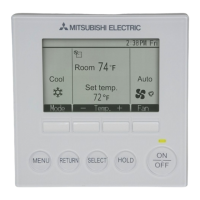
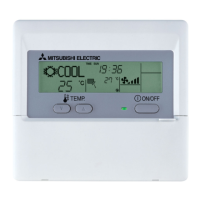
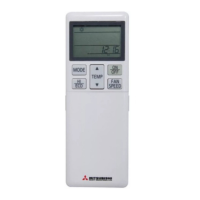
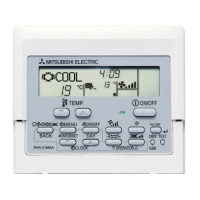
The PAR-21MAA is a user-friendly remote controller designed for Mitsubishi Electric air conditioning systems, offering comprehensive control and monitoring capabilities. It serves as the primary interface for managing various aspects of your indoor climate, ensuring comfort and efficiency.

Function Description:

The core function of the PAR-21MAA is to provide a centralized control point for your air conditioning unit. It allows users to switch the unit on and off, select different operation modes, adjust temperature settings, control fan speed, and manage airflow direction. Beyond basic control, it incorporates advanced features such as timer functions, error display, and maintenance indicators, making it a versatile tool for climate management.

Usage Features:

The PAR-21MAA is designed for intuitive use, with clearly labeled buttons and a comprehensive display.

Operation Buttons:

  • ON/OFF (1): This button serves as the main power switch for the air conditioning unit. Pressing it toggles the unit between run and stop states. A flashing light on the display indicates a malfunction, prompting the user to investigate further.
  • OPERATION MODE SWITCHING (2): This button allows users to cycle through various operation modes, including Cool, Dry, Auto, Fan, and Heat. The available modes may vary depending on the specific air conditioning system connected to the controller. The "Auto" mode's functionality is also model-dependent, typically adjusting settings automatically to maintain a comfortable environment.
  • TEMPERATURE SETTING (3): These up and down arrow buttons enable precise adjustment of the desired room temperature. The temperature setting range is typically 19°C-30°C for Cool/Dry modes, 17°C-28°C for Heat mode, and 19°C-28°C for Auto mode, providing flexibility for different comfort preferences.
  • FAN SPEED SETTING (4): This button controls the fan's intensity. Depending on the air conditioning model, there can be 2, 3, or 4 airflow speed settings (e.g., Hi, Mid-2, Mid-1, Low; Hi, Mid, Low; or Hi, Low). This allows users to customize airflow for optimal comfort and noise levels.
  • AIR FLOW DIRECTION SETTING (5): This button adjusts the angle of the air flow. Users can select from various fixed angles (e.g., 100%, 80%, 60%, 40%), activate a "Swing" function for continuous air movement, or toggle the "Louver ON/OFF." The specific air flow direction setting buttons available will depend on the model of the air conditioning unit.
  • TIMER SELECTION BUTTON (6): This button provides access to various timer functions, enhancing energy efficiency and convenience. Users can choose between a Daily timer, a Weekly timer, or an Auto Off timer, which can be set for durations ranging from 30 minutes to 4 hours. This allows for automated operation based on daily routines or specific needs.
  • Lossnay Interlock Button (7): This dedicated button is used for interlocking with a Lossnay ventilation system, if present, allowing for integrated control of both air conditioning and ventilation.
  • Time Setting Buttons (8): These buttons are used to set the current time, as well as the start and stop times for any active timers. This ensures accurate scheduling of air conditioning operation.
  • Filter Reset Button (9): This button is used to reset the filter service indication display after the filter has been cleaned or replaced.

Display Features:

The PAR-21MAA features a clear LCD display that provides real-time information about the air conditioning system's status and settings.

  • ERROR (10): In the event of a malfunction, this section of the display will show the affected air conditioner unit and an error code. For maintenance purposes, a phone number may also be displayed, facilitating quick contact with service personnel.
  • Operation Indicator (11): This lamp illuminates during normal operation. It turns off when the unit stops and flashes when a malfunction occurs, providing a quick visual cue of the system's status.
  • FILTER DISPLAY (12): This icon indicates when it is time to clean the air filter, prompting timely maintenance to ensure optimal performance and air quality.
  • INDOOR UNIT INTAKE TEMPERATURE (13): This display shows the temperature of the air being drawn into the indoor unit while it is operating, offering insight into the current indoor conditions.
  • OPERATION MODE (14): This section clearly displays the currently selected operation mode (e.g., Cool, Heat, Fan).
  • TIMERS (15): This area shows the current time and any set timer times, allowing users to monitor their scheduled operations.
  • Air Direction Indicator (16): This graphic displays the current air direction setting, providing visual confirmation of the airflow pattern.
  • Fan Speed Display (17): This section indicates the selected fan speed (e.g., Hi, Mid, Low).
  • Selected Temperature Display (18): This prominently displays the temperature that has been set by the user.
  • Power Supply Indicator (19): This lamp illuminates when electricity is supplied to the unit, confirming that the controller is powered.
  • SENSOR DISPLAY (20): This is displayed when the remote controller's built-in sensor is being used to monitor room temperature, offering an alternative to the indoor unit's sensor.
  • Time and Day Display (21): This section shows the current time and day of the week, providing complete temporal information.

Maintenance Features:

The PAR-21MAA incorporates features designed to facilitate easy maintenance and ensure the longevity of your air conditioning system.

  • Filter Display (12): The "FILTER" icon serves as a crucial reminder for filter cleaning. Regular cleaning of the air filter is essential for maintaining good indoor air quality, preventing reduced airflow, and ensuring the efficient operation of the unit.
  • Filter Reset Button (9): After cleaning or replacing the filter, the dedicated reset button allows users to clear the filter service indication, ensuring that the system accurately tracks the next maintenance interval.
  • Error Display (10): The detailed error codes displayed on the controller are invaluable for troubleshooting. They help identify specific issues, allowing users or service technicians to address problems quickly and effectively, minimizing downtime and potential damage to the unit. The display of a phone number for maintenance further streamlines the process of obtaining professional assistance.
  • Operation Indicator (11): A flashing operation lamp immediately signals a malfunction, drawing attention to a potential issue that requires investigation. This proactive alert helps prevent minor problems from escalating into more significant repairs.

In summary, the PAR-21MAA remote controller is a comprehensive and user-friendly interface for Mitsubishi Electric air conditioning systems. It provides intuitive control over various operational parameters, offers detailed status information through its display, and incorporates practical maintenance features to ensure efficient, reliable, and comfortable indoor climate management.

Mitsubishi PAR-21MAA Specifications

General IconGeneral
DisplayLCD
Battery Quantity2
Temperature Setting Range16°C - 30°C
CompatibilityMitsubishi Electric air conditioners
FunctionsTemperature control, mode selection, fan speed, timer

Related product manuals