
 Need help?
Do you have a question about the Mitsubishi PAR-20MAA and is the answer not in the manual?
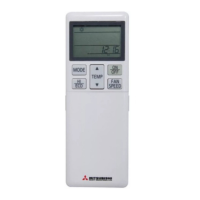
Sets room temperature in 1°C intervals. Cooling 19-30°C, Heating 17-28°C.
Switches between continuous or timer operation.
Switches between cooling, dry, automatic, and heating modes.
Switches between operation and stop modes. Indicator lamp lights during operation.
Sets the ventilation fan speed.
Sets current time, start time, and stop time.
Indicates a unit malfunction requiring check.
Lights during operation, off when stopped, flashes on malfunction.
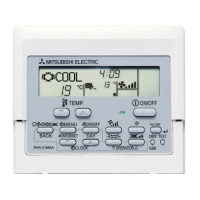
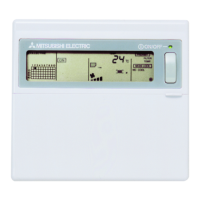
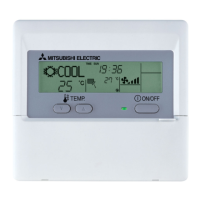
The PAR-20MAA is a remote controller designed for Mitsubishi Electric air conditioning systems, offering comprehensive control over various operational aspects of the indoor unit. This user guide outlines its functions, usage features, and maintenance indicators, ensuring efficient and comfortable climate management.
The PAR-20MAA remote controller serves as the primary interface for users to interact with their Mitsubishi Electric air conditioning system. Its core function is to allow precise adjustment of room temperature, operational modes, fan speed, and timer settings. The controller facilitates switching between continuous and timer-based operation, providing flexibility in how the air conditioning unit functions throughout the day. Users can select from various modes, including cooling, heating, dry (dehumidify), and automatic, to suit their comfort preferences and environmental conditions.
A key feature is the ability to set the desired room temperature within specific ranges: 19°C to 30°C for cooling and 17°C to 28°C for heating, with adjustments possible in 1°C intervals. This granular control ensures that the indoor environment can be tailored to individual comfort levels. The controller also manages the airflow direction by allowing users to switch the louvre motion on and off and adjust the angle of the air flow. This helps in distributing conditioned air effectively throughout the room, preventing drafts or concentrating airflow where needed.
For systems equipped with Lossnay units, an interlock button is provided, indicating integration with ventilation systems. The controller also includes a timer set function, enabling users to program the current time, as well as start and stop times for the air conditioning unit. This feature is particularly useful for energy saving and ensuring comfort at specific times without manual intervention.
The display on the remote controller provides crucial feedback to the user. It shows the selected temperature, current time, start time, and stop time, which can be viewed in ten-second intervals. The display also indicates the operation mode, fan speed, and air direction. Furthermore, it provides status updates such as when continuous operation or timer operation modes are set, and displays the time remaining for timer operations.
The PAR-20MAA is designed for intuitive use, with clearly labeled buttons and a comprehensive display. The ON/OFF button is central to operation, allowing users to easily switch the unit on or off. When the unit is operating, a lamp on this button illuminates, providing a visual cue of its active status.
Mode selection is straightforward, with a dedicated button to cycle through cooling, dry, automatic, and heating modes. For temperature adjustments, up and down arrow buttons allow users to increase or decrease the set temperature. The fan speed can be adjusted using a specific button, offering control over the intensity of air circulation. The louvre motion can be toggled on or off, and the airflow direction can be fine-tuned to optimize comfort.
The timer function is a significant usage feature, allowing users to pre-program the unit's operation. By setting start and stop times, the air conditioning system can automatically turn on before arrival or turn off after departure, enhancing convenience and energy efficiency. The display shows the programmed times, ensuring users are aware of the scheduled operations.
The controller also provides visual indicators for various operational states. For instance, a standby symbol appears when the heating operation starts until the heated air begins to blow, giving users an expectation of when warmth will be felt. Similarly, an indicator lights up when defrost operation is performed, informing users about the unit's internal processes.
In the event of a malfunction, the controller displays an error code and flashes a lamp, alerting the user to an issue that requires attention. This diagnostic capability is crucial for prompt troubleshooting and maintenance. The temperature of the suction air is also displayed during operation, providing real-time information about the air being drawn into the unit. This display flashes if the actual temperature is outside the normal operating range (less than 8°C or greater than 39°C), indicating extreme conditions.
The PAR-20MAA remote controller incorporates several features that assist with the maintenance of the air conditioning system. A key maintenance indicator is the filter service indication display. When the filter needs cleaning, a specific lamp on the controller lights up, prompting the user to perform this essential maintenance task. After cleaning the filter, there is a dedicated button to reset this service indication, ensuring that the system accurately tracks the filter's usage. Regular filter cleaning is vital for maintaining air quality and the efficiency of the air conditioning unit.
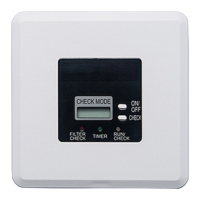
The controller's ability to display error codes is a critical maintenance feature. When a malfunction occurs, an error code is shown, and an indicator lamp flashes. This immediate notification allows users or service technicians to quickly identify the nature of the problem, facilitating faster diagnosis and repair. The "CHECK TEST" button, along with the "CHECK MODE" and "TEST RUN" indicators, suggests that the controller can be used for diagnostic checks and test runs, which are invaluable for maintenance and troubleshooting by qualified personnel.
Furthermore, the controller provides information about the unit's operational status that can indirectly aid maintenance. For example, the display of the suction air temperature helps in monitoring the unit's performance. If this temperature consistently falls outside the normal range and flashes, it could indicate an underlying issue with the unit's sensors or cooling/heating capabilities, warranting further investigation.
The overall design of the PAR-20MAA, with its clear indicators and diagnostic capabilities, aims to empower users with the information needed to ensure their air conditioning system operates efficiently and reliably, while also providing crucial alerts for timely maintenance interventions.
 General
| Compatibility | Mitsubishi Air Conditioners |
|---|---|
| Features | Backlit LCD |
| Operating Modes | Cool, Heat, Auto, Dry, Fan |
| Fan Speed Control | Low, Medium, High |
| Temperature Setting Range | 19°C to 30°C |
| Remote Control Technology | Wired |
| Type | Wired Remote Controller |
| Battery Type | Not applicable |
| Number of Batteries | Not applicable |


 To Next Page