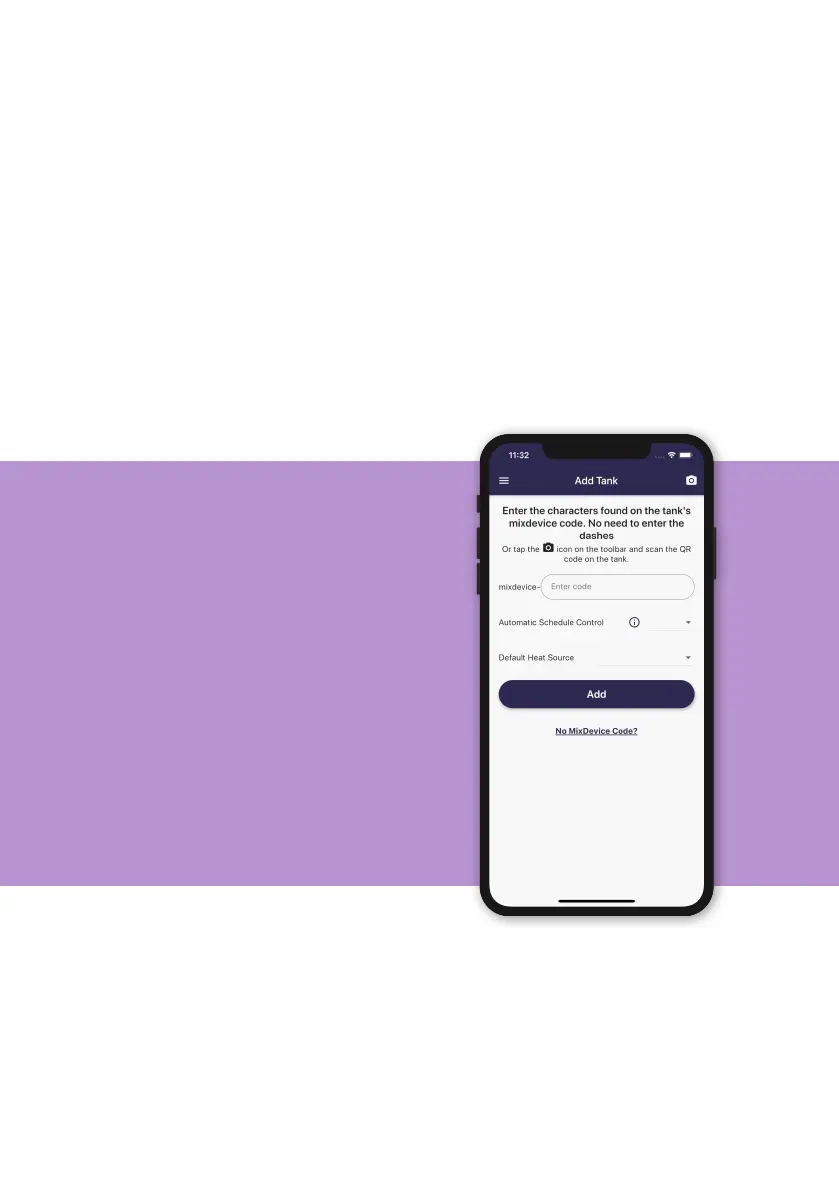
Registering your tank to your account
After logging in for the rst time, you will be asked to register your tank to your
account.
On your tank, there will be a label containing a mixdevice code which is a
25-character identier unique to your tank (please note: this is not the MX
number shown on the same label!).
Enter this code into the App. Alternatively, scan the QR Code (only available in
iOS) on the label on your tank to save typing in this code.
On this screen, you may choose whether you’d like to manually schedule your
tank (you choose when it heats, and how much), or you can select the option
for Automatic Schedule Control (our machine learning algorithm will optimise
your schedule to save on energy and money).
• If set to O, your schedule will not
be adjusted (i.e. you must manually
schedule your tank).
• If set to Standard, your tank will be
conservative in its scheduling, aiming
to save some money whilst minimising
the chance that you’ll run out of hot
water.
• If set to Economy, your tank will
optimise its schedule to maximise
savings. This comes with an increased
risk that you may run out of hot water
if your household uses more than
estimated.
11


 To Next Page