View your hot water level
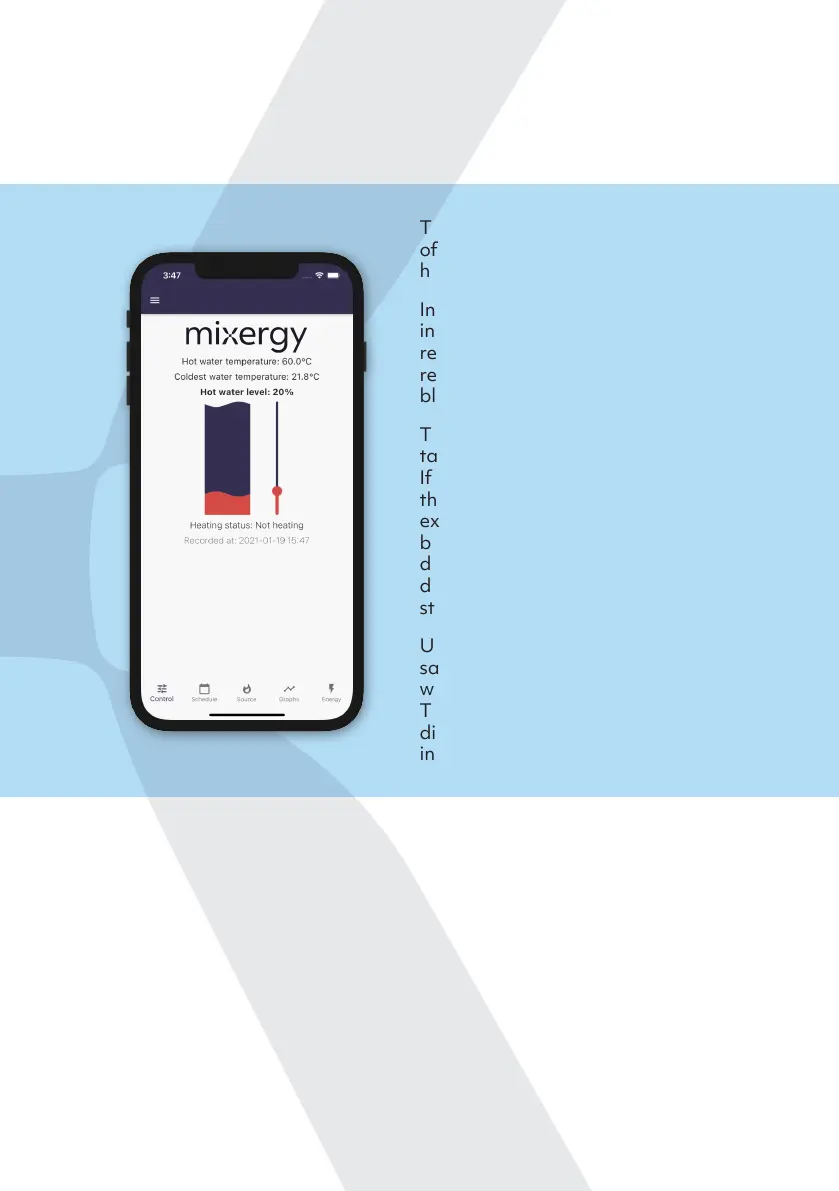
The home screen shows the current heating status of your tank, and how much
water is available.
The Hot Water Level is the percentage
of the water in the tank that is usable
hot water.
In this example, 20% of the water
in the tank is usable hot water (the
red portion of the graph) and the
remaining 80% is considered cold (the
blue portion of the graph).
The Heating Status tells you if the
tank is currently heating or not.
If it is heating, it will state where
the instruction has come from. For
example, whether it’s in response to a
boost (from the internet or gauge), or
due to a user dened heating schedule,
demand side response, or a water
sterilisation cycle.
Underneath the Heating Status it will
say what time the water measurements
were last received by Mixergy servers.
This information can be useful when
diagnosing internet connection issues
in the home.
Boosting your tank
To boost your tank to heat more water, drag the slider on the right up with
your nger to the desired level and let go. The green portion of the graph
represents the level your tank is heating to, and the heating status below will
change. As the tank heats up, the red portion will climb until the target hot
water level is reached.
To cancel a boost made from the App, click Cancel Boost.
12


 To Next Page