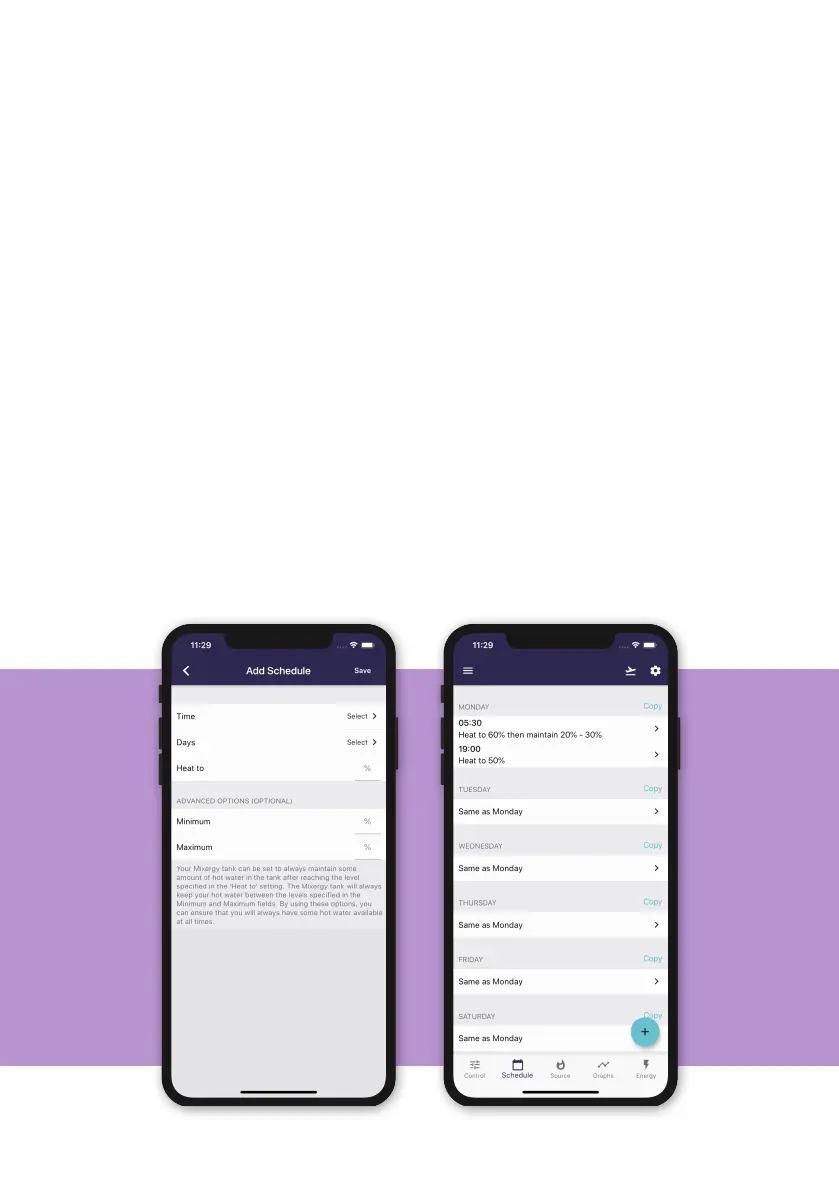
Setting a manual heating schedule
Click on the Schedule tab at the bottom of the page and press the + button to
set when and how much you want your tank to heat. Click Save to view your
new schedule.
You can set a dierent schedule for each day, or copy the same schedule over
to several days. You can also set the tank to maintain between a minimum
and maximum level – this means that if the hot water level falls below the
minimum hot water level, the tank will automatically turn back on again until
the maximum level is reached. If no maintain parameter is set, the usable hot
water will naturally cool o, unless it is rst used by a draw event.
For example, a schedule can be set every week day to heat in the morning at
06:00 up to 80%, and then again at 18:00 to 40%. The initial heat to 80% in
the morning should provide enough water to cover all morning showers, with
a second boost in the evening in anticipation for another shower or bath for
example.
On the weekends, it could be that everyone is expected to be in the house all
day and likely to be using hot water at dierent times. Therefore a schedule
can be set to heat at 08:00 to 70%, and then a maintain parameter is set to
ensure between 15-25% usable hot water is always available throughout the
rest of the day.
13


 To Next Page