8
Trimmer Functions
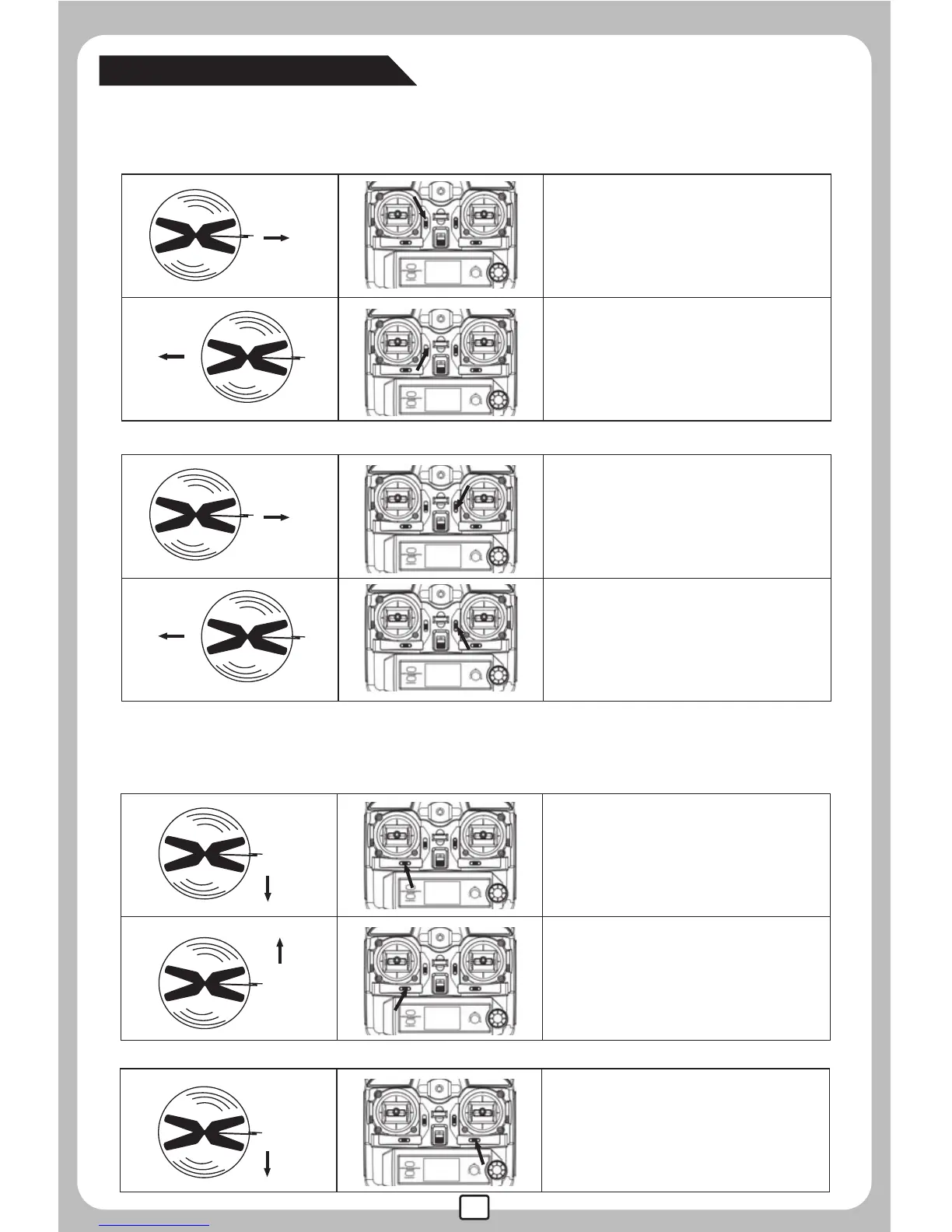
If the helicopter keeps moving forward/backward even there is no control
signal given, users may adjust the elevator trim to keep the helicopter balanced.
STICK MOD 1 or 2:
If the helicopter keeps moving
leftward, turn right of Trimmer C
until it gains balance.
STICK MOD 1 or 3:
If the helicopter keeps moving
backward, push up Trimmer A
until it gains balance.
If the helicopter keeps moving
forward, push down Trimmer A
until it gains balance.
STICK MOD 2 or 4:
If the helicopter keeps moving
backward, push up Trimmer D
until it gains balance.
If the helicopter keeps moving
forward, push down Trimmer D
until it gains balance.
If the helicopter keeps moving leftward/rightward even there is no control
signal given, users may adjust the aileron trim to keep the helicopter balanced.
STICK MOD 3 or 4:
If the helicopter keeps moving
leftward, turn right of Trimmer B
until it gains balance.
If the helicopter keeps moving
righttward, turn left of Trimmer B
until it gains balance.


 To Next Page