motherboard, it is best to unplug the touchscreen connector.
5.2 Multiple language Settings
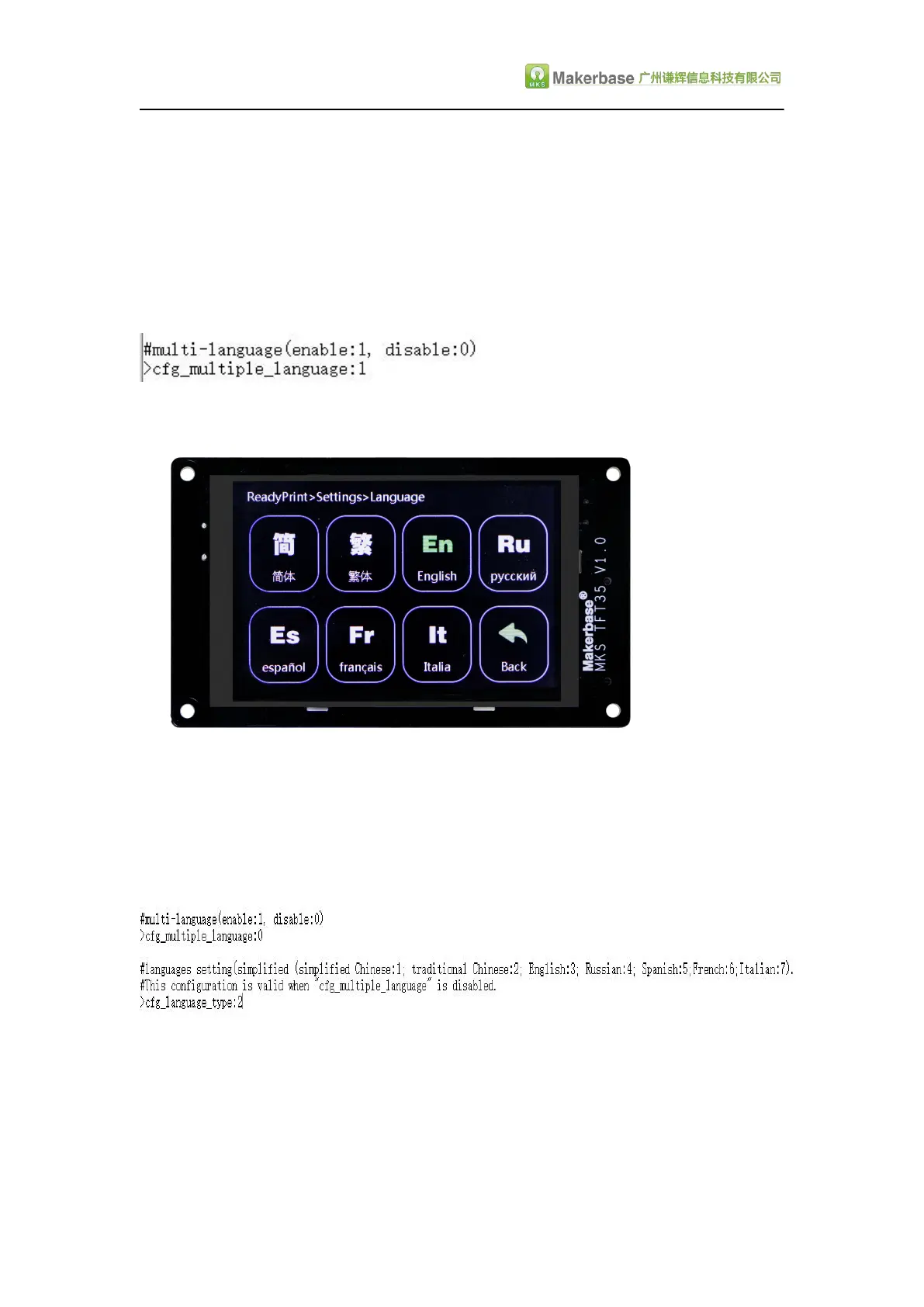
Currently, languages can support 7 national languages, 1: Simplified Chinese, 2:
Traditional Chinese, 3: English; 4: Russian; 5: Spanish, 6: French, 7: Italian.
1.The language switch mode is configured to 1 , can switch 7 languages at will in
setting the "Language option.The following figure:
2.If the user does not like the factory default font, you can configure the language
switch to 0 (the first step), which requires the second step to set the title language
(the font of the title can only be default and 7), but the default icon will not display
text below. You need to customize the icon and text to personalize the icon and font
(that is, text and icons in the same frame, custom methods refer to the following
steps: TFT touch screen user interface settings)
5.3 Automatic Leveling and Manual leveling
1.Equipped with a leveling device can be selected in the configuration file automatic
leveling (the position of the arrow is configured to 1), in the Touch screen settings
interface can be adjusted leveling.Attention:For motherboards using the smoothie


 To Next Page