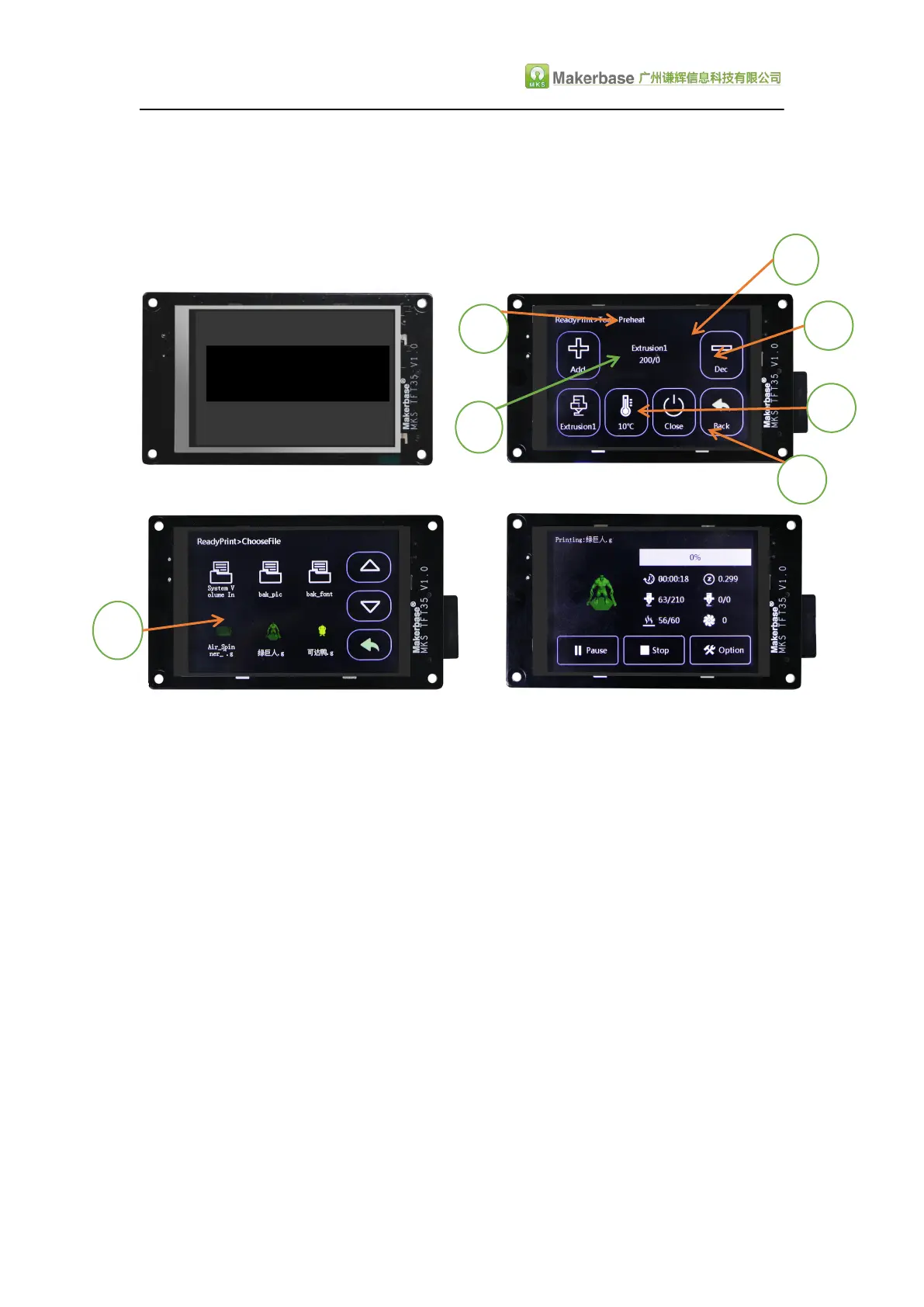
C. Title text color (see figure "2" below);
D. Status bar background color and font color (see figure "3" below);
E. file directory button background color and font color (see figure below "4");
F. Universal button Background color and text color (see figure below "5");
G. Status button background color and font color (see figure "6" below);
H. " Returns the key background color and font color (see figure "7" below);
I. Select the button background color and font color (see figure "8" below);
J. dialog box button background color and font color (see figure "9" below);
2. Custom boot logo picture, 16DPP, wide =480 pixel, high =320 pixel;
3. Customized button picture, 16DPP, wide =117 pixel, high =140 pixel;
4. The customized picture name must be in accordance with the appendix name;
5. Custom color value is 16, in accordance with 3 primary colors blue, green, red
order;
6. Customize the "More" menu function button, can be customized up to 7 function
buttons;
Steps
1.1 Preparation Tools
IMG2LCD software (cracked version of no watermark, ask customer
service to obtain)
corresponding to the. bmp suffix name of the picture, pixels to
correspond, do not know the pixel, please see above.
You can ask the customer to obtain the key source AI file to make two
modifications.


 To Next Page