• The n1 and n2 indicate the number of dots of the bit image in the
horizontal
direction. The number of dots is calculated by n1 + n2
×
256.
• If the bit-image data input exceeds the number of dots to be printed on a
line, the excess data is ignored.
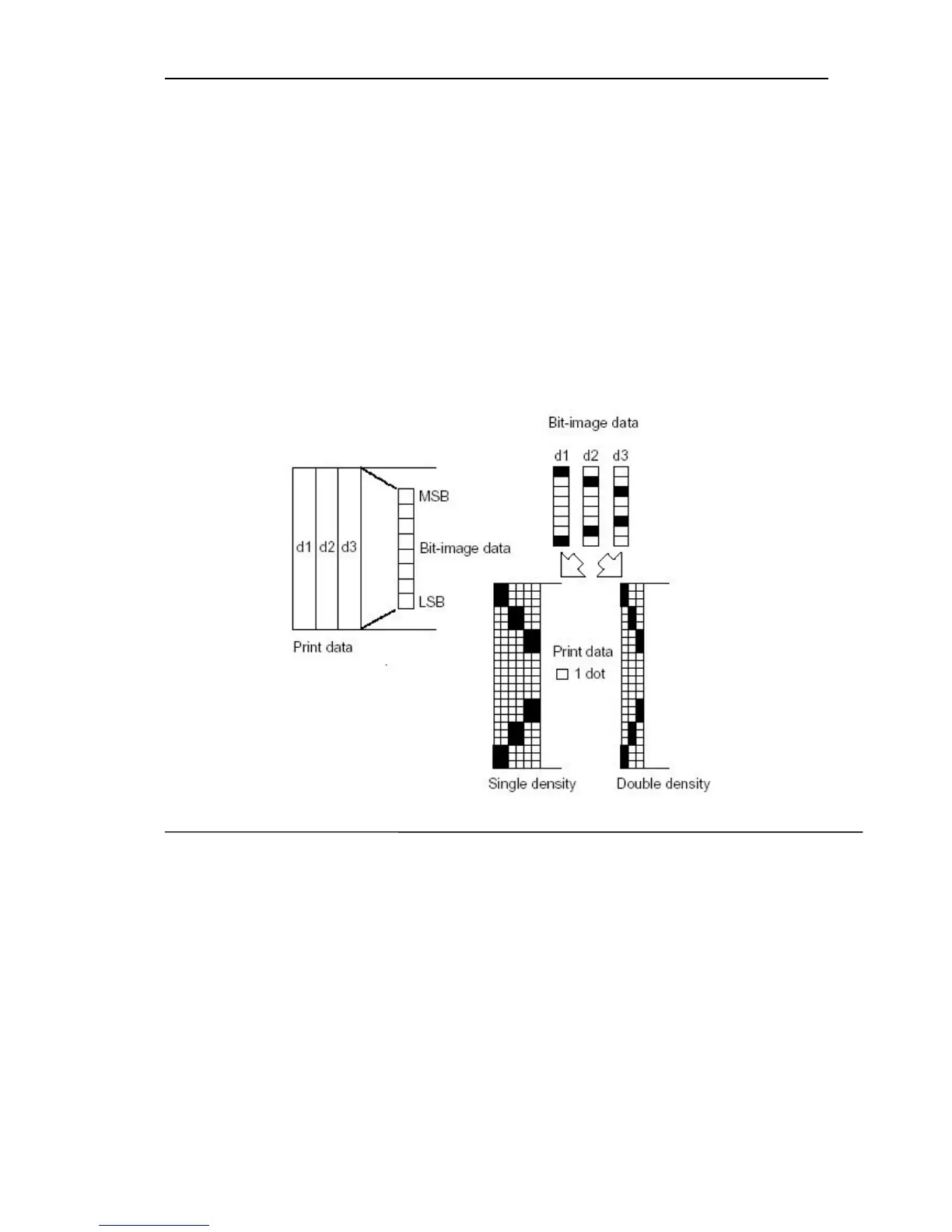
• d indicates the bit-image data. Set a corresponding bit to 1 to print a dot
or to 0 to not print a dot.
• After printing a bit image, the printer returns to normal data processing
mode.
• The relationship between the image data and the dots to be printed is as
follows:
• When 8-dot bit image is selected:
4.4.2 FS P n
[Name]
:
Print downloaded bit-image
[Format]: ASCII FS P n
Hexadecimal 1C 50 n
Decimal 28 80 n
[Description]: Prints a downloaded bit-image using the mode specified by
n.
N is the serial number of downloaded bit-image. 0≤n≤9.
The width of the bit-image is ≤ 384, height ≤1024.
[Notice]:
• This command is ignored if a downloaded bit image has not been defined.
• This command is only effective for monochrome bit-image.
• This command has no effect in the print modes (emphasized,



 To Next Page