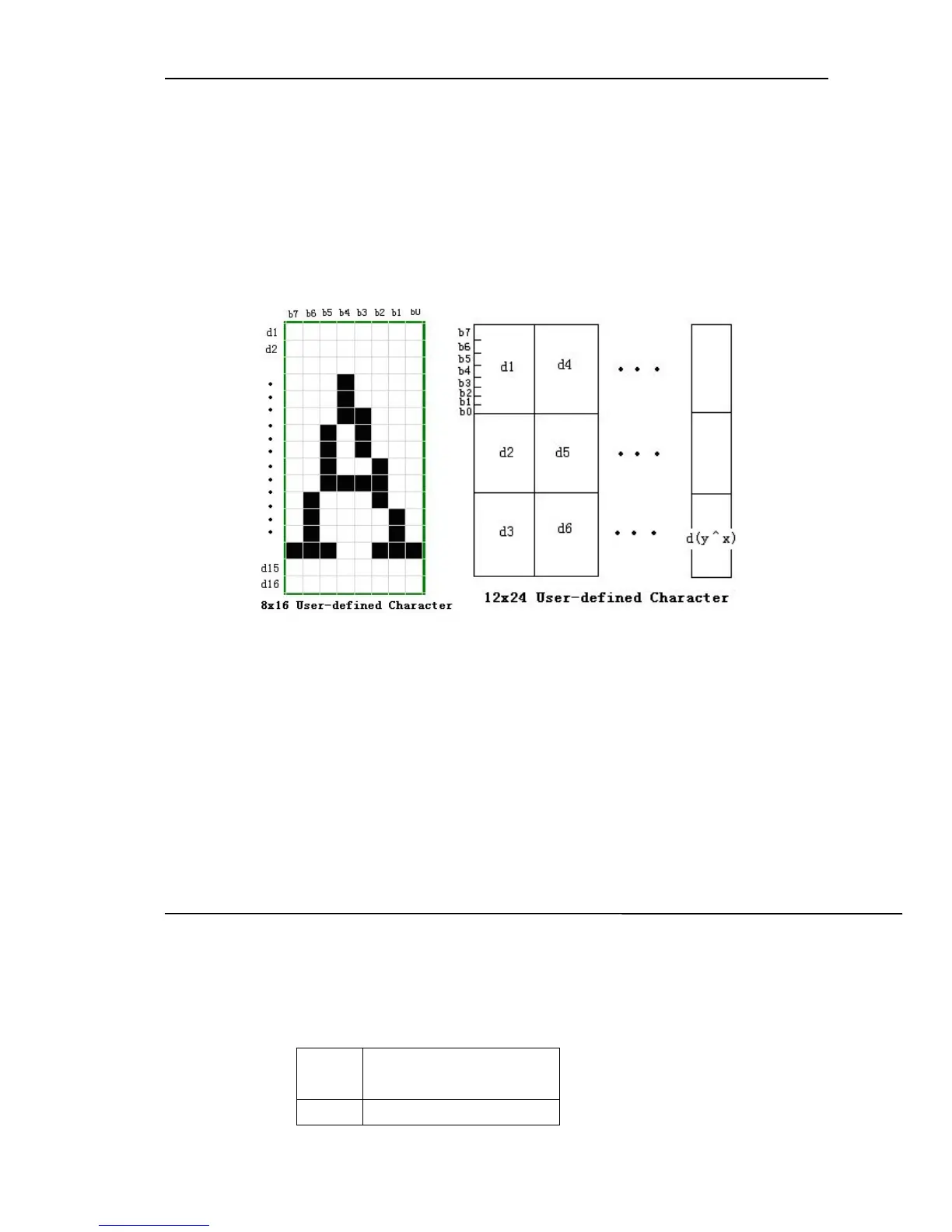
• x specify the vertical byte number, when define the characters of font A,
x≤12; when define the characters of font B, x≤8
• k=c2-c1+1
[Notice] • The code range of defined character: from <20>H to <7E>H.
• Can define the continuous codes for several characters. When only one
character is needed, c1 = c2.
• d is the dot data of the character.
Please refer to the following:
• Defining the data of user-defined character is (y × x) bytes.
• Setting the printing dot’s corresponding bit is 1 or non-printing dot’s one
is 0.
• The user-defined characters will be deleted in the following situation:
1. Carry out ESC @.
2. Printer reset or power turn off.
[Default] Built-in character set.
[Reference]: ESC %.
4.7. Set Chinese Character Rotation Printing
4.7.1 FS I
[Name]: Set Chinese character rotation printing
[Format]: ASCII FS I n
Hexadecimal 1C 49 n
Decimal 28 73 n
[Description]: Select/ cancel character rotation printing mode
n Chinese character
clockwise rotation
0 0
o



 To Next Page