15
MOBIUSTRIMMER.COM
OPERATION PREP
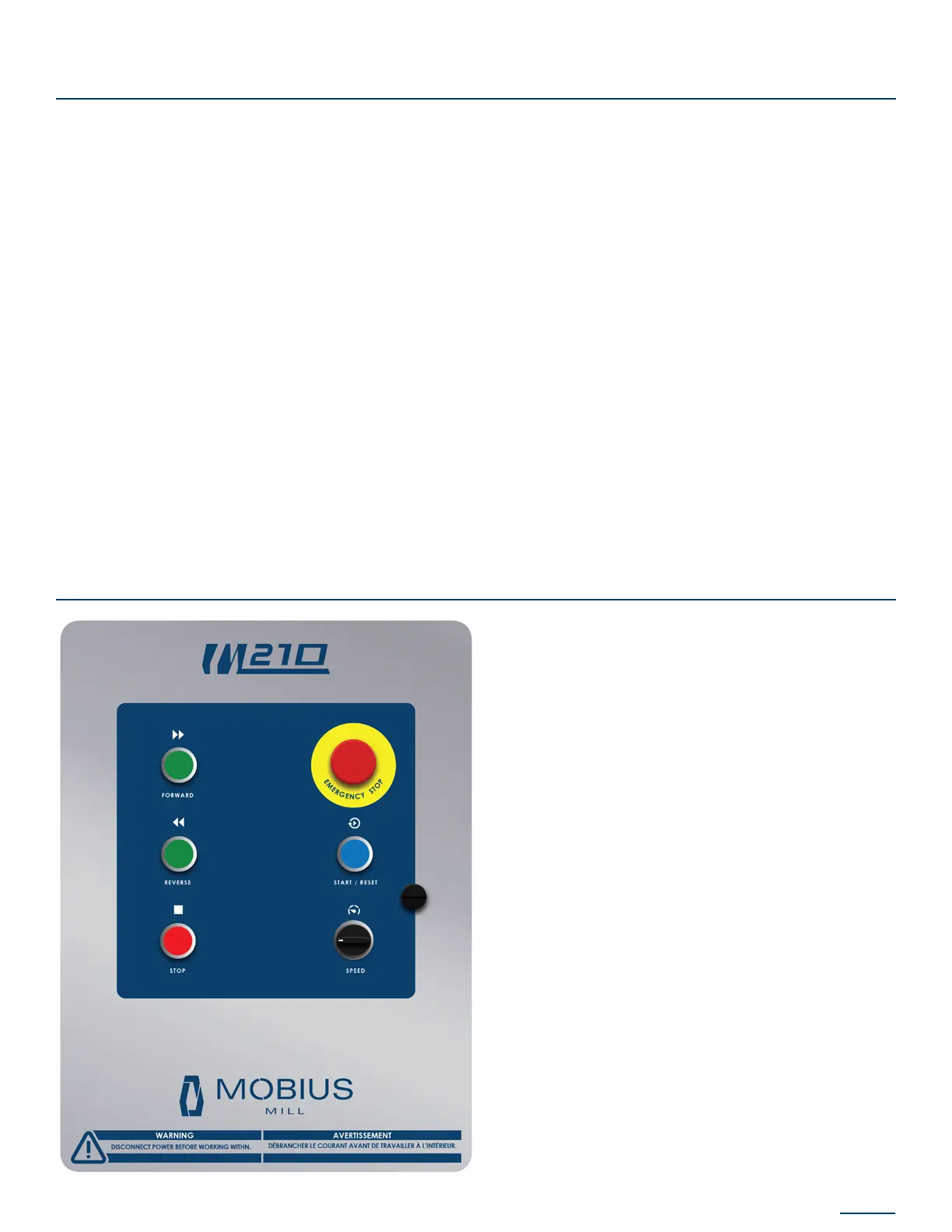
CONTROL PANEL OVERVIEW
Please take the following steps to conrm the MOBIUS M210 MILL is ready to operate:
• Ensure that your Mobius M210 MILL has been congured for the appropriate voltage (see p.12)
• Complete a thorough inspection of the equipment to ensure no damage occurred during
shipment
• Conrm the power cord is in good condition
• Ensure the rotor is properly installed with the spring-pin latch in place
• Ensure the milling screen is properly installed and located in the retention grooves
• Ensure the door is properly shut and secured
• Ensure the upper hopper is installed and in good working condition
• Ensure all guarding is properly installed and is in good working condition
• Ensure that the equipment is in a clear and tidy workspace and that all controls are accessible
and visible.
E-STOP - Emergency stop button – stops all moving
parts on the device.
START/RESET – Energizes the electrical panel and
safety circuit. Note: This button will be illuminated
when in operation.
FORWARD – Initiates rotor in a clockwise direction.
REVERSE - Initiates rotor in a counterclockwise
direction.
STOP – Stops rotor. Note: The rotor MUST be
stopped prior to toggling between forward and
reverse direction.
SPEED – Turn dial to adjust speed to desired rate.


 To Next Page