OPERATING MANUAL STEAM SYSTEM
www.modbar.com Document 003-0042-1.1| Software Version 2.0
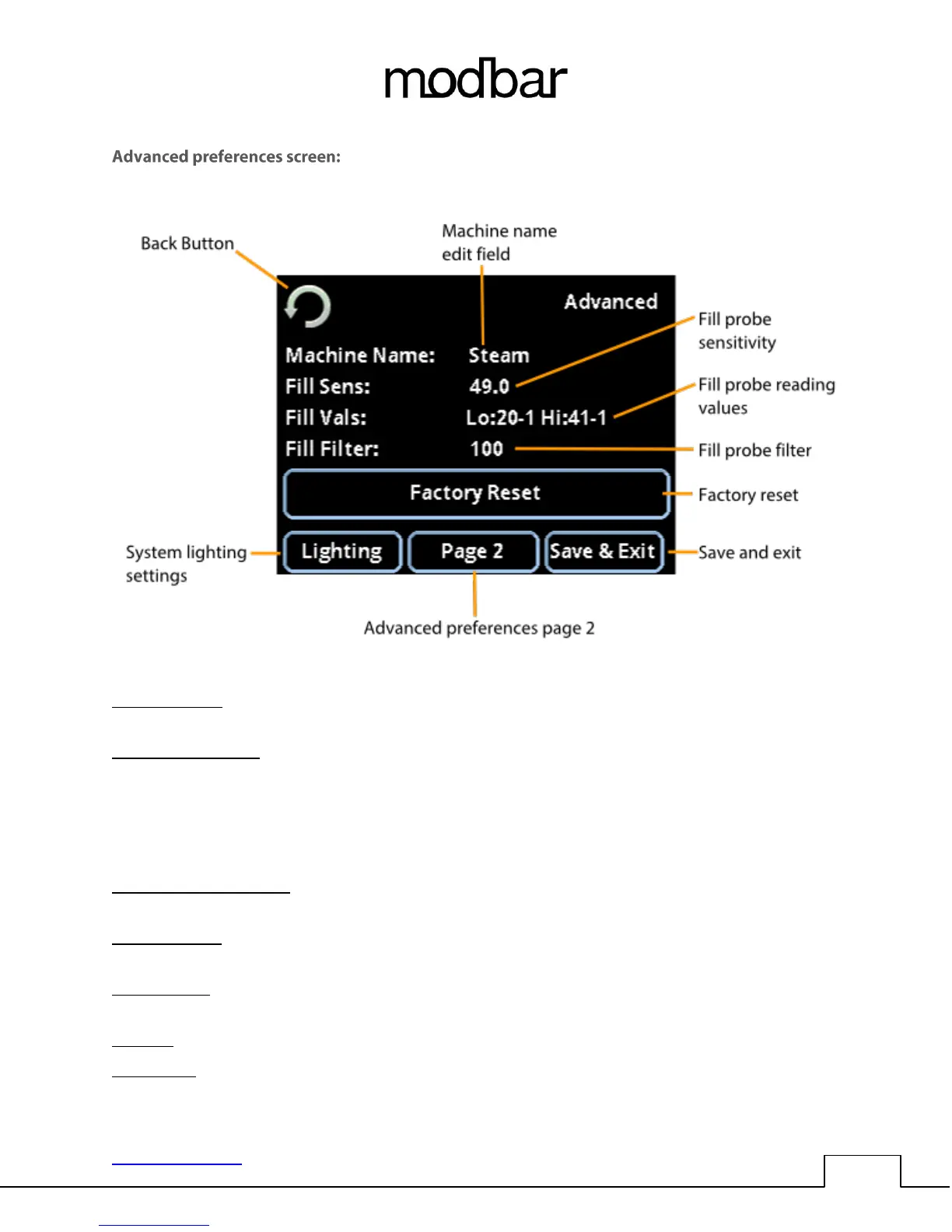
home -> main settings -> preferences -> advanced
Machine name: This is a descriptive name for the module, touch the name to highlight the field, use the
encoder wheel and push-button to rename the machine if desired.
Fill probe sensitivity: This setting is used to adjust the sensitivity of the fill level probe. Increasing the
value will make the probe more sensitive, while decreasing the value will make the probe less sensitive.
While it may be necessary to change the sensitivity value for water with very low tds levels, the need to
adjust this setting is usually indicative of another issue, such as scale deposits on the probe or probe
fitting. This setting should be used as a stopgap measure to maintain functional filling operation of the
system until there is time to perform a detailed diagnosis and/or descaling procedure.
Fill probe reading values: This field displays the current reading from the fill probe, from 0-99% of its
range of reading.
Fill probe filter: This setting is used to average a number of samples from the fill probe to avoid false
readings. The setting shown is averaging 100 samples.
Factory reset: This will return all of the system settings to their original factory values. A confirmation
screen is presented to confirm the operation of Factory Reset.
Lighting: This button navigates to the lighting settings screen.
Save & Exit: You guessed it! This button saves the settings changes and exits the current screen.



 To Next Page