18
English
OFF
C D -114 / BT
1 2 3 4 5
6 7 8 9 0
CD/CARD
MEMORY
C D -114 / BT
ON
POWER
SD CARD
AUX IN
USB
FOLDER
LOW
HIGH
SPEED
SINGLE
A > B
PLAY/
NOR
REP/
RAN
PREV
NEXT
MODE
SKIP
PROG
STOP/
EJ
9
8
7
1311
12
10
14 14
BT ANT
RS-232
ON
OFF
AUTOPLAY
L
R
OUTPUT
24 V
230V~/
50Hz
FUSE
1
3
5
2
4
6
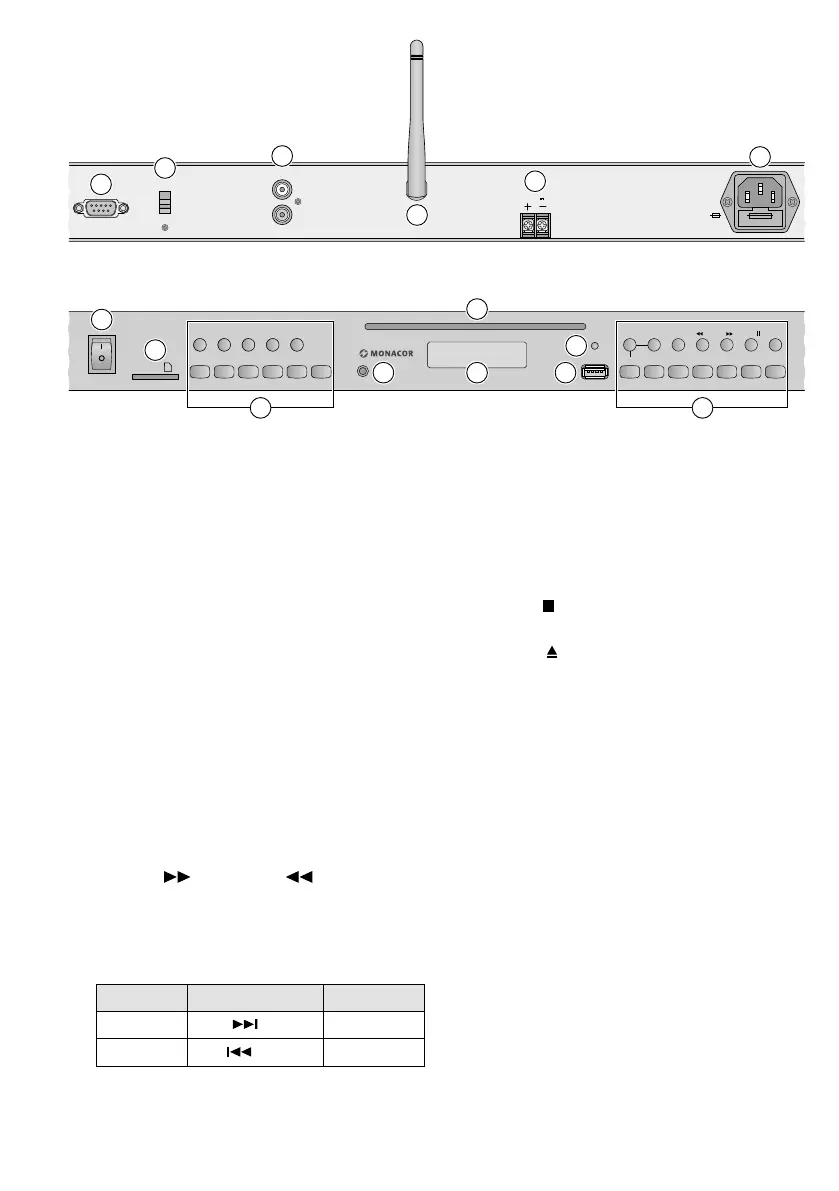
Front panel
Rear panel
3.1 Control buttons
15 Buttons for changing the speed (and thus
the pitch):
LOW to reduce the speed step by step
HIGH to increase the speed step by step
NOR to return to normal speed
16 Button for programming a title sequence
17
Button for switching on /off the replay mode
SINGLE ONE (
SG1
)
18 Button for selecting the replay mode:
– basic setting: All titles are played once one
after the other.
– repeat of the title (
R-1
)
– repeat of the folder (
R-F
)
– repeat of all titles (
R-A
)
– repeat of all titles in random order (
RAN
)
19
Buttons (next) and (previous) for
selecting folders
20
Buttons for selecting titles (press button
briefly) and for fast forward / reverse (keep
button pressed)
Player Remote control Direction
NEXT F.WD
forward
PREV REV.
reverse
21 Button to start and pause the replay
22 Button STOP / EJ on the player:
– for CD, USB storage device, SD card:
to stop the replay
– for CD mode only:
to eject the CD in stop mode
Buttons on the remote control:
a STOP for CD, USB storage device, SD
card: to stop the replay
b EJECT for CD mode: to stop the replay
and to eject the CD in stop mode
23 Button to play a loop
24
Button to switch between the operating
modes “CD”, “USB storage device”, “SD
card” and “Bluetooth“
25
Buttons for selecting titles and for saving
and calling up titles when the hot key func-
tion has been activated
26
Button to activiate / deactivate the hot key
function
27 Button to set the player to standby and to
switch it on again from standby
28
Button for speeding up the title selection
after entering the title number and as a
confirmation button while programming a
title sequence
29 Mute button to mute /unmute the sound
30 Buttons to set the volume


 To Next Page
 Loading...