26
English
6 Control via RS-232 Interface
Via the RS-232 interface, the player can be con
-
trolled from a computer by means of a terminal
program designed for this purpose. Setting up
the RS-232 control connection requires suitable
technical knowledge.
Communication between the computer and the
player is established via UART connection. The
following parameters apply:
Baud rate 19200 Bd
Start bit 1
Data bits 8
Stop bit 1
Parity none
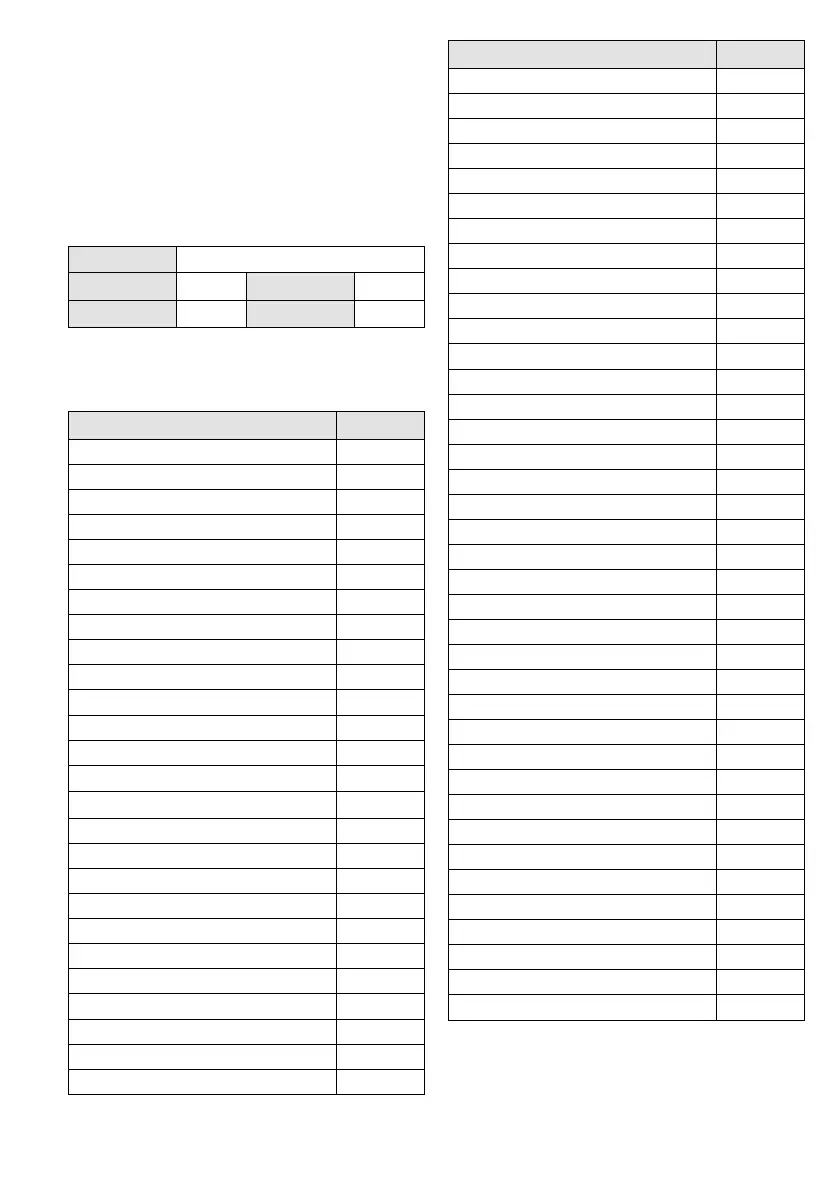
Control commands (hexadecimal code)
Please note: The first two digits of a command are
followed by a space.
Function Command
0 for title selection 71 A0
1 for title selection 71 A1
2 for title selection 71 A2
3 for title selection 71 A3
4 for title selection 71 A4
5 for title selection 71 A5
6 for title selection 71 A6
7 for title selection 71 A7
8 for title selection 71 A8
9 for title selection 71 A9
ENTER 71 CD
STOP/ EJECT (for CD mode) 71 AA
PROG 71 AB
RANDOM “On” /”Off” 71 AC
REPEAT ONE “On” 71 AD
REPEAT FOLDER “On” 71 AE
REPEAT ALL “On” 71 AF
REPEAT “Off” 71 2D
PLAY/
II
71 BA
STOP 71 BC
SKIP: title selection “next“ 71 BD
SKIP: title selection “previous“ 71 BE
Muting “On” /”Off” 71 BF
SINGLE ONE “On” /”Off” 71 CA
Fast forward “On” /”Off” 71 CB
Fast reverse “On” /”Off” 71 CC
Function Command
A > B (“A”, “B”, “Loop Off”) 71 D3
FOLDER “next“ 71 D4
FOLDER “previous” 71 D5
Switching on from standby 71 D6
Standby 71 D7
MODE 71 DB
Operating mode “CD“ 71 DC
Operating mode “USB storage device“
71 DD
Operating mode “SD card“ 71 DE
Operating mode “Bluetooth“ 71 48
Calling up hot key title 1 71 30
Calling up hot key title 2 71 31
Calling up hot key title 3 71 32
Calling up hot key title 4 71 33
Calling up hot key title 5 71 34
Calling up hot key title 6 71 35
Calling up hot key title 7 71 36
Calling up hot key title 8 71 37
Calling up hot key title 9 71 38
Calling up hot key title 10 71 39
Saving hot key title 1 71 3A
Saving hot key title 2 71 3B
Saving hot key title 3 71 3C
Saving hot key title 4 71 3D
Saving hot key title 5 71 3E
Saving hot key title 6 71 3F
Saving hot key title 7 71 40
Saving hot key title 8 71 41
Saving hot key title 9 71 42
Saving hot key title 10 71 43
VOLUME + 71 44
VOLUME − 71 45
VOLUME max. 71 46
VOLUME min. 71 47
Hot key function “Off” 71 4C
SPEED HIGH 71 E7
SPEED LOW 71 E8
SPEED NOR 71 E9


 To Next Page
 Loading...