22
English
5.5 Setting the volume, muting
Use the buttons VOLUME − /+ (30) to reduce / in-
crease the volume. The setting range is 0 ...30.
Each time the button is pressed, the display will
briefly show the setting selected (not in “Blue-
tooth” mode).
To mute the sound, press the button (29). The
display will show the symbol
. To unmute the
sound, press the button again.
5.6
Playing a CD, a USB storage device
or an SD card
5.6.1 Play, pause, stop
Depending on the position of the switch AUTO-
PLAY on the rear panel of the player, the player
will read the medium (indication
READING
…)
and immediately start playing it or the player will
read the medium and go to stop mode.
To start and pause the replay, press the but-
ton PLAY/
II
(21). During replay and pause, the
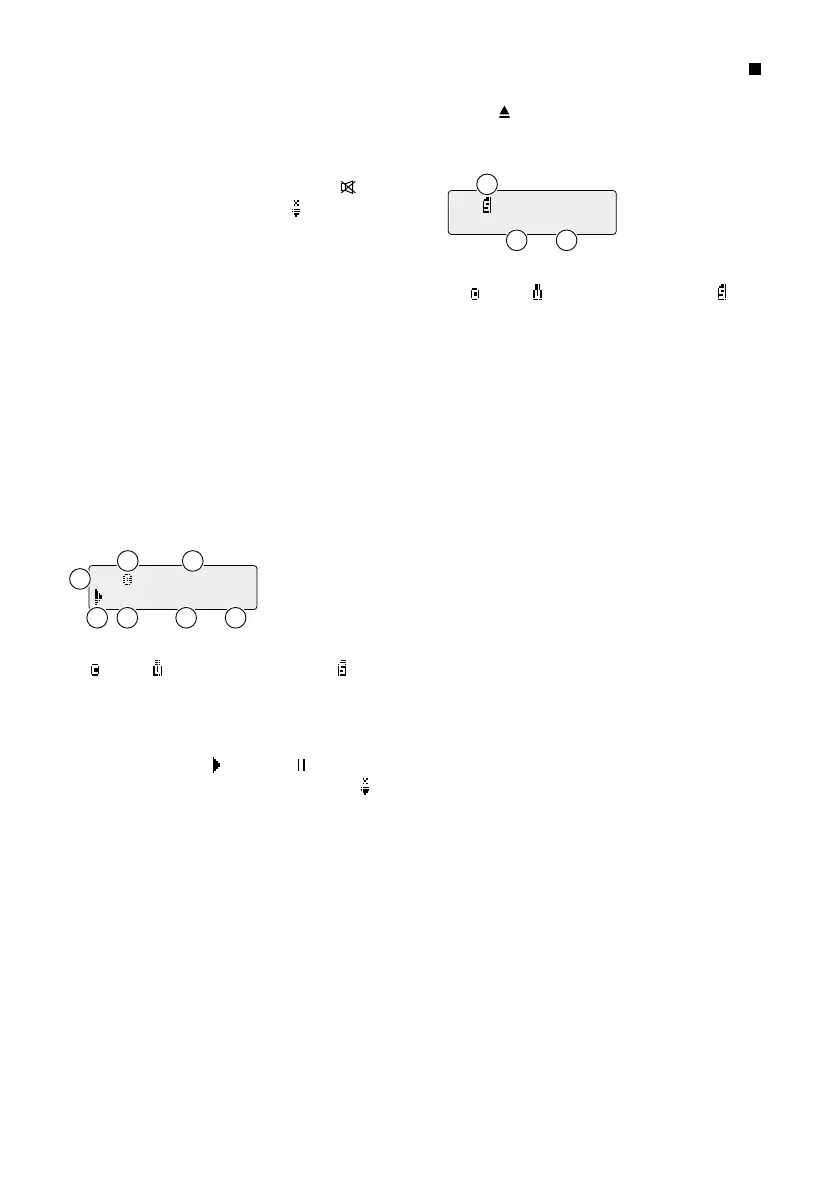
display will show:
T0003 04:42 MP3
F01 file--Hello
B
C
A
E F GD
A symbol for the medium:
= CD, = USB storage device, = SD card
B
scrolling text information (file name, title
name, artist name, album name)*
C number of the folder*
D symbol for play or pause
(when the sound is muted: symbol )
E number of the title (in the folder*)
F time already played
G either audio format
CD
(= CD-DA),
MP3
or
WMA
,
when the replay mode selected is basic set-
ting
or the replay mode
R-1
,
R-F
,
R-A
,
RAN
or
SG1
,
when a replay mode other than basic setting
is selected
To stop the replay, press the button STOP/ EJ
(22) on the player or the button STOP ( (22a)
on the remote control. For CDs, the button
EJECT (22b) on the remote control can also
be used. After the player has been set to “Stop”,
the display will show:
F04 T0047
A
B C
A symbol for the medium:
= CD, = USB storage device, = SD card
B number of folders*
C number of titles
5.6.2 Selecting the replay mode
To activate one of the “Repeat” modes, press
the button REP/ RAN or RANDOM / RE PEAT (18)
repeatedly until the desired mode is selected.
The mode selected will appear on the right at
the bottom of the display:
– indication
CD
,
MP3
or
WMA
basic setting: All titles are played once one
after the other, then the player goes to stop
mode.
– indication
R-1
REPEAT ONE: repeat of the title
– indication
R-F
REPEAT FOLDER: repeat of all titles in the
folder (not available for CD-DAs)
– indication
R-A
REPEAT ALL: repeat of all titles
– indication
RAN
RANDOM: repeat of all titles in random order
To activate the mode SINGLE ONE, press the
button SINGLE (17). After playing a title in the
mode SINGLE ONE ( indication
SG1
), the player
will return to the beginning of the title and go
to pause. To deactivate the mode, press the but-
ton again. The player will then go to the basic
setting (see above).
* for media with MP3 or WMA files



 To Next Page
 Loading...