23
English
1 2 3 4 5
6 7 8 9 0
CD/CARD
MEMORY
26
25
FOLDER
LOW
HIGH
SPEED
SINGLE
A > B
PLAY/
NOR
REP/
RAN
PREV
NEXT
MODE
SKIP
PROG
STOP/
EJ
18 22 2416
15
17
21 23
19
20
2
4 5 6
8
1 3
7 9
0
ENTER
CD
/
CARD
STOP PLAY
/
I
I
–
FOLDER
–
REV.
–
SKIP
–
F.WD
EJECT
MODE
POWER
MEM.
PROG
RANDOM
SINGLE
REPEAT
LOW NOR HIGH
SPEED
A B
VOLUME
+−
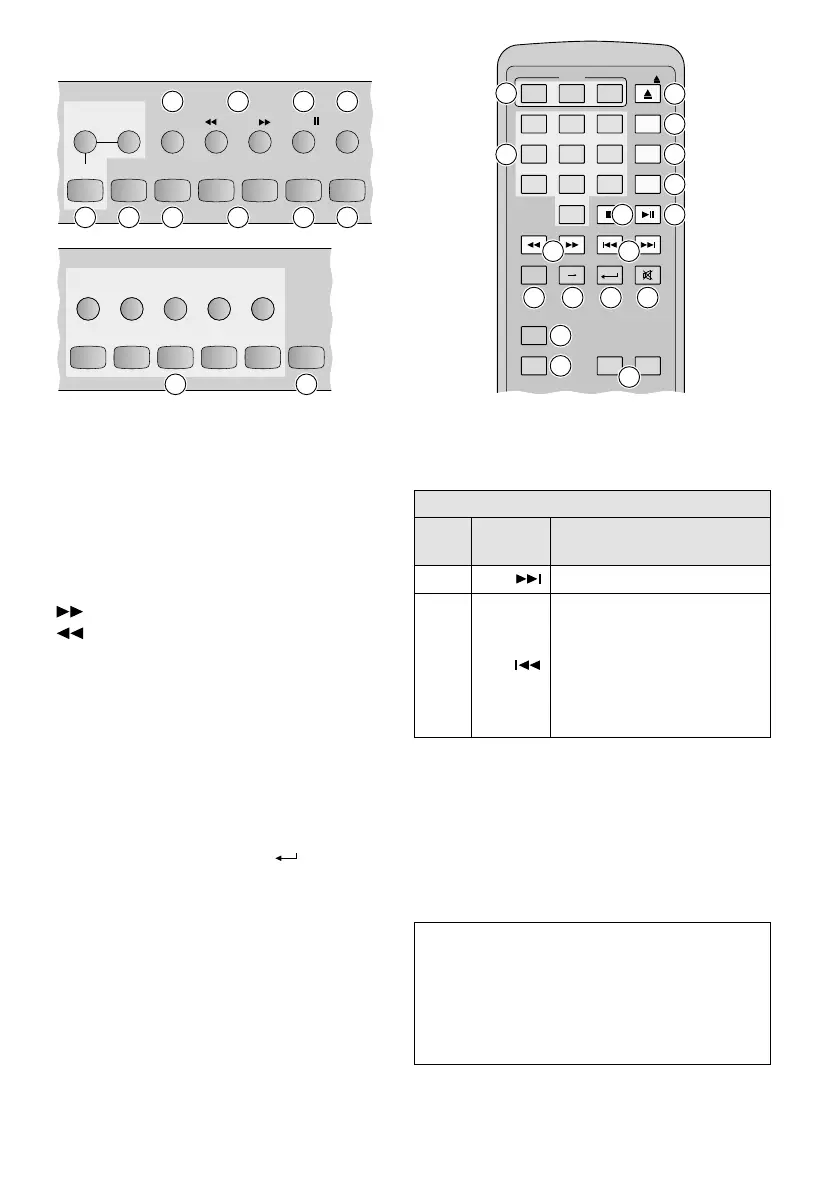
22a 21
18
17
16
2019
24 23 28 29
27
26
30
25
15
22b
Buttons on the remote controlButtons on the player
5.6.3 Title selection
Titles can be selected during replay or pause or
in stop mode (
☞
note on display indications).
1)
For media with several folders: Before select-
ing the title, use a FOLDER button (19) to
select the folder containing the title:
= skip to next folder
= skip to previous folder
After folder selection in play or pause mode,
the first title of the folder will start immedi-
ately; in stop mode, the first title of the folder
will be selected.
2) Title selection via numeric buttons:
Use the corresponding numeric button(s)
(25) to enter the number of the title (in the
folder). The title will start shortly after that. To
speed up the title selection, enter the number
and press the button ENTER (28).
Title selection via SKIP buttons:
Use a SKIP button (20) to skip to the title:
☞
table below. If the title is in a folder,
please note that title selection in stop mode
is only possible within the folder.
After a title has been selected in play or
pause mode, the title will start immediately;
in stop mode, the button PLAY/
II
(21) must
be used to start the title.
SKIP buttons
Player
Remote
control
Function
NEXT F.WD
to skip to the next title
PREV REV.
for play / pause:
to return to the beginning of
the current title first, then to
go back one title at a time with
each press of the button*
in stop mode:
to skip to the previous title
* Exception for a CD in pause mode: When the reverse button
is pressed, the player will immediately go back one title at
a time.
Note on display indications: In stop mode, after
a folder has been selected or after a title has been
selected with a SKIP button, the display will no
longer indicate the number of folders and titles
(
☞
chapter 5.6.1) but the number of the folder
selected and the number of the title selected (in
the folder).


 To Next Page
 Loading...