EasyManua.ls Logo

Monacor PA-302 - User Manual

Monacor PA-302
8 pages
Print Icon
To Next Page IconTo Next Page
Loading...
BEDIENUNGSANLEITUNG
INSTRUCTION MANUAL
MODE D’EMPLOI
ISTRUZIONI PER L’USO
GEBRUIKSAANWIJZING
MANUAL DE INSTRUCCIONES
INSTRUKCJA OBSŁUGI
PA-VERSTÄRKER FÜR 12-V-/24-V-BETRIEB
PA AMPLIFIER FOR 12V/24 V OPERATION
PA-302
Best.-Nr. 17.1270
®
Question and Answer IconNeed help?

Do you have a question about the Monacor PA-302 and is the answer not in the manual?

Summary

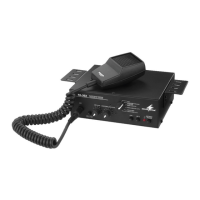
Operating Elements and Connections

Functional Switch

Selects operating modes: AUX, INTERCOM, FOG, SIREN.

Power Supply Terminal

Connection point for the power input.

PA Speaker Terminals

Terminals for PA speakers and intercom microphones.

AUX Input Jack

Input for audio sources like CD players.

Safety Notes

Environmental Usage

Usage limitations: indoor use only, protect from humidity/heat.

Warranty and Liability

Warning: improper use voids warranty and limits liability.

Applications

Usage Scenarios

Versatile use: announcements, PA music, intercom.

Making the Connections

Professional Installation

Connections must be made by qualified personnel with unit off.

Connect Microphone

Connect microphone to MIC jack (2).

Connect PA Speakers

Connect PA speakers (min. 4 Ω) to LSP 1/LSP 2 terminals.

Connect Audio Source

Connect audio units (e.g., CD player) to AUX (14) for PA music.

Connect Power Supply

Connect 12V or 24V DC power to terminal strip (10).

Operation

Mode Selection

Adjust operating mode with rotary switch (6).

Volume Adjustment

Adjust volume for announcements/music with MIC/AUX (4).

Intercom Reply Volume

Adjust reply volume with GAIN control (5).

Specifications

Power Supply Requirements

Specifies voltage and current for power supply.

Summary

Operating Elements and Connections

Functional Switch

Selects operating modes: AUX, INTERCOM, FOG, SIREN.

Power Supply Terminal

Connection point for the power input.

PA Speaker Terminals

Terminals for PA speakers and intercom microphones.

AUX Input Jack

Input for audio sources like CD players.

Safety Notes

Environmental Usage

Usage limitations: indoor use only, protect from humidity/heat.

Warranty and Liability

Warning: improper use voids warranty and limits liability.

Applications

Usage Scenarios

Versatile use: announcements, PA music, intercom.

Making the Connections

Professional Installation

Connections must be made by qualified personnel with unit off.

Connect Microphone

Connect microphone to MIC jack (2).

Connect PA Speakers

Connect PA speakers (min. 4 Ω) to LSP 1/LSP 2 terminals.

Connect Audio Source

Connect audio units (e.g., CD player) to AUX (14) for PA music.

Connect Power Supply

Connect 12V or 24V DC power to terminal strip (10).

Operation

Mode Selection

Adjust operating mode with rotary switch (6).

Volume Adjustment

Adjust volume for announcements/music with MIC/AUX (4).

Intercom Reply Volume

Adjust reply volume with GAIN control (5).

Specifications

Power Supply Requirements

Specifies voltage and current for power supply.

Monacor PA-302 Specifications

General IconGeneral
Input sensitivityMic: 1.5 mV, Aux: 150 mV
Dimensions483 x 88 x 380mm (W x H x D)
Weight12.5kg
Total Harmonic Distortion< 1%
Inputs1 x aux (RCA)
Power supply230 V AC, 50 Hz
Input Impedance10kΩ
Output power30 W RMS
Power Output30 W RMS

Related product manuals