Moneris Core® Move/5000 Wireless Terminal: Setting up Your Hardware 4
4. Close the lid, and press down to snap it back into place so
that the extended paper is pressed securely against the
closed lid and the faceplate.
Note: To advance the paper from the printer when the
lid is closed, you must press and hold down the paper feed
key when the terminal is powered on. DO NOT
attempt to manually advance the paper by pulling it as
this will damage the printer.
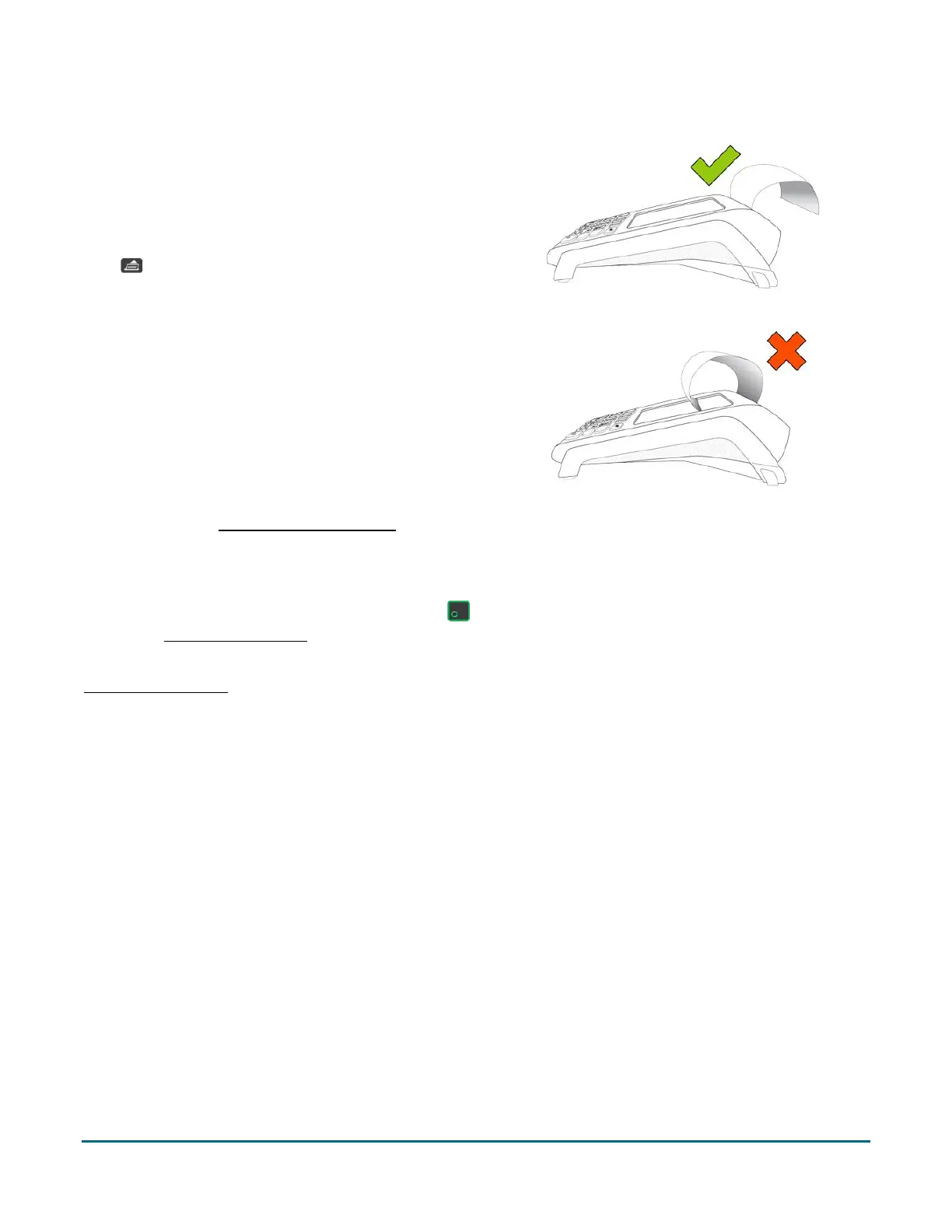
Note: The paper should unroll back over the top of the
printer, not unroll over the faceplate.
5. Proceed to the Powering on the terminal section below.
Power on the terminal
To power on the terminal, press and hold the green key until the screen illuminates. Once powered on,
proceed to Charging the battery on page 5.
Note: You may need to connect the terminal’s power cable in order to power it on. Refer to the instructions in
Charging the battery on page 5 for your setup type (direct-to-terminal charge cable or optional charge base).


 To Next Page