Moneris Core® Move/5000 Wireless Terminal: Setting up Your Hardware 8
Battery use
To maintain battery charge, use either of these two methods:
Direct-to-terminal charge cable: Connect this cable to the power port on the side of the terminal (see page
5), and plug the other end into a working power outlet.
Charge base: Dock the terminal on the optional charging base.
Helpful hints
Before using the terminal, check the battery charge level (see icons below).
Power off the terminal when not in use or being charged.
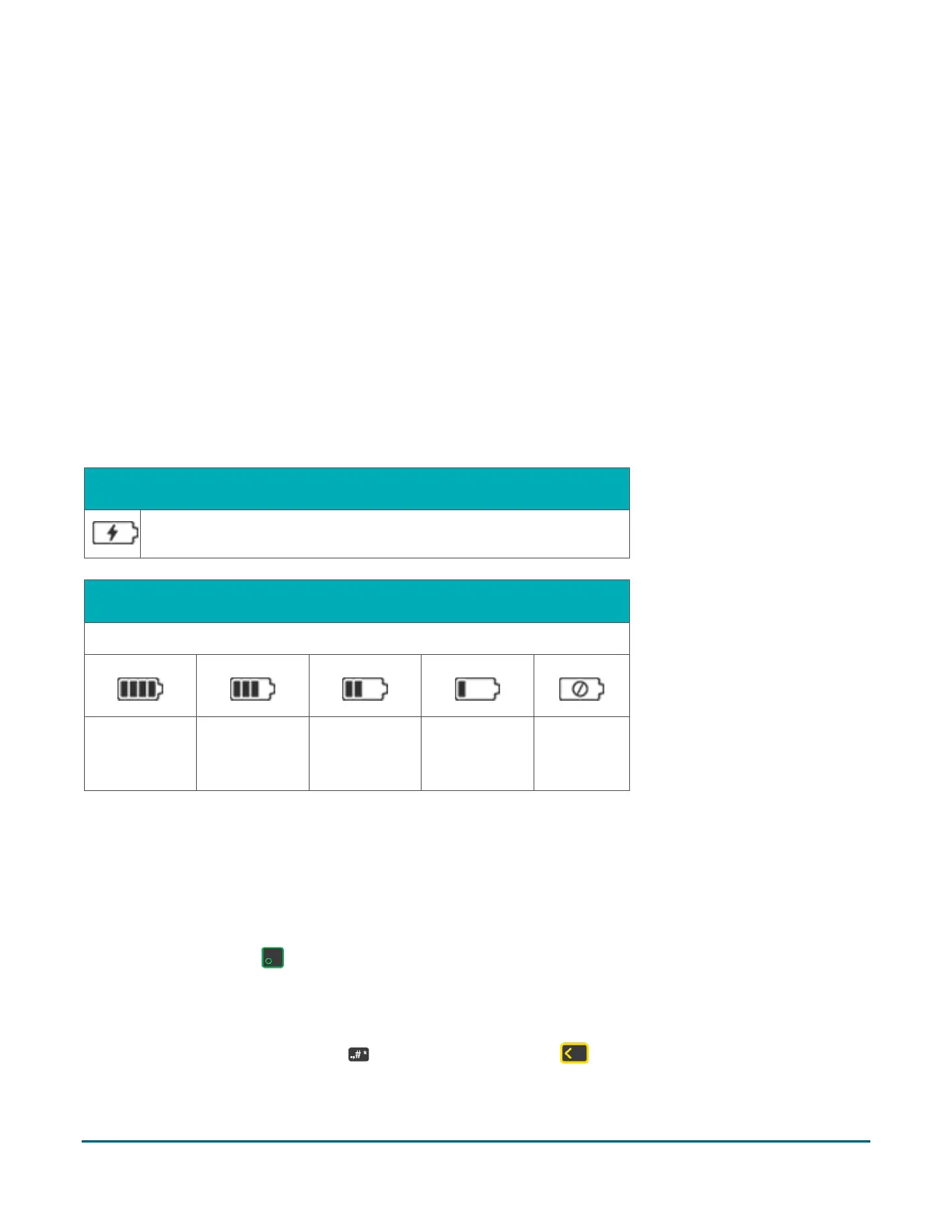
Battery status indicators
The battery icon displays in the status bar. The icon reflects the battery charge status/charge level.
Terminal connected to external power source
The "lightning bolt" portion of the battery icon appears when the
terminal is connected to an external power source.
The coloured bars blink (one level at a time) when the battery is charging.
25% charge or less: The terminal may power off. Data will not be lost if this happens. Recharge the battery as
soon as possible.
At 0% charge: The terminal will power off unless connected to a power source. Data will not be lost if the
terminal powers off.
Power on
Press and hold the green key until the screen illuminates.
Power off
Press and hold down the punctuation key, then press the yellow key until the terminal begins to power
off.


 To Next Page