monitoraudio.com
4
1
1
2
2
3
3
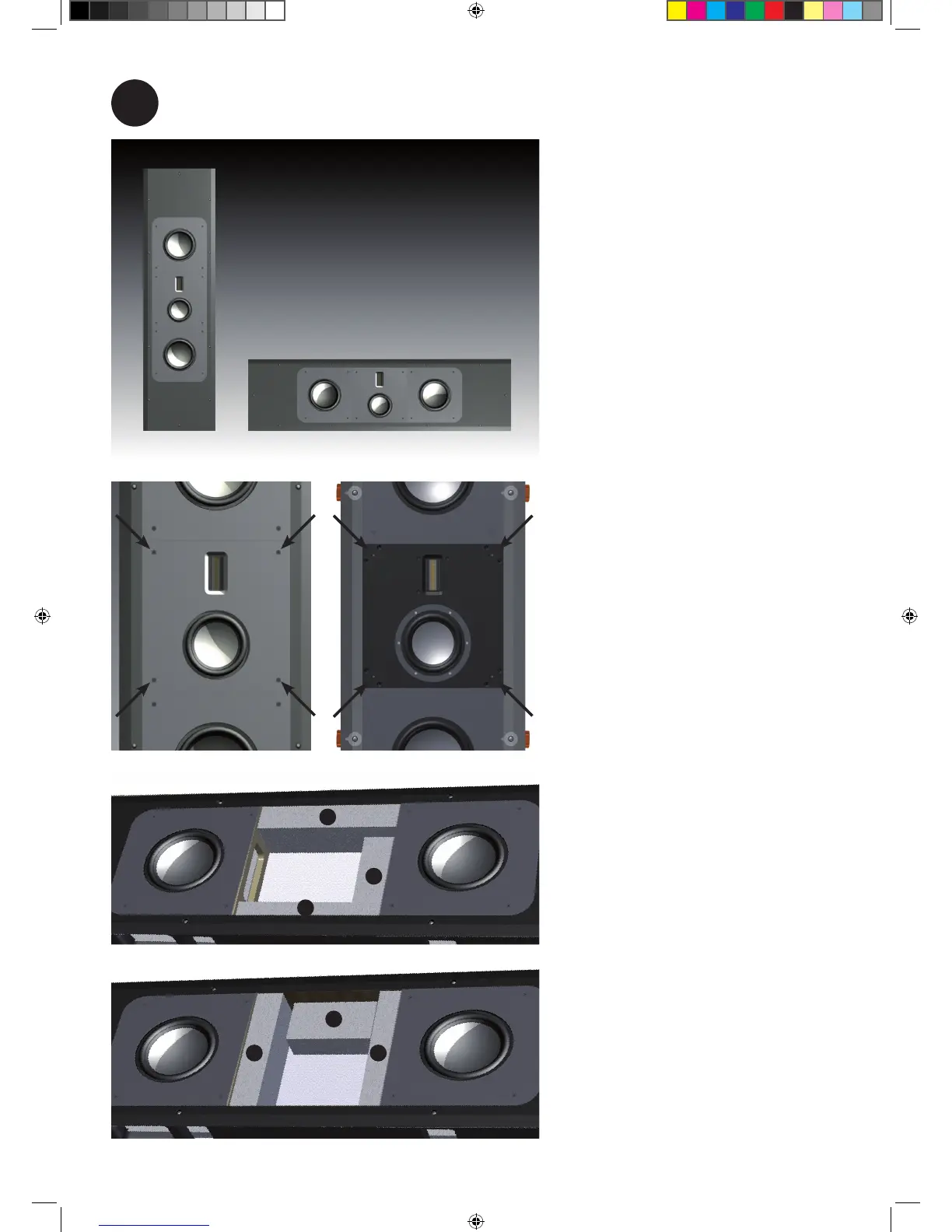
Optional, rotate tweeter and mid range housing.
The Platinum In Wall can be used
for the left/ right channels or a
centre channel. When being used
as a centre channel, the mid range
and tweeter housing needs to be
rotated.
i) Remove the four trim screws
(arrowed), then carefully remove
the metal trim.
ii) Remove the eight screws that
fix the mid/ tweeter housing in
place. Lift the assembly out and
disconnect the mid and tweeter
cables from the units.
Standard foam locations.
iii) Reposition the 3 pieces of
acoustic foam in accordance with
the illustrations.
Foam locations for when the PL IW
is being used as a centre channel.
iv) When the foam has been
repositioned, refit the mid/tweeter
cables. Place the mid/ tweeter
housing in it’s location and screw
down. Refit the trim.
PL IW Manual.indd 4 14/12/2010 12:04:42









 To Next Page